Jeff Nelson
Forum Replies Created
-

I got it working, guys!! I had a firewire 800 adapter on my mac tower, which I guess I used to ingest from a capture card when I ingest cards. I plugged my deck in there – Premiere sees it, and I’m now capturing smoothly!
Don’t know if that adapter would work on my new iMac, but don’t want to tie up the iMac since this is the box I mostly live on, and so the old tower is in the other room, and for the next week or whatever I’ll be going in every hour or so and putting in a new tape. Also have a sh*t ton of old home movies I’m going to put across.
Thanks again.
-
Thanks. I heard about an app called LifeFlix which is good for this job. It’s $99, seems a bit overpriced. Need to figure a way to see if my setup can just basically “see” my DVR. Then can play around with different ways to ingest. Think that means experimenting with different adapters…firewire 400 to 800 to thunderbolt 2…to tb 3… So going to see what I can do there first. Thanks again to everyone.
-
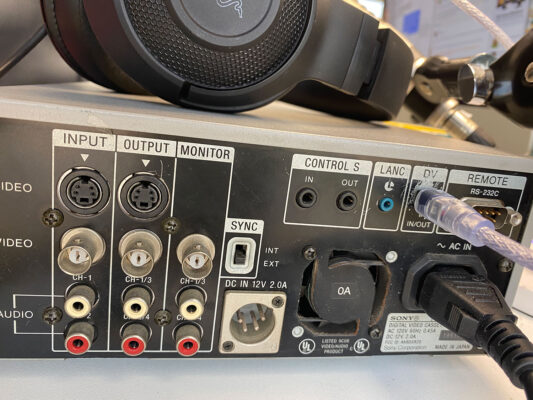
Thank you everyone! Here is a photo of the back of my deck., in case that sparks any other suggestions.
I also have a mac tower and a macbook pro. Maybe I have a firewire 800 adapter into the tower, have to check. If so, I would need a mini-dv out to a firewire 800, or to 400 then to an 800 to get in? That’s a lot of adapters!
Way too much footage to find a service, could cost a small fortune. Don’t want to go buy a windows machine for this, IF there’s a way to do using my tower or imac or mac pro.
Dang. Don’t really want to use analog, need the best I can get. Appreciate the ideas!
Thanks!
Jeff
-
And I have a 2020 iMac, so where do I install whatever card I need. Thx again.
-
Thanks, Steve. Any recommendations? What specifically do I need to get. For sure that sounds like the way to go.
-
Thanks, I copied the CONTENTS file to a hard drive. But I can’t access that either. Looks like EditReady will work. Just tried trial version, seems to be working! $50 is fine in order to have my footage tonight. Thanks!!
Wonder what went wrong with FCP 7…
Appreciate your quick reply.
-
Help – I shot on my C300 and cannot get footage off the card. I can see the files on the card. I can put in another card and my Log and Transfer works fine for footage on that card. But on one card, I can see the mxf files are there, but have no way to get them into FCP 7.
Any suggestions? I have Canon XF utility installed, but can’t see any way to get the footage off. Thanks.
-
Same here. Just started a couple weeks ago. Every clip, when it is finished ingesting, I have to click that error before it will start ingesting the next one… So I can’t just Log & Transfer, I have to click that message twice after each clip is transferred. Any suggestions? Thanks.
-
Looks like it was xpfm-2-1-1-8-9l
Do you want me to send to you?
-
Shane — someone on another board gave me a link to an answer you gave previously at https://discussions.apple.com/message/16190382#16190382 I followed the link and downloaded and now I’m good to go!! So all is good. Thanks for your time!
Cheers,
Jeff