

Activity › Forums › Adobe Premiere Pro › How to ingest old DV?
-
How to ingest old DV?
Posted by Jeff Nelson on June 30, 2021 at 12:01 amI have a bunch of old mini-DV tapes from a project 15 or 20 years old. Trying to figure out how to ingest into Premiere Pro. Have a deck, have a cable that’s firewire on one end, USB on the other. It’s plugged in, I go to Capture in PP, and it doesn’t see my deck.
What am I missing?
Some kind of capture card? What do I need to get in order to get PP to “see” the deck, so I can capture a ton of footage?
Thanks for any pointers!
Paul Carlin replied 5 years, 2 months ago 10 Members · 15 Replies -
15 Replies
-

Steve Brame
June 30, 2021 at 12:37 amSave yourself a lot of headaches and install a very inexpensive firewire card. We have hundreds and hundreds of tapes that we still pull from occasionally. You’ll have a very difficult time trying to get a Firewire to USB adapter cable to work today.
-

Jeff Nelson
June 30, 2021 at 1:54 amThanks, Steve. Any recommendations? What specifically do I need to get. For sure that sounds like the way to go.
-
Jeff Nelson
June 30, 2021 at 1:55 amAnd I have a 2020 iMac, so where do I install whatever card I need. Thx again.
-

Christopher Hill
June 30, 2021 at 6:49 amIf it’s an iMac then you won’t be installing any capture card as it’s impossible to access the internals.
And because it’s a Mac you’ll have to find an external interface solution if your direct cable solution isn’t working. I’ve had some success with the Elgato Analog capture device in the past (https://www.elgato.com/en/video-capture) but that would require and analog output from your deck.
-

Bill Celnick
June 30, 2021 at 10:47 amI’ve used the elgato device Christoper mentions for some old family 8MM tapes I came across – it works just fine, with RCA inputs
….there’s also this one which is a bit more versatile – but you’ll have to find a used one as it’s not an active product.
I used an iMac years ago (2008) as my main editing workstation – but they had firewire ports back then – I assume yours has Thunderbolt – maybe there is a cable that converts these?
-

Ann Bens
June 30, 2021 at 12:45 pmThere is only one way to properly capture mini dv tape and that is over FIREWIRE.
Dont use s-video or analog you will lose image quality.
Get yourself an old Windows machine with firewire.
Capture your tapes with e.g. WinDV, then transcode them to Prores 422 HQ.
These files can be edited on the mac.
-

Eric Santiago
June 30, 2021 at 4:33 pmOr find a service that digitizes old tapes.
I have a ton of gear that can do all that but I haven’t hooked up a BetaSP/DVCAM/XDCAM deck in almost 3 years.
I don’t want to know what ails these old decks 😛
-
Jeff Nelson
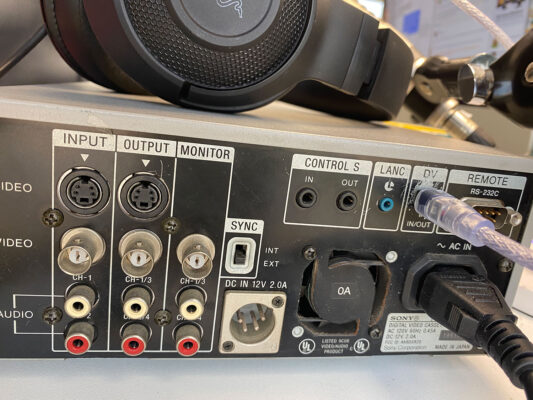
June 30, 2021 at 6:44 pmThank you everyone! Here is a photo of the back of my deck., in case that sparks any other suggestions.
I also have a mac tower and a macbook pro. Maybe I have a firewire 800 adapter into the tower, have to check. If so, I would need a mini-dv out to a firewire 800, or to 400 then to an 800 to get in? That’s a lot of adapters!
Way too much footage to find a service, could cost a small fortune. Don’t want to go buy a windows machine for this, IF there’s a way to do using my tower or imac or mac pro.
Dang. Don’t really want to use analog, need the best I can get. Appreciate the ideas!
Thanks!
Jeff
-

Oliver Peters
June 30, 2021 at 6:47 pmGoing back to the original issue, I would suggest getting a FW to Thunderbolt adapter to go from your DV deck to the TB input of your iMac. Make sure you have the right versions of each. Then see about capturing in something other than Premiere. You may actually have better luck with iMovie or QT. Definitely FCP is that’s installed.
-

Robert Withers
June 30, 2021 at 7:25 pmHi Jeff,
You have a deck, you have Firewire, I think there could be software issues. The last version of Pr I used to ingest from mini-DV was Pr 2014. The ingested digital files are still good. Current Pr versions may not do this. I wonder if there is other software that will . . .
Reply to this Discussion! Login or Sign Up