Forum Replies Created

Page 1 of 2
  • Jacqueline Bazinet

    May 9, 2022 at 7:20 pm in reply to: Resize quality

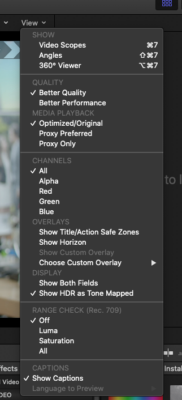
    Check your timeline viewer settings before you export. They should be on “Better Quality” and “Optimize/Original” media playback

  • Jacqueline Bazinet

    February 19, 2022 at 12:14 am in reply to: Am I screwed?

    Are you able to playback on the camera?

  • Jacqueline Bazinet

    February 18, 2022 at 11:22 pm in reply to: ISO: CatDV Wizard

    Did you ever find your wizard? If so I need to pick their brains!

  • Jacqueline Bazinet

    February 18, 2022 at 11:11 pm in reply to: relink source files in proxy editing project

    Hi Suan,

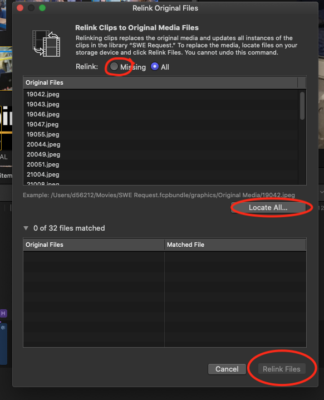
    You can move the original files to another drive, then when you are ready to relink the proxy files to the original files on the new drive, do waht Robert Olding has suggested. You simply choose Relink FIles, then chose all or missing, then click Locate all, chose the drive and folder where the new location is, and click relink. Voila!

  • Do you have a support contract with CatDV? I don’t know if I can help you but here is my recent experience with CatDV. I have been running this software since 2014.

    I have noticed that a LOT of their support materials online are not up to date. I would contact CatDV via email first. SquareBox was bought last year by Quantum. I have some ongoing issues with CatDV that I need to address and support has been slow and unresponsive. Support with our vendor reseller ASG has also been slow or unresponsive.

    I am running Catalina on 2 Mac Pros and 2 Mac Mini’s. I just installed 14.0.1, and I am having some clip playback issues and lots of errors regarding Native Helper and the support person gave me a link to 14.0.2 but I haven’t had time to install and test yet.

  • Jacqueline Bazinet

    December 21, 2021 at 11:38 pm in reply to: Please Help – Premiere editor has project in FCPX

    Hi Dave,

    The short answer to your question is “no”. There are no separate audio tracks from video tracks. You CAN manually separate audio tracks from video tracks, but I don’t recommend it. However, you can relearn and retrain yourself. I began my editing career on Avid, then moved to FCP, then Premiere, back to FCP 7, and then to FCPX. My employer simply said, here’s what we are going with, go learn it on your own. Even though I’ve been using FCPX for many years, I still struggle with the Magnetic Timeline during the re-editing process. Recently, a friend colleague of mine suggested Ripple Training, so I have signed up to learn those little tricks and tips that should keep my swearing down to a minimum! Simply put, just because you don’t know FCPX, doesn’t mean you can’t learn it in a short amount of time. As an NLE editor, you know what you want, you just have to know what keystrokes and the terminology to get there. Good luck!

  • Jacqueline Bazinet

    April 19, 2021 at 7:27 pm in reply to: Monitor switching

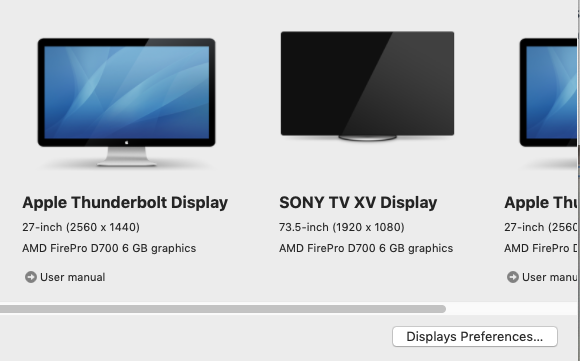
    Yes. I did. I finally just pulled the TV monitor out of the mix and that solved it (in a way). Once I am ready to use the TV monitor for final playback I’ll plug back in and see if that “fixed” it.

  • I made a short screen recording to show you but it’s too large for this post reply. Check it out here. https://youtu.be/o1izEJWySdg

    Basically you can change the keyframe from “linear” to “smooth” by right clicking on the keyframe when you are in the transform viewer.

    Some contents or functionalities here are not available due to your cookie preferences!

    This happens because the functionality/content marked as “Google Youtube” uses cookies that you choosed to keep disabled. In order to view this content or use this functionality, please enable cookies: click here to open your cookie preferences.

  • Jacqueline Bazinet

    April 15, 2021 at 5:58 pm in reply to: Monitor switching

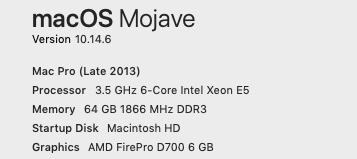
    That is actually how I actually got to this issue. Mac wasn’t booting up correctly, (applications were unresponsive) so I unplugged all peripherals and rebooted. I’ve had this set up since 2014 so it’s not changed much. In 2019 our company decided to take over IT services for our department’s Macs and put all kinds of security software on them and they’ve never been the same (sigh). I’ve got a brand spanking new 2020 Mac Pro waiting to replace it, I just want to get one last project done before tearing it all apart!

    I may just pull the TV out of the mix completely until I am ready to QC my project. That would be my quick fix but not ideal.

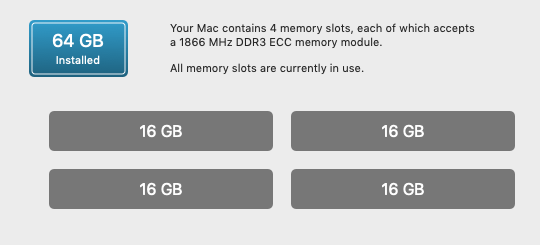
    Specs below

    FCPX 10.4.9

  • Jacqueline Bazinet

    January 11, 2018 at 6:40 pm in reply to: cfast 2.0 on ursa Mini not readable by computer

    I realize this answer may be late, but when you formatted your CFast cards on the Ursa, did you format in MacOS or ExFat?

Page 1 of 2

We use anonymous cookies to give you the best experience we can.
Our Privacy policy | GDPR Policy