Creative Communities of the World Forums

The peer to peer support community for media production professionals.

Activity Forums Apple Final Cut Pro relink source files in proxy editing project

  • relink source files in proxy editing project

    Posted by Suan k. Seol on February 16, 2022 at 7:09 am

    Hi,

    I’m in the middle of edit a feature documentary using proxy media in FCPX.

    My external hard drive where all my source files are, have some problem and I now should change the location of all the files.

    I understand usually I need to relink the files in the new location. But in this case, I wonder which media I should relink. I don’t want to relink them to the original medias because the project will be then too heavy to edit.

    If the proxy medias are in library (transcoded media folder), the project still shows the clips, I found. But how do I make the proxies to link to the original folder in a new location??  


    Thanks!

    Jacqueline Bazinet replied 4 years, 2 months ago 3 Members · 2 Replies
  • 2 Replies
  • Robert Olding

    February 16, 2022 at 3:43 pm

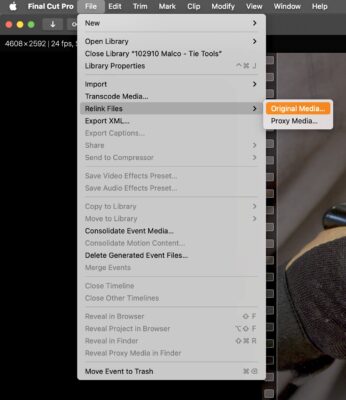
    Under the “File” menu, choose “Relink Files” and pick which media you’d like to relink. Final Cut Pro will automatically match the proxies and the originals.

  • Jacqueline Bazinet

    February 18, 2022 at 11:11 pm

    Hi Suan,

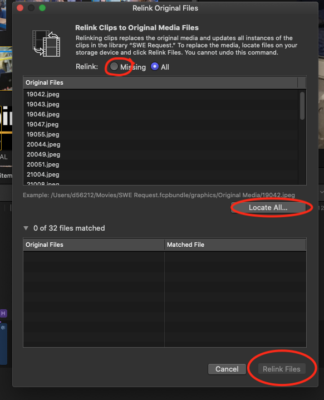
    You can move the original files to another drive, then when you are ready to relink the proxy files to the original files on the new drive, do waht Robert Olding has suggested. You simply choose Relink FIles, then chose all or missing, then click Locate all, chose the drive and folder where the new location is, and click relink. Voila!

We use anonymous cookies to give you the best experience we can.
Our Privacy policy | GDPR Policy