


Forum Replies Created
-

question about HDCAM
i know the format specs are 1440 – 1080, however there are HDCAM camcorders that record full 1920 – 1080 image, HDWF900R for example.
does this only apply to output through HDSDI or will it actually put 1920×1080 on an HDCAM tape.
in the camera specs it does say that the 900R is 12/10 bit cappanle but records “8 bit sample for internal compression process” which is an HDCAM limitation.
says nothing about resolution on tape…
anyone knows?
Hector Berrebi
Schibber Group
prePost Consulting -
Dave,
if you give me a few more details, I might be able to send you a step by step
what was the documentary shot on? how did you capture it? and what are your timeline settings?
another thing, how long is the piece you are trying to export?
peace
Hector Berrebi
Schibber Group
prePost Consulting -
last year AVID didn’t attend but had a cool sort-of-a-booth off site at the Hard Rock. it felt like surprise (and they had stuff to show…) and was quite cool. cooler than most software booths on the floor.
just a thought, apple should consider
Walter, not that i’m trying to get inside apple’s logic, but isn’t 2009 about the right time for a major update? i mean, at least according to history?
i’m never sure whether i really love or really hate super secret software policies…
Hector Berrebi
Schibber Group
prePost Consulting -
isn’t studio 3 coming out in april? or at least supposed to? would be strange not to showcase it in any way at NAB… just doesn’t make sense…
Hector Berrebi
Schibber Group
prePost Consulting -
what is your final format?
what format did you shoot?go to audio/video settings and set your capture preset to hdv-prores hq, this will capture HDV and transcode it to prores
then cut and do all work on a prores timeline, clips you want to do speed changes to you can send to motion and use optical flow as your frame blending option.
this will take some time but give you fairly good results depending on your footage and what you are trying to do.
actually, once you captured prores you could try to slowmo in FCP and see if it looks ok to you.
once you are done with everything export as quicktime movie using current settings
then re-import and place in a prores SD timeline, this time forcing timeline settingsits one way to do it…
Hector Berrebi
Schibber Group
prePost Consulting -
hi Andrew
did you try a prores HQ and optical flow workflow?
Hector Berrebi
Schibber Group
prePost Consulting -
hi Ken
intuitively i would go with BBC and say FCP 16:9 title safe might be a little off
i always felt 16:9 title safe was a little too safe
then again, i’m not sure whether title safe is a standardized thing.
anyway, title safe is an old, general precaution, like the yellow line in subway stations…
just view the thing on an output monitor, and a TV set. its the “safest” way 🙂Hector Berrebi
Schibber Group
prePost Consulting -
Amy
way before the optic fiber channel and AJA i/o, an internal raid with or without a raid card can take you safely through many projects.
the raid card does make a difference, its a faster, more stable solution both in reading and writing. i would look into the cladigit card, which is less expensive than the apple one, and can do up to 16 TB (with three additional ports)
as for other things,
IO HD is sweet, but pricyif you plan on video work you will need monitoring for CC and maybe inputs and outputs that are not firwire, you can look into blackmagick’s decklink HD extreme its a good card, and does a lot for a fair price.
normal computer speakers are problematic for video work. basic studio monitors (speakers) should go for around 200-500$ you can look into m-audio’s studiophile series
eventually, a professional video monitor, SD or HD, is something you would want to look into as well
goodluck
Hector Berrebi
Schibber Group
prePost Consulting -
Tom..
maybe this will make it clearer than explaining..
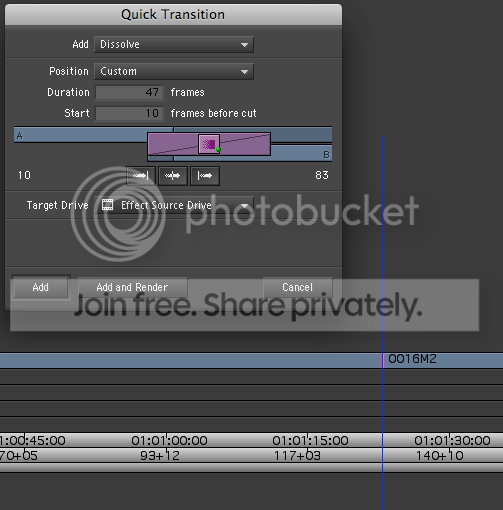
some time one side does not have enough media and you still want a long dissolve..
Hector Berrebi
Schibber Group
prePost Consulting -
hi Tom
though i haven’t tested it lately. i always hated scrolling timeline in avid… so much i didn’t notice its absence in FCP. i seam to remember it (years back) as a buggy feature, especially on complex timelines. i should take a look at it in MC3 on mac and see if it runs smother now…
asymmetrical cross dissolves are awesome. imagine a a cut where shot A is an old man finishing a sentimental confession and gazing away in reminiscence and Shot B is a landscape, a sunset for example. and you have a dissolve between them where at the end of shot a A you have about 7-10 blended frames of dissolve (maybe matching a musical note) but in the beginning of shot B you have 28-36 blended frames, the old man’s gaze slowly fading away over the sunset. it looks and feels nothing like centered on cut.
you could work around this and get the same result. but as AVID has this dissolve option for many many years now (at least since 97), how complex can it be to implement…?
peace.
Hector Berrebi
Schibber Group
prePost Consulting