Forum Replies Created

Page 49 of 112
  • Graham Quince

    December 19, 2020 at 10:36 am in reply to: Aurora Abstract Gradient Borealis

    You could try adding a second stroke to your shape, but much thinner or duplicating the shape layer and thinning the stroke to act as a matte to make the gaps. Fractal Noise and Tint instead of Fill will give you some more of the texture look.

    And adding a Wiggle Paths to the shape layer will also help match the look.

  • Graham Quince

    December 18, 2020 at 11:11 am in reply to: Recreating This Spiral Animation In After Effects. Help!

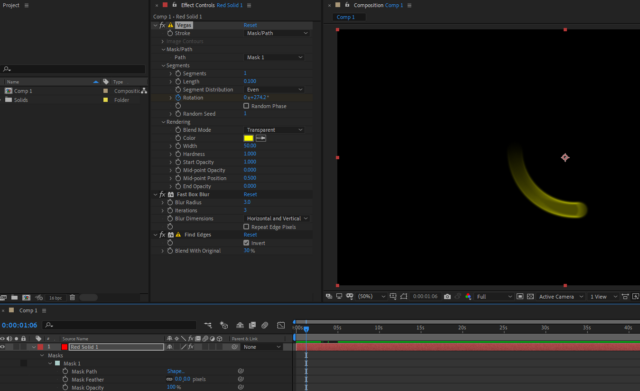
    Take a look at Vegas instead of Stroke. That’ll give you the faded tail. I noticed the edges of the ones in the screenshot were stronger than the interiors, so I used Find Edges set to invert to give it a border. But then Vegas started showing strobing, so i plonked in a fast box blur to hide that.

  • Graham Quince

    December 13, 2020 at 9:49 am in reply to: basic question about rendering

    Could you post a screenshot of After Effects and a second one of media encoder? There too many possibilities from your description and pictures will help narrow it down.

  • Graham Quince

    December 12, 2020 at 6:06 pm in reply to: Falling objects animated from still images

    When you say different perspectives of the object, I’m guessing that you want it to appear to tumble as it falls? If so, assemble your stills in one comp, (each one lasting a frame or 2) and then use that comp as your falling object in another comp.

  • Graham Quince

    December 12, 2020 at 5:58 pm in reply to: Trapcode particular 3d Space

    I think you might be out of luck. The particles are linked to the 3D Null, which you could parent to another null and scaling that up should probably scale up the movement positions, but the particle effect itself will also need its particle scale and number of particles altering manually.

    I suppose you could use expressions to multiply the current values by the same factor? That might work, something like:

    Position: [value[0]*2,value[1]*2,value[2]*2]

    Or particle number: value*2

  • Graham Quince

    December 12, 2020 at 5:53 pm in reply to: TRANSITION PROBLEM

    Lots of different ways to do this. Firstly you’ll need to isolate your actor, either greenscreen or rotabrush to separate the background. Then you can add effects like Colorama to the background as you change it and your character will remain in place.

  • Graham Quince

    December 12, 2020 at 5:50 pm in reply to: Instagram Glitch

    I’ve had problems with Instagram video myself. (Not sure if it’s connected, but I’m on my iPad right now and choppy your video wouldn’t play for me). I’ve given up trying to upload videos from my PC – Insta is very device focussed, so I get the videos onto my phone and post from there.

  • Graham Quince

    December 6, 2020 at 1:56 pm in reply to: Infinite Scroll with a Dynamic Layer Size

    So you need to add up the widths of all the text layers? I’m guessing that you won’t know how many text layers there are?

  • Using CC Glass with a shape layer is probably the closest you can get to the CC Lens effect but with different shapes. If you use the shape layer for both the bump map and as an Alpha channel. It’s not quite right but you could always add in extra effects and probably get closer.

  • Graham Quince

    December 2, 2020 at 10:11 am in reply to: need help with a project (tight schedule)

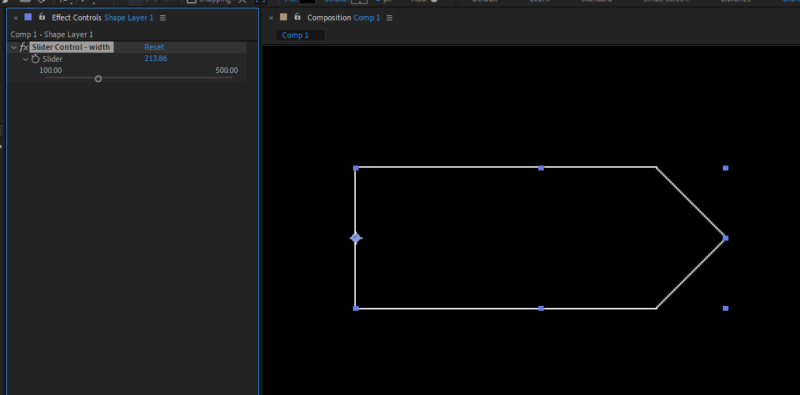
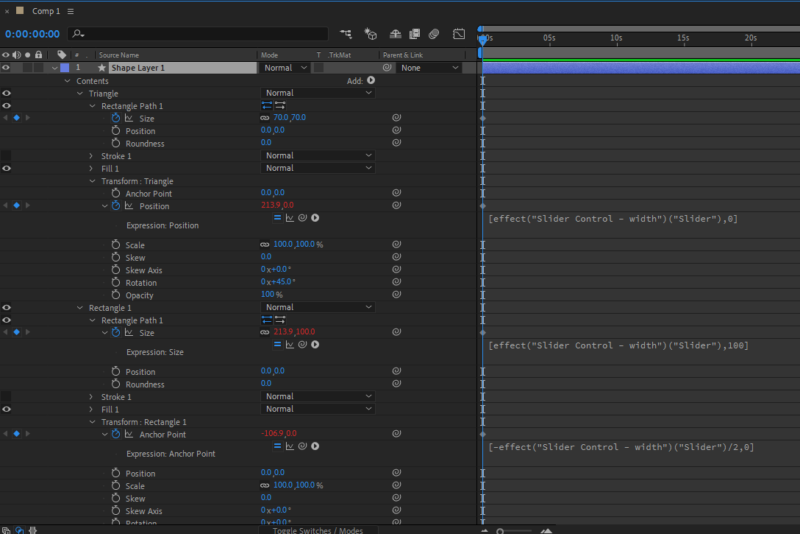
    Had a few minutes, so put this together. It was a little more involved than I first explained, but in a nutshell:

    Make a rectangle

    Make a square

    Rotate the square by 45 degrees.

    Add an slider control and match all the timeline properties and expressions to the image.

    Drag one of the shape’s Stroke options out of the shape and place it at the bottom of the shape list. This will then run on both shapes (and turn the other stroke off).

Page 49 of 112

We use anonymous cookies to give you the best experience we can.
Our Privacy policy | GDPR Policy