Forum Replies Created

Page 34 of 112
  • Graham Quince

    October 26, 2021 at 1:38 pm in reply to: Stippilism effect

    I’d probably start with Scatterize or CC Ball Action

  • Graham Quince

    October 26, 2021 at 7:04 am in reply to: VideoCopilot.net

    Right before the pandemic hit, he was on a workshop tour (I missed it 🙁 ), but he trailed a new plug-in which rendered 3D clouds. Still waiting on it, but it looks awesome. If you search for “nebula” and “video copilot” there are previews available

  • Graham Quince

    October 20, 2021 at 8:32 am in reply to: Swimming frog in AE

    If you can’t find usable stock footage and it needs to be realistic, could you take a still of a frog and animate it swimming using the Puppet tool? You could use whatever footage you can find for reference. If you “dress” the pond with ripples, reflections, plants on the surface, you’ll probably be able to disguise the animated still quite effectively.

  • Graham Quince

    October 20, 2021 at 8:28 am in reply to: resizing masks

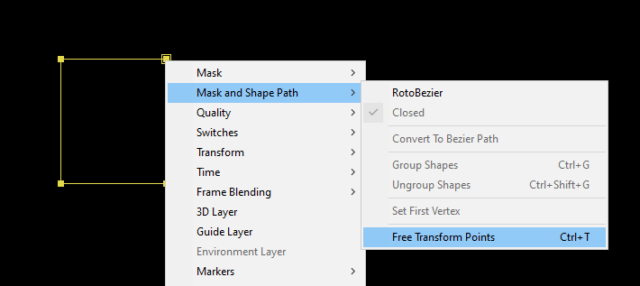
    You’ve got two solid methods there, but if for some reason, these don’t give you the result you’re after, a third option is to select your mask (or just a couple of points), right-click on them and choose Mask & Shape Path > Free Transform Points

    That will let you scale and move the mask

  • Graham Quince

    October 6, 2021 at 12:10 pm in reply to: Looping in Trapcode Particular

    What are you trying to loop? Almost all of Particular’s properties can be keyframed, which should let you loop them

  • Graham Quince

    October 6, 2021 at 10:12 am in reply to: Stretch image gradually by using a gradient

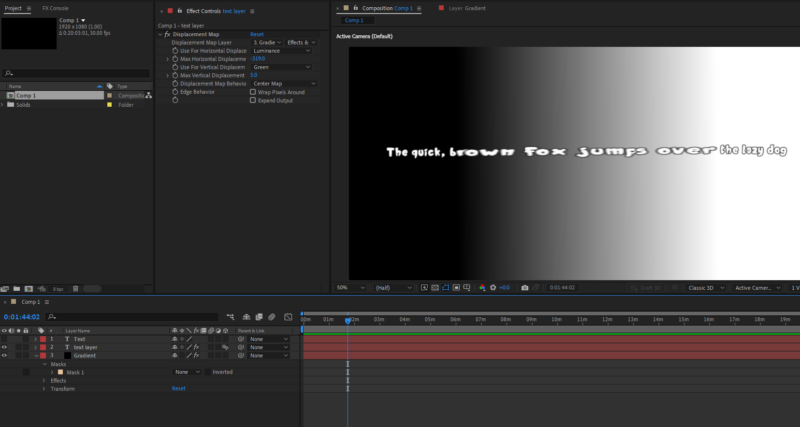
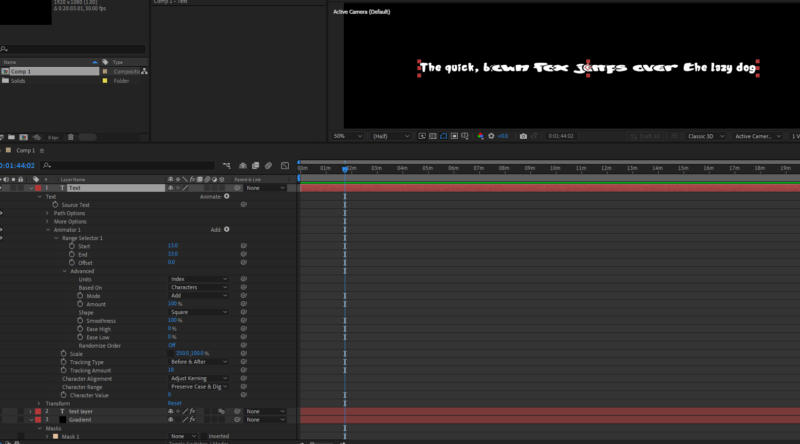
    There’s a couple of options I can see to do this.

    The gradient ramp and displacement map should get you there with these settings:

    But you could also look at the Text animation options:

  • Graham Quince

    October 2, 2021 at 2:02 pm in reply to: Exclude layers from preview for faster previews

    How odd that the text doesn’t mention the solo option.

    Any layers tagged with the solo option will show up in previews and all the others will be hidden and stay that way even in rendering until you deactivate all solo-ed layers (I’ve made that mistake too often).

    I edit my tutorials directly in AE, and solo just the video and audio layers for easier previewing. You can click drag to turn all off / on easily enough (and I bet there’s a shortcut key that I don’t know about)

  • Graham Quince

    October 2, 2021 at 1:58 pm in reply to: Timeline Layers Overlap When Importing PSD to AE

    I’ve not tried animating in Photoshop before, so I can’t say what used to work verses now, but if you go to Animation > Keyframe Assistant > Sequence Layers, you should be able to organise the layers with a new clicks to have each layer take up one frame and not overlap

  • Graham Quince

    October 2, 2021 at 1:54 pm in reply to: Help with Axis Mode and Options!

    I feel your pain – I’ve just tried every setting I can think of to replicate this issue, but can’t spot anything obvious. I can’t find any documentation to suggest the axis mode tools are an option.

    Have you tried selecting some of the other tools at the top and then reselecting the Select tool?

  • Graham Quince

    September 25, 2021 at 9:20 am in reply to: Control multiple paths shape in one shape layer

    I’d probably use the pickwhip to link each path’s anmation to a main one, and then edit the expression to alter the value, something like:

    LINKED_VALUE – 5

    (where LINKED_VALUE is the pickwhipped expression.

Page 34 of 112

We use anonymous cookies to give you the best experience we can.
Our Privacy policy | GDPR Policy