Graham Bernard
Forum Replies Created
-

That’s good. And is it inviting you to update the driver? Let’s see a ScreenGrab of what that Help screen is saying. If this is the ONLY place your seeing your card mentioned, I’ve got to ask, do you have GPU acceleration Switched On under Preferences > Video?
-
Since I updated the Driver Studio on my RTX3080Ultra VP19 it’s much better. Tell me, is your RTX recognised under the Help Menu?
-
Graham Bernard
September 5, 2021 at 8:19 am in reply to: How do I get the head to automatically go to the END of an event after record?Hmm…? I’ll have a look at this. G
-
Hi there! I need to ask, but do you have the Vegas HUB App installed on your phone?
-
Good question. However, I think you’re going to get a speedier response over on the Official VegasPro Forum.
-
I would like to avoid all of this if possible so I can render with my GPU and use Nvenc for previewing.
Ah, righto! I completely understand. Good detailed report. However, this is getting more complex now, I think you should take your questions to the Main Official VegasSoftware Public Forum. Many more people to assist you there. Have you tried yet?
Regards – BG -
Are you able to view the preview onto your non primary monitor without using the legacy settings?
What Legacy Settings? Don’t understand?
My issue is kind of a two parter. Ideally I’d like to find a solution where I don’t have to use any of these weird settings at all as they have side effects and I would like to use the new features.
What “weird” settings? And what side effects?
I’m trying here 😀 .
-
I can switch. Don’t believe VP would force this on you? What have you tried so far?
-
You haven’t given us a base level of information. If you are going to ask for help, we need to know more detail than what you’ve offered.
Present Render Outcomes: How long is too long? Minutes, hours, or days? You haven’t said – yeah? How long IS your Project? What format is your Media and what are you rendering to?
Project Setup: Match Media to Project settings OR, this is what I do, Match Project Settings to Media
Regressive Testing: Start removing Events or FXs and rendered until you find the Culprits.
-
Graham Bernard
August 6, 2021 at 5:43 am in reply to: Vegas Pro 18 often locks up when clicking the Audio Event FX button on an event.<div>Hi, yeah, a real PITA . . .
</div><div>Most crash/freeze help is to do with video. This is specifically to do with Audio FX. Any ideas?
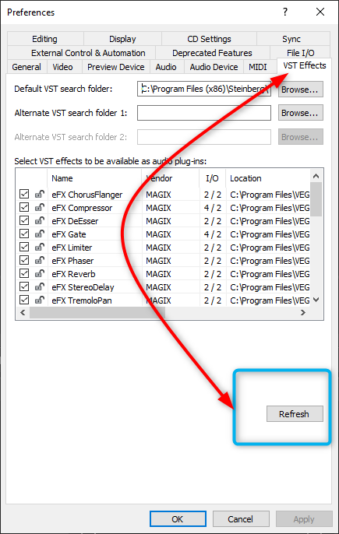
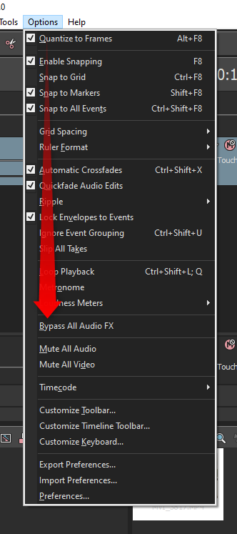
Have you refreshed your VST Folders recently? When I get issues with SFXs I go here. Also have got the OPtion to turn off Audio FXs checked?