-
Video Preview On External Monitor Crashes
So I have been using Vegas for many years through many iterations and one problem I have always had was getting the external monitor preview to work without crashing. My current setup is an R9 5950X with a GTX 1080 using the newest version of Windows 10 and Nvidia drivers.
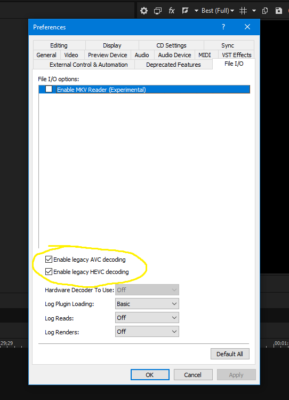
Previously all I had to do was turn off GPU Accel in the older versions of Vegas. However, more recently in version 17 or 18 I had to start turning on the Legacy settings for AVC and HEVC Decoding. Although this does work, it stops me from being able to render using Nvenc and can stop some 10 bit files from being supported. Why turning off Nvenc just for the preview even affects the rendering options is beyond me.
In version 19 neither of these settings are working so I am finally trying to get to the bottom of why this happens in the first place. After doing some investigating I have come to two possible reasons. One being Vegas is just poorly coded or there is some setting I have not come across that can magically fix this. Or the other one being the more realistic explanation and that is Nvidia does not support Nvenc on secondary monitors.
Currently I have a dual set up. My left monitor is an LG IPS panel which I like to use for my fullscreen previews as it has decent colors, and on my right I have my 144 hz BenQ gaming monitor which I do my main editing on as it has poor colors. My primary monitor is set to this gaming monitor as it is straight on from where I sit and that’s how it’s been for the past several years. I am used to my desktop being there and having all my windows open on this monitor.
But I have noticed if I drag Vegas over to my left monitor and change it to preview onto my right monitor it works fine. I have also noticed if I switch my primary monitor from my right monitor to my left monitor, it is able to preview onto my left monitor with no issues. Am I right coming to the conclusion that this may be physically impossible to make work thanks to Nvidia or is there something I can do to fix this? I really do not want to be forced to change my whole work flow just because Vegas doesn’t want to cooperate.