Francesco Barese
Forum Replies Created
-

tyvm. appreciated!
quick follow up. what if the mogrt is 32 bit color?how will premiere handle it if the rest of the project isnt 32?
-
Francesco Barese
May 11, 2021 at 7:25 pm in reply to: Automating gaps/position between clips on timelineoh youre a lifesaver, thank you!!!!
-
Francesco Barese
February 15, 2021 at 1:35 am in reply to: AE adds gaps when importing edited (cut/split) footage from Premierewill do. thanks for the help
-
Francesco Barese
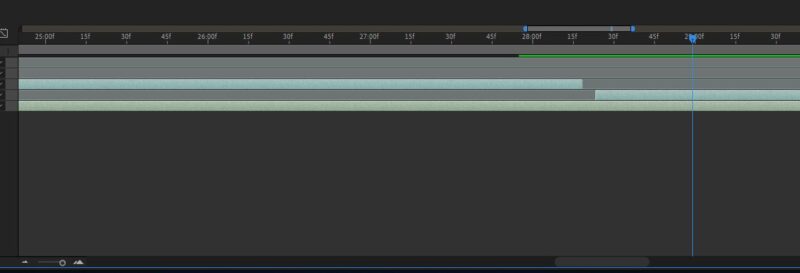
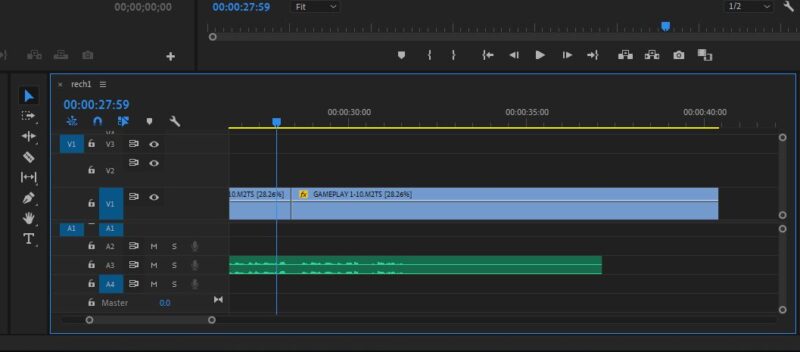
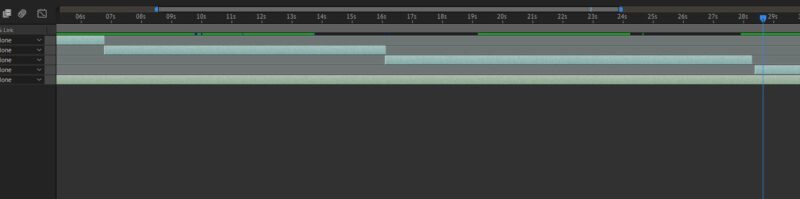
February 13, 2021 at 11:29 am in reply to: AE adds gaps when importing edited (cut/split) footage from Premierei tried doing like you said, but unfortunately the result was same.
there definitely isnt any gaps in pp however they get added in ae.
and they get added at seemingly random.
only the last clip has it (if you look closely in the last picture)

-
Francesco Barese
February 12, 2021 at 8:20 pm in reply to: AE adds gaps when importing edited (cut/split) footage from Premiereim also working on pp19 and ae19 as well. im not using dynamic link. just importing directly.
would “replace with ae composition” solve framerate discrepancies?
(i will take screenshot when i get home)
-
Francesco Barese
February 12, 2021 at 8:18 pm in reply to: AE adds gaps when importing edited (cut/split) footage from Premiereyes, there is framerate discrepancies. ae project is in 60fps, one of the videos is 29.xxfps and the other one is 59.xxfps.
-
Francesco Barese
February 9, 2021 at 5:17 pm in reply to: inconsistencies in saturation/color and shadow quality when exportingthank you very much, im gonna give it a try!
however i found a workaround (writing this for anyone that is facing the same problem and is looking for a workflow solution)
what im gonna do is edit the entire raw footage with proper scaling (gameplay+joystick+voiceover) in premiere from start to finish. then split it into 20 segments (1 for each trial), delete 19 segments,leave only “segment 1” delete gameplay and save it as “joystick premiere projects”, then undo, delete joystick and save it as “gameplay+voiceover premiere project”. then import both as individual fully edited clips onto the timeline in AE and place them on top of their respective boarders elements in the AE template.
the footage is already edited,now all i gotta do is move the elements around when i need them.
once im done with segment one, i will precomp the whole thing and save.the adjustable/editable template is done so all i have to do is rinse and repeat for the next 19 segments of the raw footage and save them as their own precomp. and when its all done i will just import the 20 finished precomps one right after the other and export as one file
-
Francesco Barese
February 7, 2021 at 2:18 am in reply to: inconsistencies in saturation/color and shadow quality when exporting(yes, its for youtube).
so basically, from now on i should be working with 8 bit by default, and get the colors and shadows looking the way i want them to in an 8-bit environment to begin with?
-
Francesco Barese
February 7, 2021 at 2:17 am in reply to: inconsistencies in saturation/color and shadow quality when exportingthank you!
-
Francesco Barese
February 6, 2021 at 5:24 pm in reply to: inconsistencies in saturation/color and shadow quality when exportingoh,right. my projects in 32bit. thank you i will try that!
my shadows dont have blending modes (its just the “drop shadow” effect preset.)
i guess maybe because the background is lighter the shadows appear lighter too (+ loss of date from exporting in 8bit color depth format png).
i will try again using the settings you suggested.
how about the video tho? i have some motion elements that im exporting with transparencies(same as i did with the pngs). but i exported in avi.
whats a video format that supports 32 bit?