Creative Communities of the World Forums

The peer to peer support community for media production professionals.

Activity Forums Adobe After Effects AE adds gaps when importing edited (cut/split) footage from Premiere

  • AE adds gaps when importing edited (cut/split) footage from Premiere

    Posted by Francesco Barese on February 12, 2021 at 7:00 pm

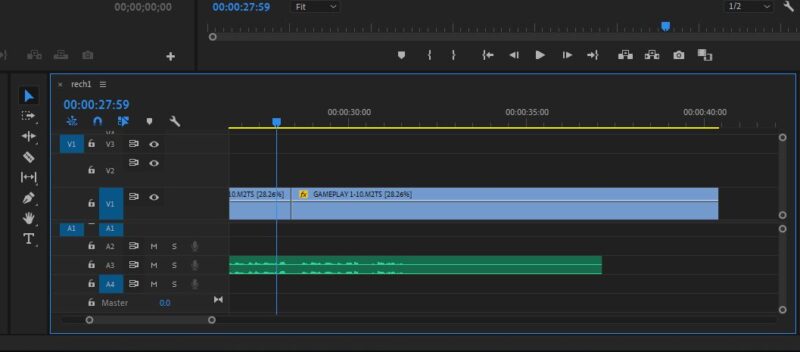
    i edit my footage in PP (splice it, rearrange it,cut it etc). when i look at it in PP its all seamless and frame perfect. no transitions used. just one clip right after the next.if i were to export it from pp as a video it would also be seamless. there is no gaps in the pp arrangement whatsoever.

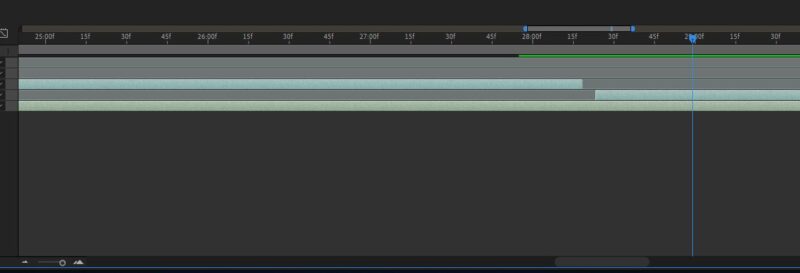
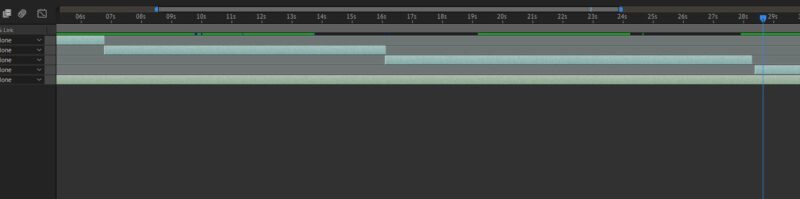
    but when i import the pp project into ae theres these one frame gaps where the footage was split in pp. just enough to give an ugly split millisecond of blackscreen. i cant drag to fill the gaps because there is a picture in picture situation and everything has to be aligned perfectly down to the frame. theres also some dependencies between the clips (due to some workarounds i had to do in order for my computer to handle editing large projects in ae(slow pc. gtx1060 6gb/ryzen5).

    so i kinda need to the gaps to not be there or it might cause a lot of misalignment down the line.

    any idea why ae is adding gaps where there werent any?how can i fix this?thank you

    Francesco Barese replied 5 years, 3 months ago 3 Members · 7 Replies
  • 7 Replies
  • Dave Baum

    February 12, 2021 at 7:16 pm

    Are there speed changes and / or any frame rate discrepancies?

  • Elias Huch

    February 12, 2021 at 7:28 pm

    Can you post a screen shot of your timeline? Also, you are saying export and import. Are you using Dynamic Link or importing the Premiere file directly into AE? Also, are your versions matched up? i.e. AE 19 PrPro 19 I have intentionally stayed away from 20 and 21 due to their bugginess in both softwares so if the solution below doesn’t fix your problem, I’d highly suggest downloading version 19 of both and making it your default. However, before that…

    I would try the following:

    Open your Premiere Project

    Duplicate the Sequence you are trying to work with in AE

    Open the new Duplicate sequence

    Select all clips in the sequence

    Right click on any clip in the timeline

    Select “Replace with After Effects Composition” near the top

    This will open a fresh AE project and should maintain all of the properties inside of your Premiere project.

    Please let me know if this works or not.

    ?

  • Francesco Barese

    February 12, 2021 at 8:18 pm

    yes, there is framerate discrepancies. ae project is in 60fps, one of the videos is 29.xxfps and the other one is 59.xxfps.

  • Francesco Barese

    February 12, 2021 at 8:20 pm

    im also working on pp19 and ae19 as well. im not using dynamic link. just importing directly.

    would “replace with ae composition” solve framerate discrepancies?

    (i will take screenshot when i get home)

  • Francesco Barese

    February 13, 2021 at 11:29 am

    i tried doing like you said, but unfortunately the result was same.

    there definitely isnt any gaps in pp however they get added in ae.

    and they get added at seemingly random.

    only the last clip has it (if you look closely in the last picture)

  • Elias Huch

    February 13, 2021 at 8:03 pm

    I would report this to Adobe. However, in the meantime you can simply use the nudge tool

    (Option/Alt + , ) for left

    (Option/Alt + . ) for right

    to nudge the clips back into place.

  • Francesco Barese

    February 15, 2021 at 1:35 am

    will do. thanks for the help

We use anonymous cookies to give you the best experience we can.
Our Privacy policy | GDPR Policy