Forum Replies Created

Page 3 of 3
  • Nils Hammers

    March 12, 2024 at 10:10 am in reply to: Text On A Plaque Effect

    Is it likely you are looking just for a rectangle which will change its size depending on the text entered, right?
    In that case, you would split your graphics into two layers: one with text, another with rectangular shape. Then there many tutorials around that show how to prime the underlying rectangle so it reacts to the text. Here’s one of those..

    Some contents or functionalities here are not available due to your cookie preferences!

    This happens because the functionality/content marked as “Google Youtube” uses cookies that you choosed to keep disabled. In order to view this content or use this functionality, please enable cookies: click here to open your cookie preferences.

  • Nils Hammers

    March 11, 2024 at 2:23 pm in reply to: 3D Position to Angle

    Thank you Dan,
    Your expression works like a charm, except it just needed some minor adjustment for the result:

    L = thisComp.layer(“Light_POS”) ;
    p1 = L.toWorld(L.anchorPoint) ;
    p2 = toWorld(anchorPoint) ;
    v = p1 – p2 ;
    v2 = fromWorldVec(v) ;
    +radiansToDegrees(Math.atan2(v2[1],v2[0])) -90 ;

    Thankyouthankythankyouthankyou Dan!
    This particular case is solved. 🎆

  • Nils Hammers

    March 11, 2024 at 2:17 pm in reply to: CC Composite Issue

    Sorry, apparently there is no bug, and the CC Composite works as expected.
    The “bug” happened upon layer duplication – it just kept original layer’s setting, even it was pointing to itself – the pointing-to-itself wasn’t duplicated.
    Unfortunately, there is no way to script the TopLayer property to thisLayer, which in turn undermines the flexibility of automatic layer customization – user will need to enter the every copy and re-set every layer and effect with Layer control properties. Or, can you suggest a workaround, a smart duplicate script that does that? 😪

  • If I were doing something similar, I’d approach the problem from another direction.
    The main object there is that black grid box that scales from zero to hero, to which the pink and gray boxes are pinned (not parented); the pink box will have the anchorPoint snapped to the bottom right corner, the gray box – to the upper left corner.
    Expression for the pink box’s position might be something like:
    b = thisComp.layer(“BlackBox”) ;
    fromComp(b.toComp([0, 0]) ;

    For the gray box:

    b = thisComp.layer(“BlackBox”) ;
    fromComp(b.toComp([b.width, b.height]) ;

    Now, when the black box scales from 0, the pink and gray boxes appear like pulling the opposite corners of black box.

  • Nils Hammers

    March 9, 2024 at 4:34 pm in reply to: 3D Position to Angle

    Hey Dan,

    I am not behind my workstation, can tell you just from the memory.
    I am trying to simulate rim light and shadow on tree leaves, using the Emboss effect, some sort of toon shading.
    The comp consists of 3D layers only.

    — There’s a root null, to which some fifty leaf copies are parented (+ bunch of expressions, including for Orientation and RotXYZ to auto orient to center and simulate gravity and wind, randomize, curvature). Each leaf has Emboss, which has angle property.
    — Then there is that Light_POS null, toward which I was trying to aim every leaf’s Emboss effect. Can’t use real light as it would impact the shading, there is no switch for Accept Lights in Advanced 3D render engine.
    Perhaps there are better ways to simulate such kind of shading. If any alternative comes into mind, please spill the beans. 🙂 I was considering using Particular, however, here I need quite large, slightly bent leaves the character interacts with, so I went for the aforementioned setup.

    Thanks, best,
    NH

    P.s. If description wasn’t helpful, can post some screenshots on Monday.

  • Nils Hammers

    March 8, 2024 at 3:24 pm in reply to: 3D Position to Angle

    Yeah, it made no errors, thank you! 😉
    However, the result was not the expected behavior – the angle is changing, however, unpredictably slow, then suddenly to the opposite direction, even the Light_POS had barely moved.
    Haven’t figured out what is what, yet at the moment look[1] works better than look[2] and look[0].
    Will proceed the next week.

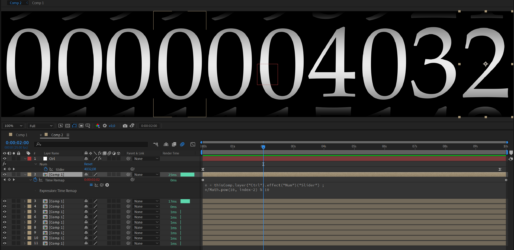
  • From what you describe, I suspect, that would not be the result you are after, as usually for those analogue counters, the increment happens once previous disc rolls from 9 to 0.
    Assuming you have 10 secs long base composition where all the numbers snap one by one through, loopable, you can use this expression in TimeRemap property:

    n = thisComp.layer(“Ctrl”).effect(“Num”)(“Slider”) ;
    n/Math.pow(10, index-2) % 10 ;

    In the base composition, instead of animating ten snaps, you can do animation just for the first one, one second long segment, and add expression:
    loopOut(“offset”) ;

    Experiment with animation there, have a key at frame 00:00:00, copy it to close the end of the first second, animate the numbers strip to the next digit at 00:01:00 – the shorter the animation, the snappier will be the numbers.

    TIP: you’d have numbers 9012345678901 for each roll, as those extra numbers might be visible, if more than current number is exposed.
    NOTE: this is very simplistic example, the motion blur won’t work correctly, as the expression is snapping back the numbers layer for every cycle. I remember building rolls out of 3D layers, so that those can have any angle and mblur is controllably calculated in the same composition.

  • Nils Hammers

    September 1, 2023 at 1:27 pm in reply to: Get Deformed Shape Path Data

    Hi Filip,

    Thank you for your answer, yet the news You’ve brought were kind of sad. 🙂

    Having an intermediate knowledge of AFX expressions, I was inspired by CreateNullsFromPaths script and https://ae-scripting.docsforadobe.dev/matchnames/layer/shapelayer.html and was hoping there is something esoteric, like

    …(“ADBE Root Vectors Group”)(1)(“ADBE Vectors Group”)(1)(“ADBE Vector Shape”)…
    with some magic of
    …(ADBE Vector Filter – Roughen)…
    and
    …points()

    that would output the data that is being rendered.

    I suspected some wiggly things could be done with createPath(), and then, from what you say, I conclude I should work with masks directly, as Scribble supports mask modes, and I would be able to simulate boolean behavior.

Page 3 of 3

We use anonymous cookies to give you the best experience we can.
Our Privacy policy | GDPR Policy