Creative Communities of the World Forums

The peer to peer support community for media production professionals.

Activity Forums Adobe After Effects Expressions Help looping a Time Remap for a linear value of another property

  • Help looping a Time Remap for a linear value of another property

    Posted by Viviane Boyer Araujo on March 7, 2024 at 12:12 pm

    Hi !

    The short version:

    I’m desperately trying to link time remaps and make it so that time remap B loops every X frames of time time remap A.

    Basically, what I’d like to do is, when TR A plays, say, 15 frames, TR B plays it’s full length, then when TR A plays another 15 frames (raching frame 30), TR B loops again. It doesn’t have to be a number of frames, percentages will do. Percentages will probably be more helpful, actually.

    And then, I’d like to be able to apply the expression to a TR C linked to TR B, then TR D linked to TR C, etc

    Hopefully I’ve somehow managed to convey my issue. Thanks in advance !

    More details:

    I’m trying to do an animated rotating number counter with a big, big number. It goes from hundreds to million. The rotating numbers are animated in a precomp, so far so good, but I just cannot have a long enough timeline to simply loop the animation in the precomps and then link and speed the time remaps in a parent composition.

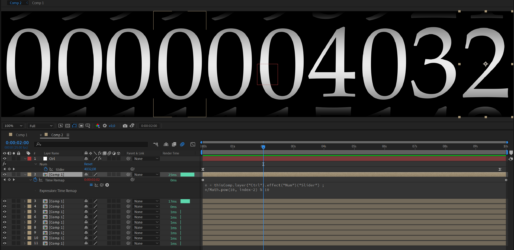
    Brie Clayton replied 2 years, 3 months ago 3 Members · 3 Replies
  • 3 Replies
  • Nils Hammers

    March 8, 2024 at 1:31 pm

    From what you describe, I suspect, that would not be the result you are after, as usually for those analogue counters, the increment happens once previous disc rolls from 9 to 0.
    Assuming you have 10 secs long base composition where all the numbers snap one by one through, loopable, you can use this expression in TimeRemap property:

    n = thisComp.layer(“Ctrl”).effect(“Num”)(“Slider”) ;
    n/Math.pow(10, index-2) % 10 ;

    In the base composition, instead of animating ten snaps, you can do animation just for the first one, one second long segment, and add expression:
    loopOut(“offset”) ;

    Experiment with animation there, have a key at frame 00:00:00, copy it to close the end of the first second, animate the numbers strip to the next digit at 00:01:00 – the shorter the animation, the snappier will be the numbers.

    TIP: you’d have numbers 9012345678901 for each roll, as those extra numbers might be visible, if more than current number is exposed.
    NOTE: this is very simplistic example, the motion blur won’t work correctly, as the expression is snapping back the numbers layer for every cycle. I remember building rolls out of 3D layers, so that those can have any angle and mblur is controllably calculated in the same composition.

  • Viviane Boyer Araujo

    March 8, 2024 at 5:00 pm

    Extremely thankful for your answer ! Like really. Thank you so much ! And you even fixed the roll snap problem that I had given up on even bothering with, honestly (because the numbers involved are so big, and the animation so incredibly speedy).

    I just knew there was a way of handling percentages to do this, and that I also didn’t have the knowledge to find it out on my own, and it was driving me up the proverbial wall.

    Anyway, again, my most heartfelt thanks! Wishing you a good day!

  • Brie Clayton

    March 8, 2024 at 7:16 pm

    Thank you for solving this, Nils!

We use anonymous cookies to give you the best experience we can.
Our Privacy policy | GDPR Policy
