Forum Replies Created

Page 12 of 63
  • Doug Metz

    September 18, 2023 at 5:06 pm in reply to: Artifacts using flow dissolve

    The Flow transition doesn’t really care what you’re shooting with. What really matters is the difference between the clips being ‘flowed’ together – if one side of the transition has a hand in the shot, and the other side doesn’t, you’ll get some weird looks. If the person speaking moves their head a lot, or if the background changes, you’ll get some oddities as well.

    Another thing to keep in mind is that FCP needs to calculate/analyze the differences, so it’s important for that to happen prior to playback. I do this by parking the playhead over each Flow transition as I put them in, and wait for the ‘Analyzing’ bit to finish.

    Try to keep them short. It works best with a talking head that keeps relatively still. The more action you try to bridge, the more potential for artifacts.

  • Sure! Do you just need the XML, or are you planning to bring it into FCPX? If so, the XML will also need to be converted to .fcpxml (can also do that).

  • I’ve not had good luck with anything to repair damaged files.

    I have heard from multiple sources that accessing the original card with the original camera to view the clips can often repair them. But not always.

  • Doug Metz

    August 11, 2023 at 9:43 pm in reply to: Importing P2 card filmed at 720p on Panasonic HPX 170

    If you set the camera to record at 720p, the savings would be seen as extended recording time while you shoot.

    A full 64GB card is going to transfer 64GB, regardless of format, whether it’s 20 minutes of 1080i or 40 minutes of 720p.

    How are you doing ingest?

  • Ben, I understand your answer perfectly fine. I’m not disagreeing that the functions are totally different and that expanding audio offers the most flexibility. It’s what I usually do. You are absolutely correct.

    Ignore my remark about using a simple video cut transition to quickly crossfade audio, which is not something I typically do, and is the part of my first comment that I wanted to, but cannot, modify or remove. Focus instead on the OP’s problem with the Crossfade function.

  • Doug Metz

    July 14, 2023 at 7:40 pm in reply to: Zoom separate audio files not syncing in FCP X

    First thing would be to try and get the cloud recordings set up to match local settings.

    Are the local and cloud recordings both at 25fps, with the only difference being audio sample rate? I’d be interested to see the spec difference between a local recording and the 360/720 cloud files – changing the timeline pixel dimensions should have zero effect on audio sync. That’s bizarre.

  • I think you’ve missed my point, and focused on the tangent.

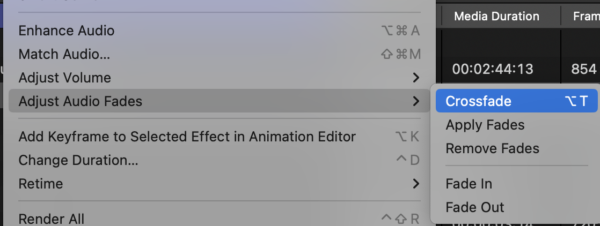
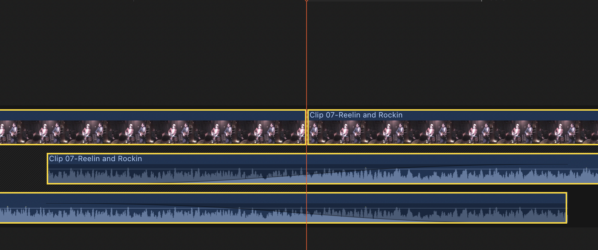
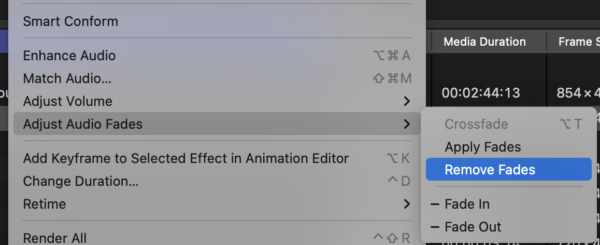
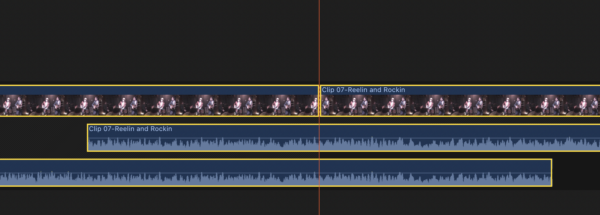
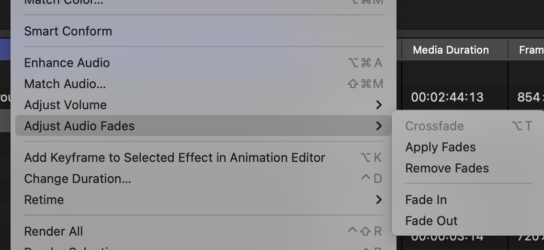
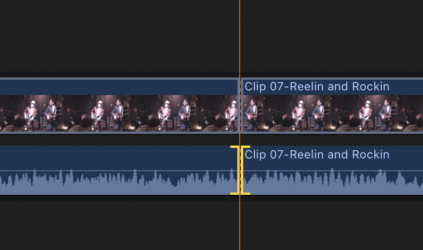
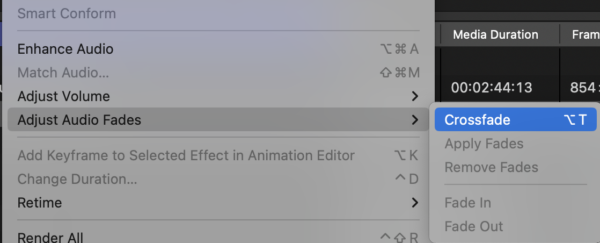
    OP applies the Crossfade function (01). Behind the scenes, it extends the audio portion of the clips on both sides of the cut point and applies fades via the handles (02). If you then select Remove Fades (03), behind the scenes it removes the handle adjustment, but leaves the audio ends of the clips extended (04) and you can’t reapply fades using the Crossfade command (05), unless you first trim back the audio components to the original video cut point (06, 07).

    It was not my intention to imply that the video cut was ‘the way forward’, simply an anecdote about an alternate way to crossfade en masse that you can readily see on the timeline without expanding components. And in/out fade types are adjustable in the inspector. Apparently, it’s too late to edit the post and remove the comment which is unfortunate, as it is poorly worded and implies much that I hadn’t intended.

    If OP were to set the Audio Fade duration to the same value as Crossfade in prefs, then Modify / Apply Fades would operate on those extensions to re-apply the original Crossfade without having to trim them all back.

  • I haven’t used this function, but your documentation is bulletproof.

    When applying Crossfade in this way, the audio is extended on both sides and the fade handle is applied. When you Remove Fades, it only undoes the fade handle and does NOT return the audio extensions to their previous, cut-at-the-edit-point position. You can observe this by selecting the affected clips and selecting Expand Audio. Once you trim the audio back to the video cut point on both sides, Crossfade is once again available.

    They really need a specific Undo Crossfade function that returns the clips to their unextended state.

    The first transition I ever made in Motion was an audio-only crossfade, and I’ve only ever used that when needing a video cut with audio cross. You can readily see and adjust it without expanding the audio.

  • Doug Metz

    July 7, 2023 at 3:10 pm in reply to: Can’t open compound clip

    This seems to be a bug.

    If you drop a psd into a timeline, double-click to open it and add a transition to any layer, that timeline instance of the psd will no longer open with a double-click (it’s layer icon also disappears). Sometimes transitions used within will also automatically choose to Transition from Black (right click the transition and uncheck to fix).

    You can still open and modify the psd instance in the timeline by selecting it and choosing Open Clip from the Clip menu.

  • Doug Metz

    June 12, 2023 at 9:46 pm in reply to: Moving Files to Harddisk for Archival: File Format

    I’ve been cataloging everything with NeoFinder (was CDFinder) for a very long time (decades). Great product, great support, reasonable price. https://www.cdfinder.de/

    For archive, I’m using LTO for nightly backups of servers and RAIDs, also using it for bulk archiving alongside HDD copies of those archives as near-line storage which doubles as a safety copy. Faster restore is a bonus.

Page 12 of 63

We use anonymous cookies to give you the best experience we can.
Our Privacy policy | GDPR Policy