
Forum Replies Created
-

Here we are ~10 years later and I found your question whilst looking for the same answer. I just found that if one selects the sequences in the project window the command “Render In to Out” does work on that multiple timeline selection, and they’re all rendered.
My current setup is Adobe Premiere Pro 2022 on Windows 10. Do let me know if you find this works for you as well please?
-
The technique is freelensing or lenswhacking I believe. There’s now a effect in Sapphire that can get you close:
https://m.youtube.com/watch?v=y6ZLnizWQOI
Good luck!
Some contents or functionalities here are not available due to your cookie preferences!This happens because the functionality/content marked as “Google Youtube” uses cookies that you choosed to keep disabled. In order to view this content or use this functionality, please enable cookies: click here to open your cookie preferences.
-
P.S.: Wouldn’t recommend my case (Corsair 680x) but definitely would recommend others from them. Also note that the total cost includes many components already owned; totaled it all for insurance purposes.
-
Check this nice little corner of the internet: https://www.reddit.com/r/buildapc/
My recent build: https://pcpartpicker.com/user/Cx/saved/gWRk99
That’s all I got for now ’cause last time I posted a bunch of links the COW suspended my account for spamming (even though all the links were directly relevant) and no one from COW responded to my emails… Best of luck.
-
Chris Jeffries
September 16, 2020 at 6:04 am in reply to: Object Move speed according to the path curvatureCan you show a demo of how this might work as a resulting animation? I understand the desire to have the solution be procedural, and it would be helpful to see how you would like the result to move.
-
Chris Jeffries
September 15, 2020 at 10:00 pm in reply to: How are these video clips mapped onto these surfaces in this old show open?My guess is that this is 99% done in 2.5D vs. 3D and there are layers that were cut out and infill painted.
Some links from a quick search:
https://www.youtube.com/watch?v=GZimVBFSGm0
https://www.youtube.com/watch?v=KcUz8Qx69GU
https://www.youtube.com/watch?v=x4_sdgFldig
An interesting alternate version of the effect with a great voiceover (LOL):
https://www.youtube.com/watch?v=apt2yfdbCS0There’s a script from Paul Tuersley that can help with the process:
https://aescripts.com/pt_multiplane/
Some contents or functionalities here are not available due to your cookie preferences!This happens because the functionality/content marked as “Google Youtube” uses cookies that you choosed to keep disabled. In order to view this content or use this functionality, please enable cookies: click here to open your cookie preferences.
-
Chris Jeffries
September 10, 2020 at 8:03 am in reply to: Checking file integrity of an image seuqence of JPGTo be fair there is a program out there (more than one) as you’ve found; they’re just not the cost or UI that you’d prefer.
One method that I’ve used is to open the directory in thumbnail view; it may take a while but generally I find the miscreants in time.
Something like Adobe Bridge might help with this too, as you can choose to show files within subfolders.
-
Chris Jeffries
September 10, 2020 at 2:37 am in reply to: How to create a dot grid with expressions?Coming late to this conversation, and wanted to offer that there are a few scripts over at AE Scripts that may help:
https://aescripts.com/cloners-plus-effectors/
https://aescripts.com/moglyph-fx/
https://aescripts.com/shapemonkey/
There are, of course, other options, and it would help to know more about what you’re aiming to do with the transparency and color.
E.g.: I was able to quickly create the grid in Illustrator and import it, and from there it can be used as a matte for a layer that has transparency/color information such as a video.
Once imported, I was able to convert the AI layer to a shape layer, if you’d like to avoid referencing an external file.
Also, I attempted to break apart the shape layer using “Explode Shape Layers 3.5.2” and AE choked, so there’s that. Additionally I’ve used “Release to layers (sequence)” within AI to create individual layers for import, and am waiting on AE to crash or succeed in importing via the convert to layered comp function.
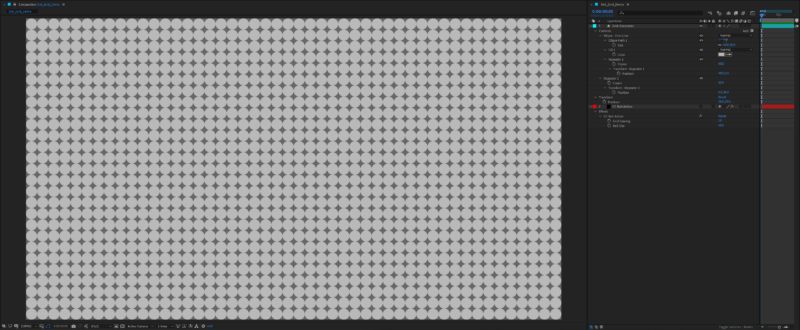
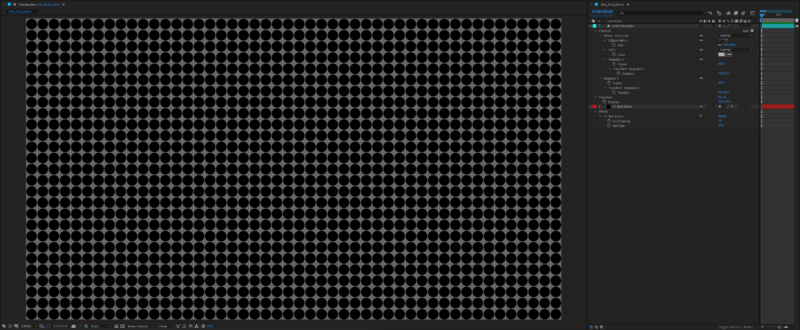
The two screenshots attached show methods of using (1) a shape layer with repeaters and (2) the CC Ball Action effect. Again, the result of either can be used as a matte, and they’re both light-weight solutions.

-
Chris Jeffries
September 10, 2020 at 1:45 am in reply to: What determines the size of a PNG in a PNG sequence?Can you share a link to two of the disparate files? It may help us figure it out…
-
Chris Jeffries
September 10, 2020 at 1:37 am in reply to: Instagram resizable text box by line NOT by entire text?