
Forum Replies Created
-

Chris Jeffries
September 10, 2020 at 1:29 am in reply to: Animate a shape layer's stroke based on the duration's property of a compositionThis sounds like a possible batch job… You may be interested in the excellent CompsFromSpreadsheet script, which I’ve used extensively and recommend:
https://aescripts.com/compsfromspreadsheet
It supports automated importing, variable comp length, and could be combined with one of the other solutions here via the template you’ll need to set up.
Do let us know what ends up working for you?
-
Chris Jeffries
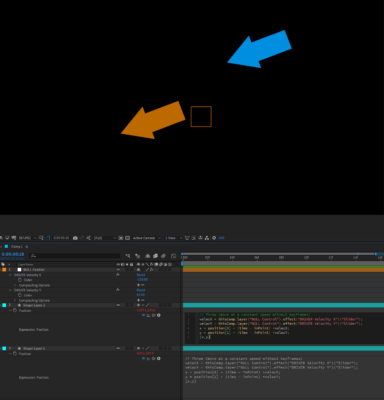
September 8, 2020 at 7:01 pm in reply to: Is there a script that combines Throw with a direction?See the attached image for a possible solution.
I don’t know the math required to make a similar setup with an angle control, but I’m sure there’s another helpful soul out there who does.
(I’m intentionally not including text for copy/paste because I’m of the
opinion that it’s helpful, when learning these things, to actually type
them out. Hope you still find this useful!)
-
Chris Jeffries
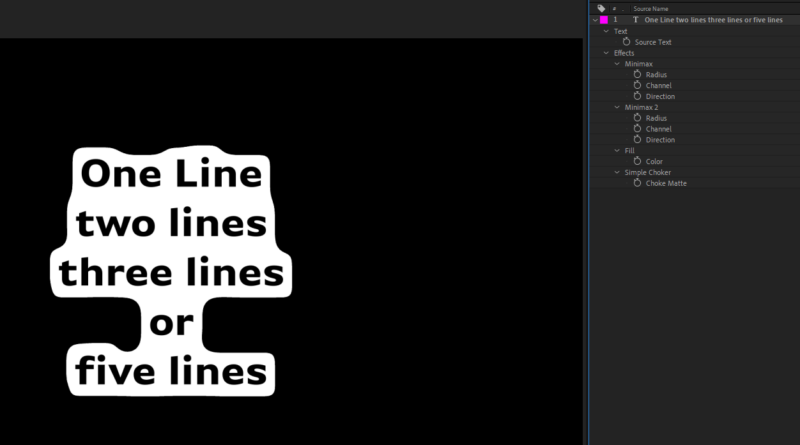
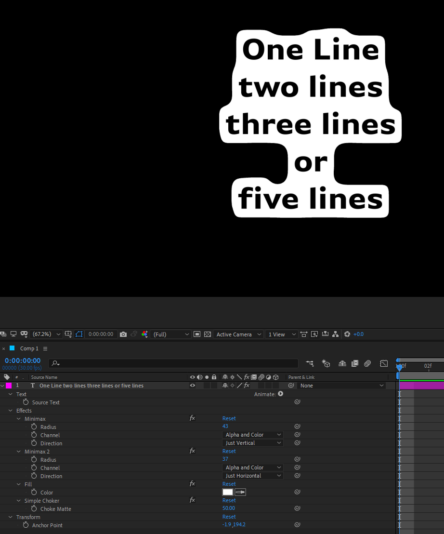
September 8, 2020 at 6:41 pm in reply to: Instagram resizable text box by line NOT by entire text?This isn’t a perfect match but it might be a nudge in the right direction… (Edited to include effect values in the image.)
-
Chris Jeffries
August 10, 2017 at 2:32 am in reply to: Is there a way to open multiple instances of AE on Windows?“C:\Program Files\Adobe\Adobe After Effects CS5\Support Files\AfterFX.exe” -mThanks much – greatly appreciate the tip!
___
-
Another concurrence here: Cinema 4D Studio R17.048 (Build RB147424) crashes when manually saving out a compositing project file as .AEC. (Have not tested for other formats.)
Have found that switching from physical render to standard render allows me to manually export the .AEC successfully.
My current practice is to right-click on the active render setting and choose “New Child” which I then set to use the standard render whilst preserving all of the other options specified in the parent render setting.
One might also choose to use the take system to accomplish the same as it could afford more flexibility.
Interestingly, when the project is set to save the compositing file automatically as part of the render (I.E. at the end of the render sequence) it saves the .AEC upon completion without hanging / freezing / crashing even if set to use physical render.
(Of note: saving to a local hard disk on Windows 8.1. Nothing else seems significant to include; more specifics upon request.)
___
-
Chris Jeffries
June 11, 2013 at 2:27 pm in reply to: Creating a self-contained, editable chart graphic?Hi Chris Thompkins,
I know it’s possible to hand off the project; that’s what I meant in saying it could be a template.
But how might one simplify the construction of the element? My solution would involve a video layer for each point of the data set, with animations on each, resulting in a nested timeline with transform effects… The result would be a nightmare to edit / duplicate.
Can this be done in another, more simple way?
Best,
-Chris___
-
Chris Jeffries
June 11, 2013 at 1:02 pm in reply to: How to view background as transparent instead of blackYes, there is a way to preview with no background.
You’ll want to have a separate preview sequence – this will have two video tracks.
Video 2 = Main Edit Timeline (as a nested sequence.)
Video 1 = Checkerboard pattern that you generate (a still from whatever source you wish – this is only for your comfort that you’re seeing transparency.)For outputting the video with an alpha channel, it may be a useless exercise. Do you know that your playback program can mask the video with the alpha channel? Some VJ solutions can, but most standard players won’t be able to.
Regardless – here’s a starter.
In order to render an alpha channel in to your video, you may have to output 3 times:
- 1x Video RGB
- 1x Video Alpha – see following notes
- 1x Composite from AE
The reason I say 3x with once from AE is that I don’t know of a way to output the alpha channel as an embedded alpha from within Premiere – I can only see options to output composite video.
You can, however, create an sequence to output the alpha as a composite video, which you can then combine to a composite video in After Effects. Nest your main edit timeline as listed above, but remove the checkerboard pattern. Then apply an effect such as “4-Color Gradient” to modify only the non-transparent pixels. Change the effect controls to all white. The result should be a black & white video that shows only white where the video is not transparent (I.E. where it will show up on the projection surface) and that it shows only black where the video should be see-through.
I’m out of time at the moment, but if this is still relevant and you’d like more help, reply here to my comment and I’ll try to write up the next steps. If you want to try to figure it out on your own, search for “track matte” in the After Effects forums.
Best of luck!
___
-
Chris Jeffries
June 11, 2013 at 5:37 am in reply to: Creating a self-contained, editable chart graphic?Thanks for the reply, but I’m not ready to say the “i” word yet! 😀
A clarification to the terms: I can generate source imagery to be used in Premiere, but the client must not be required to edit the source imagery to make their changes. In example, I can create a PSD with a gradient in an ellipse and use it as a matte, and they’re fine with that. Creating the whole chart as a PSD and importing it is not OK.
I’m confident I could do it using transitions & the titler – there’s a radial wipe, right? Barring that, I could use a gradient wipe, with a radial gradient as a source, keying out color ranges to create slices… Or I’m sure there’s another way, but the issue is that I think that whatever I cook up in Premiere Pro will be more complicated than using an external program.
Any ideas to simplify?
Thanks again!
___
-
Post-render solution: SeqSort
Original Post: forums.cgsociety.org/showthread.php?t=855638
Repost/Update: forums.cgsociety.org/showthread.php?t=1069060
Personally have used with great success!
___
-
This might be an older topic but I’d love to see some responses here.
Currently working quite a lot with a facility that uses a Rourke server over fiber, and dealing with scenes totaling around 65GB on average for all passes. Rourke doesn’t like the 6000+ files in the folders.
Sorting at render time would be a best case scenario, but post-render would be acceptable.
Bonus points if your solution works with NETRender R12.
If you have another solution that doesn’t involve file sorting to folders, please feel free to contribute. Have tried using AE plugin “Immigration” which is great, but still want file sorting.
Thanks for any feedback!