Chaz Chester
Forum Replies Created
-

Hi, Peter!
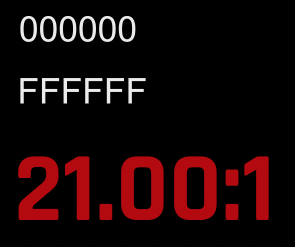
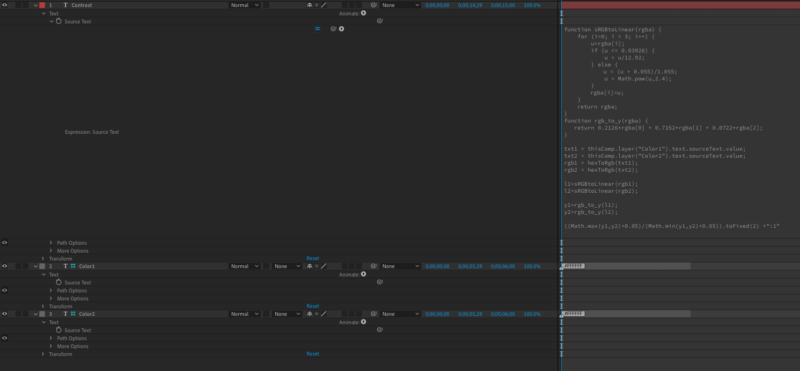
It looks like this was my setup. I think the issue is that your color layers say “Color1NoTag” and “Color2NoTag” instead of “000000” and “808080”, which should give you a contrast ratio of 5.32:1

-
What version of After Effects are you on? I stopped getting the error at some point (not sure exactly how/when), and I think it was an update that fixed it.
-
Does changing Output Control > Speed % to 104 work?
-
Chaz Chester
August 17, 2020 at 11:13 pm in reply to: Simplist way to make animations more choppy/jerky and less smooth.The effect “Posterize Time” lets you decrease the frame rate of a layer. You could keyframe the Frame Rate property if you want it to be inconsistent.
-
Chaz Chester
August 15, 2020 at 1:46 am in reply to: Adding 00s to DAYS in a counter timer using format YEARS:DAYS:HOURS:MINUTES:SECONDSLike this?
slider = effect(“Slider Control”)(“Slider”);sec = Math.floor(slider)%60;
min = Math.floor(slider/60)%60;
hour = Math.floor(slider/3600)%24;
days = Math.floor(slider/86400)%365;
years = Math.floor(slider/31536000);function addZero(n) {
if (n < 10) return “0” + n else return n;
}function addTwoZero(n) {
if (n < 10) return “00” + n;
if (n >= 10 && n < 100) return “0” + n;
else return n;
}addZero(years) + “:” + addTwoZero(days) + “:” + addZero(hour) + “:” + addZero(min) + “:” + addZero(sec)
-
You can also convert hex to this format using this expression that Dan Ebberts and Scott McGee figured out:
txt = “FFFFFF”; //the hex code
hex = parseInt(txt,16);
r = hex >> 16;
g = (hex & 0x00ff00) >> 8;
b = hex & 0xff;
[r/255,g/255,b/255,1] -
Chaz Chester
August 9, 2020 at 1:21 am in reply to: After Effects write paragraph from bottom to top?The Initial Y Value can be any number, it’s just where the text starts vertically. I have it referencing a slider control for easy access, so it’s looking for a slider control named “Initial Y Value”.
You could add a Slider Control (Effect > Expression Controls > Slider Control) to the layer and right click on the effect name to rename it to “Initial Y Value”…
…or here’s a much better version of all this that you can put right in the position expression for your text layer without having to deal with sliders (I made this way more complicated than I needed to because I was also pretty new to writing my own expressions at the time):
[transform.position[0], transform.position[1]-(thisLayer.sourceRectAtTime().height)]
Because the position property contains multiple values (x,y, and sometimes z), it’s what’s known as an “array.”
The first value of an array is [0], the second is [1], the third is [2], and so on. You can tell something’s an array because it uses these square brackets: [ ]
So we have an opening bracket, our first value, a comma, our second value, and a closing bracket.
The first value is just the X value, and the second is the Y value minus the height of the layer. -
Chaz Chester
August 4, 2020 at 11:24 pm in reply to: How to link a shape’s drop shadow direction (Angle) to a nul (Light Source)Using this expression (borrowed from rd:QueEsSpanNull) for the direction should do the trick:
p1 = [thisComp.layer(“SHADOW LIGHT SOURCE”).transform.position[0]*thisComp.pixelAspect, thisComp.layer(“SHADOW LIGHT SOURCE”).transform.position[1]];
p2 = [thisLayer.transform.position[0]*thisComp.pixelAspect, thisLayer.transform.position[1]];
delta = p1-p2;
(Math.atan2(delta[1], delta[0])*180/Math.PI)-90; -
Chaz Chester
July 29, 2020 at 11:30 pm in reply to: expression: thisLayer.width taking comp width instead of shape widthI think the expression you were looking for is
thisLayer.sourceRectAtTime().width -
Chaz Chester
July 27, 2020 at 2:29 am in reply to: Is it possible to keep a head framed when using warp stabilizer?If Warp Stabilizer is cropping your footage too much, try turning down the smoothness or changing the framing to “Stabilize Only” or “Stabilize, Synthesize Edges”. Usually excessive cropping occurs when the shot changes a lot from start to finish or when there isn’t a good point of reference for stabilization, so it might also help to cut the shot into pieces and then adjust reassemble them (you’ll have to adjust the position/scale/rotation) after stabilizing.
If none of that helps, you might want to try a different stabilization technique, such as “Stabilize Motion” in the Tracker panel.