Creative Communities of the World Forums

The peer to peer support community for media production professionals.

Activity Forums Adobe After Effects Expressions Expression-based Contrast Ratio Calculator

  • Expression-based Contrast Ratio Calculator

    Posted by Chaz Chester on June 28, 2020 at 11:26 pm

    Hi! I’m trying to write an expression that’ll take two hex color codes (for now I just have it grabbing them from text layers), determine their Relative Luminances, and then compare them to determine the Contrast Ratio between them.

    The part that’s tripping me up- I’m pretty sure- is converting After Effects’s sRGB 2.2 values to linear RGB, since I keep getting the wrong Relative Luminance. Can anybody tell where I’m screwing things up in this expression?

    //Relative luminance of color 1
    txt1 = thisComp.layer("Color1NoTag").text.sourceText;
    hex1 = parseInt(txt1,16);
    r1 = hex1 >> 16;
    g1 = (hex1 & 0x00ff00) >> 8;
    b1 = hex1 & 0xff;
    if ((r1/255) <= 0.03928) {
    rConv1 = (r1/255)/12.92;
    }
    if ((g1/255) <= 0.03928) {
    gConv1 = (g1/255)/12.92;
    }
    if ((b1/255)<= 0.03928) {
    bConv1 = (b1/255)/12.92;
    }
    if ((r1/255) > 0.03928) {
    rConv1 = ((r1/255)+0.055)^2.4;
    }
    if ((g1/255) > 0.03928) {
    gConv1 = ((g1/255)+0.055)^2.4;
    }
    if ((b1/255) > 0.03928) {
    bConv1 = ((b1/255)+0.055)^2.4;
    }
    rel1 = ((rConv1/255)*0.2126)+((gConv1/255)*0.7152)+((bConv1/255)*0.0722);

    //Relative luminance of color 2
    txt2 = thisComp.layer("Color2NoTag").text.sourceText;
    hex2 = parseInt(txt2,16);
    r2 = hex2 >> 16;
    g2 = (hex2 & 0x00ff00) >> 8;
    b2 = hex2 & 0xff;
    if ((r2/255) <= 0.03928) {
    rConv2 = (r2/255)/12.92;
    }
    if ((g2/255) <= 0.03928) {
    gConv2 = (g2/255)/12.92;
    }
    if ((b2/255)<= 0.03928) {
    bConv2 = (b2/255)/12.92;
    }
    if ((r2/255) > 0.03928) {
    rConv2 = ((r2/255)+0.055)^2.4;
    }
    if ((g2/255) > 0.03928) {
    gConv2 = ((g2/255)+0.055)^2.4;
    }
    if ((b2/255) > 0.03928) {
    bConv2 = ((b2/255)+0.055)^2.4;
    }
    rel2 = ((rConv2/255)*0.2126)+((gConv2/255)*0.7152)+((bConv2/255)*0.0722);

    //Contrast Ratio
    (Math.round((rel1+0.05)/(rel2+0.05)*100)/100) +":1"

    Peter Denisimo replied 4 years, 11 months ago 4 Members · 7 Replies
  • 7 Replies
  • Filip Vandueren

    June 29, 2020 at 11:08 am

    Short answer is that ^ as a power-function is not supported in expressions.
    Either use Math.pow(x,2.4) or in the new javascript-Engine you can use x**2.4

    Also, in the contrast-formula, the brightest color should always be the numerator, see below

    In the new engine I’d re-write the whole thing like this:

    function sRGBtoLinear(rgba) {
    for (i=0; i<3; i++) {
    u=rgba[i];
    if (u<=0.04045) {
    u = u/12.92;
    } else {
    u = 1.055*(u**(1/2.4)) - 0.055;
    }
    rgba[i]=u;
    }
    return rgba;
    }
    function rgb_to_y(rgba) {
    return 0.2126*rgba[0] + 0.7152*rgba[1] + 0.0722*rgba[2];
    }

    txt1 = thisComp.layer("Color1NoTag").text.sourceText.value;
    txt2 = thisComp.layer("Color2NoTag").text.sourceText.value;
    rgb1 = hexToRgb(txt1);
    rgb2 = hexToRgb(txt2);

    l1=sRGBtoLinear(rgb1);
    l2=sRGBtoLinear(rgb2);

    y1=rgb_to_y(l1);
    y2=rgb_to_y(l2);

    ((Math.max(y1,y2)+0.05)/(Math.min(y1,y2)+0.05)).toFixed(2) +":1"

  • Chaz Chester

    June 29, 2020 at 12:13 pm

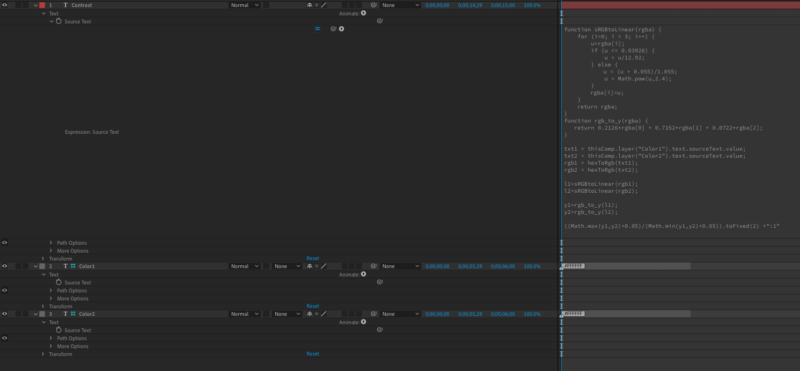
    This is so much better than what I had. I adjusted it slightly and now it’s doing exactly what I wanted. Adding the expression in case anybody else wants it. Thanks, Filip!

    function sRGBtoLinear(rgba) {
    for (i=0; i < 3; i++) {
    u=rgba[i];
    if (u <= 0.03928) {
    u = u/12.92;
    } else {
    u = (u + 0.055)/1.055;
    u = Math.pow(u,2.4);
    }
    rgba[i]=u;
    }
    return rgba;
    }
    function rgb_to_y(rgba) {
    return 0.2126*rgba[0] + 0.7152*rgba[1] + 0.0722*rgba[2];
    }

    txt1 = thisComp.layer("Color1NoTag").text.sourceText.value;
    txt2 = thisComp.layer("Color2NoTag").text.sourceText.value;
    rgb1 = hexToRgb(txt1);
    rgb2 = hexToRgb(txt2);

    l1=sRGBtoLinear(rgb1);
    l2=sRGBtoLinear(rgb2);

    y1=rgb_to_y(l1);
    y2=rgb_to_y(l2);

    ((Math.max(y1,y2)+0.05)/(Math.min(y1,y2)+0.05)).toFixed(2) +":1"

  • Peter Denisimo

    May 21, 2021 at 3:33 pm

    This looks awesome and just like what I’m trying to do! I’m still a little confused though… how many layers did you have in your comp, just the two text layers? Also, can you specify where exactly you’re adding these expressions to? Finally, how do you see the actual contrast calculation? Sorry if these are dumb questions, I’m still relatively new to expressions… Thanks!

  • Kevin Camp

    May 21, 2021 at 5:08 pm

    It looks like they have at least 3 text layers, 2 for the hex values and a 3rd for the output of the contrast ratio.

    The expression above would go into the source text of the 3rd text layer.

  • Peter Denisimo

    May 25, 2021 at 11:11 pm

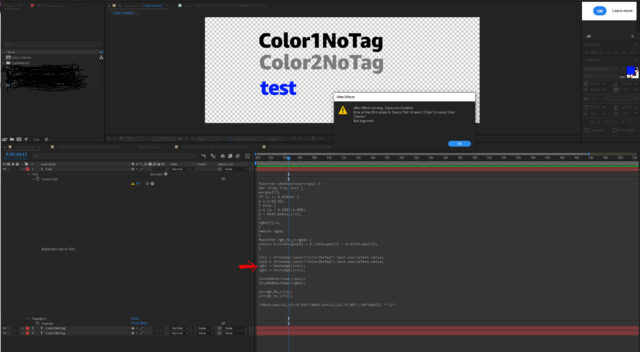
    Thanks for the response, Kevin! Unfortunately I tried that and I’m getting an error that says “Bad argument” – I’ve attached a screenshot here of the expression i have and drew a red arrow to where the error message is indicating the error is.

    Also, I should note that in Project Settings > Expressions, i have it set to “Legacy ExtendScript” – when I have it in JavaScript it still gives me a “Bad argument” error except this time at line 1.

    As far as software/system, I’m using AE 2020 – v17.0.5. Also, I’m on PC using Windows 10.

    Any idea what I’m doing wrong here? Was hoping to turn this into an Essential Graphics file that could be used in Premiere. Any help would be much appreciated, thanks!

  • Chaz Chester

    May 26, 2021 at 12:01 am

    Hi, Peter!

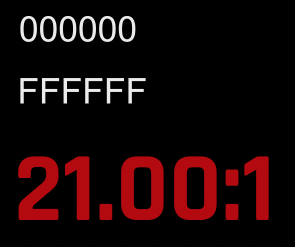
    It looks like this was my setup. I think the issue is that your color layers say “Color1NoTag” and “Color2NoTag” instead of “000000” and “808080”, which should give you a contrast ratio of 5.32:1

  • Peter Denisimo

    May 26, 2021 at 10:58 pm

    Ahhhh, oops! Thanks Chaz, it’s working now! I converted this into an Essential Graphics .mogrt file that can be used in Premiere with a color picker – works great! I’ve attached it here in case anyone wants to check it out. Thanks again!

We use anonymous cookies to give you the best experience we can.
Our Privacy policy | GDPR Policy