Chad Pearson
Forum Replies Created
-

Chad Pearson
June 11, 2021 at 3:33 pm in reply to: ProPresenter to ATEM (black part of Lowerthird is keyed out)A luma key, by definition, uses the black and non-black parts of your image (aka the luminance) to determine what to key out. Anything that is black is removed.
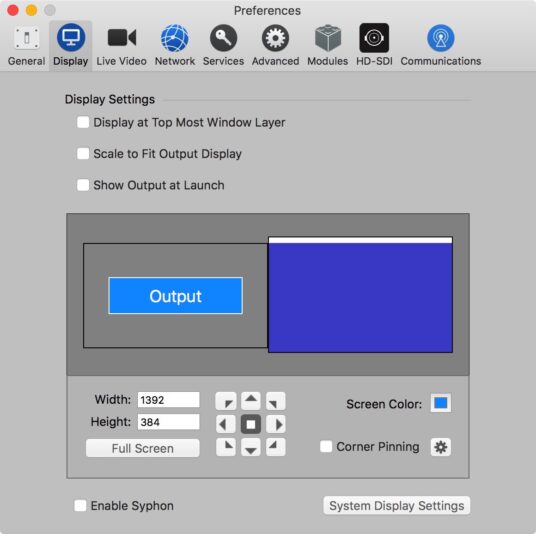
Instead, try using a chroma key to select a different color to key out, like blue or green, and setting that as your Screen Color in ProPresenter’s Display preferences.
Alternatively, you will need to purchase either a UltraStudio or Decklink output device and use ProPresenter’s Alpha Key module instead.
Setting up an Alpha Key output from ProPresenter – Renewed Vision

-
Like Glenn said, capture devices like the UltraStudio line exist to interface with “professional” Television and broadcast equipment. They are really the only way to capture and playout to tape decks of yore found in TV stations around the world, or for plugging in a video camera signal directly to the computer instead of recording to files and ingesting into a computer.
On the playback side, they find a home in the live event space. If you need to play back a clip into a professional video switcher that uses SDI, you need a device like this. Want to do lower thirds with alpha transparency? Only a device like this will work.
For video editing, the only value it provides is the ability to plug into a broadcast monitor or TV so you can preview exactly what it looks like, and ensure that you stay within the legal color range.
-
Directly to the monitor? Yes. But you must make sure to change the display settings on your Mac to a supported resolution that is compatible with both the converter and the monitor. If one of the default resolutions does not work, try holding down the Option key when you click the “Scaled” radio button. That will unlock several other resolutions that may work better.
-
Chad Pearson
August 2, 2017 at 10:22 pm in reply to: Intensity Pro Analog Audio Input is Not Working Without the Presence of any Analog Video InputThis answer is a gross simplification of how device drivers work.
When you write a hardware driver for a specific operating system, like Windows or MacOS, you have to tell the operating system what type of device is at the other end of the connection. The operating system defines the possible choices, and the capabilities of each choice. Now, Blackmagic chose to declare itself as a video capture device, and according to the operating system, a video capture device can pass both video and audio. But not just audio.
Looking at the video signals themselves, unless you are still using analog, the audio is actually interleaved into each video frame. That means to capture audio, you have to start with a video signal and extract the audio from it.Now, it is technically possible for Blackmagic to write a driver that declares the device as a sound card instead of a video capture device (or a hybrid device, or some other kind of device) and shove the audio down the cable in a non-video signal format, however it would undoubtedly increase the cost of developing their drivers. So they choose not too.
Many would argue that users who want an audio only capture device would be much better served with an actual USB sound card. They have far less latency, support higher sample rates (Blackmagic is limited to 48khz since that is the TV industry standard), have better quality pre-amps, and come with a combination of balanced, unbalanced, digital and optical connections.
-
Chad Pearson
July 21, 2017 at 8:30 pm in reply to: How can I determine what files sizes will be using Ultrastudio miniWhich UltraStudio Mini are you referring to? The UltraStudio Mini Recorder? The UltraStudio HD Mini?
In either case, neither of those devices create files. They are capture cards that can be used by professional video software to ingest raw video signals. The software itself decides which codec, bitrate, etc; that it wants to capture and save to a file.
-
The UltraStudio supports video inputs up to 4kp30 (aka 6G-SDI), but it will not take an SD or HD signal and upconvert it into that format. That can only be done by a scaler. The Only scaler that Blackmagic makes that has the capability to upscale from to 4K and has HDMI input is the Teranex AV. Overall, the Teranex line was one of the best scalers on the market when Blackmagic bought the company.
-
Your scaler is only upscaling to 1080p, not 4k, so that’s the resolution your Ultrastudio will see and be able to capture. None of the other products you are using have scalers so can only pass through the same resolution that is going into them
-
Chad Pearson
April 13, 2017 at 1:01 am in reply to: Live stream multiple camera’s through Blackmagic ATEM and Wirecast?The ATEM can only output one signal at a time. Though that one signal can contain a “picture in picture” of two sources plugged into the ATEM that will only show up as a single input to Wirecast.
Instead check out the newly released Blackmagic Web Presenter, each Web presenter will still only appear as a single input into Wirecast, but at less than half the price of an ATEM you can buy two and each will appear as a separate web cam in Wirecast.
-
If your iOS device is on version 8 or later you can plug it into a Mac and open up QuickTime to do direct screen captures over the USB connection, no capture card required.
https://ioshacker.com/how-to/use-quicktime-record-screen-iphone-ipad-ipod-touch-running-ios-8
-
Chad Pearson
September 1, 2016 at 10:29 pm in reply to: Canon XA35 – Blackmagic MicroConverter SDI to HDMI – Intensity Shuttle No signalWhat kind of monitor? Is it a computer monitor or a video monitor (TV). Many computer monitors can only handle RGB signals and not the YCbCr format of a video signal (although some can via a menu setting), so they may not be a valid test.
On the converter, do you see the little white light lit indicating a signal lock?