Forum Replies Created

Page 14 of 20
  • Brendon Murphy

    October 3, 2020 at 6:56 pm in reply to: Remove hidden properties and effects

    I think I get what you mean. I had a few minutes to get you started – this script will delete all disabled effects on selected layers.

    app.beginUndoGroup(“Delete Hidden”);

    var activeComp = app.project.activeItem;

    var allLayers = activeComp.selectedLayers;

    var numLayers = allLayers.length

    var layerCheck = allLayers[0];

    //make sure something’s selected

    if (!layerCheck ) {

    alert(“Please select layers inside the active comp.”);

    } else {

    //CYCLE THROUGH LAYERS

    for (var f =0; f <= activeComp.numLayers-1; f ++) {

    var currLayer = allLayers[f];

    var numEffects = currLayer.Effects.numProperties;

    var removeThese = [];

    for (var i =1; i <= numEffects; i ++) {

    var currEffect = currLayer.effect(i);

    if (currEffect.enabled ==false){

    removeThese.push(currEffect.name);

    //currEffect.remove();

    };//end if statement

    };//end effects loop

    for (var j =0; j <removeThese.length; j ++) {

    var currentRemoval = removeThese[j];

    currLayer.effect(currentRemoval).remove();

    };

    };//end layers loop

    };

    app.endUndoGroup();

  • Brendon Murphy

    October 3, 2020 at 4:24 am in reply to: Use script to retrieve value from expression

    You can do it dynamically with an expression on scale:

    compWidth = thisComp.width;

    compHeight = thisComp.height;

    ratioX = value[0]/1920; //replace 1920 with your original comp width

    ratioY = value[1]/1080; //replace 1920 with your original comp height

    newSizeX = compWidth*ratioX;

    newSizeY = compHeight*ratioY;

    [newSizeX,newSizeY];

    You’ll need to script out the position as well if you want the text to stick in place, or have your anchor point in the center of the comp.

  • You may need to precompose the freeze-framed layer using “move all attributes”. Then turn off the precomp.

    Duplicate your presenter footage. The bottom copy is your background. Top copy is the extracted presenter. The difference matte goes on the top copy. Choose the precomposed freeze-frame in the “Difference Layer” dropdown.

    You powerpoint can now go between the presenter layers.

  • Brendon Murphy

    October 3, 2020 at 2:55 am in reply to: Remove hidden properties and effects

    Not quite sure what you’re asking. You can twirl down all the properties for your shape layer in the timeline. Select each one you don’t want and press “delete”. For effects, select the unwanted effect in the “effect controls” panel and press “delete”.

  • Brendon Murphy

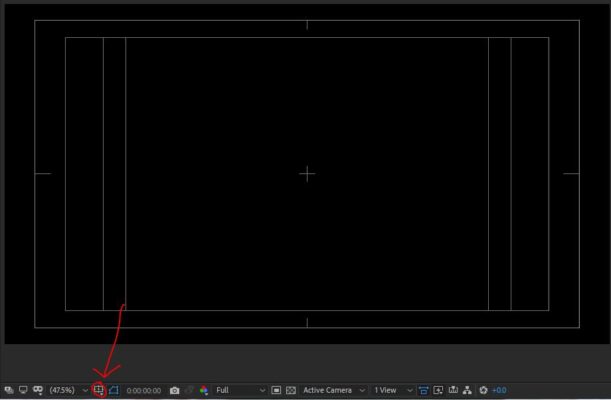
    October 3, 2020 at 2:49 am in reply to: Can’t find the way to hide this feature

    Access those overlays by clicking here

  • Try the effect called “Difference Matte”. You can freeze frame the clean background on another layer and use that to extract the person.

  • Can you precompose your entire animation and then use Pixel Motion Blur on the precomp?

  • Brendon Murphy

    September 30, 2020 at 3:01 am in reply to: Disable or Enable an Expression with a Checkbox Control

    make sure to delete the “//put the original expression here”, including the slashes!

  • Brendon Murphy

    September 30, 2020 at 2:58 am in reply to: Disable or Enable an Expression with a Checkbox Control

    Add a checkbox effect to Shape_Base, then do this on the start parameter:

    if (effect(“Checkbox Control”)(“Checkbox”)==1){

    //put the original start expression here

    }else{value};

    And then this on the end parameter:

    if (effect(“Checkbox Control”)(“Checkbox”)==0){

    //put the original end expression here

    }else{value};

  • Brendon Murphy

    September 29, 2020 at 6:12 pm in reply to: exporting in AE for Avid 2020.8 with alpha

    You can still export as h.264 through media encoder (I recommend mp4 instead of mov). However, H.264 is a highly compressed format with a GOP frame structure – definitely not recommended for editing or applications with alpha. If your projects are higher than 8 bpc, go with something like a TIFF or exr sequence. If you’re working at 8bpc, a png or tiff sequence should do. Make sure to enable the alpha channel in export settings.

Page 14 of 20

We use anonymous cookies to give you the best experience we can.
Our Privacy policy | GDPR Policy