Forum Replies Created

Page 1 of 3
  • Ha! Wow, not so bad, I guess! I had heard of Math.SQRT2 – 1 before, but not the 4/3 — if you have a moment, can you explain where that comes from? I appreciate the response either way!

  • Blake Goulette

    February 12, 2025 at 3:56 pm in reply to: Unexplained render artifacts?

    All right, one more discovery: I had the particle emission tied to the intersection of a field (parented to the green ball thing) and the “floor” of my set. In order for emission to only happen at the locus of the intersection, I’d subdivided the floor: I think the Boolean object got confused with all those components, so I removed the subdivisions and used planes that are invisible to the renderer as my “hit boxes,” so to speak. That seems to be working in my testing so far.

  • Blake Goulette

    February 12, 2025 at 2:04 pm in reply to: Unexplained render artifacts?

    Hi Kouraib,

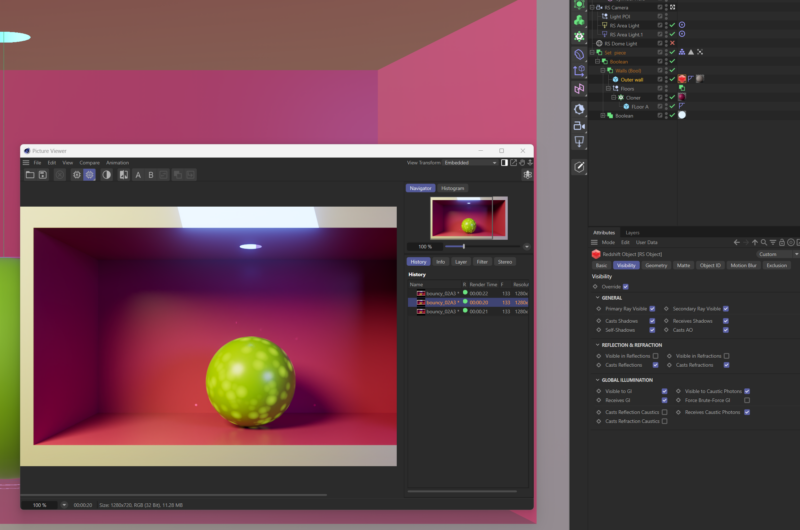
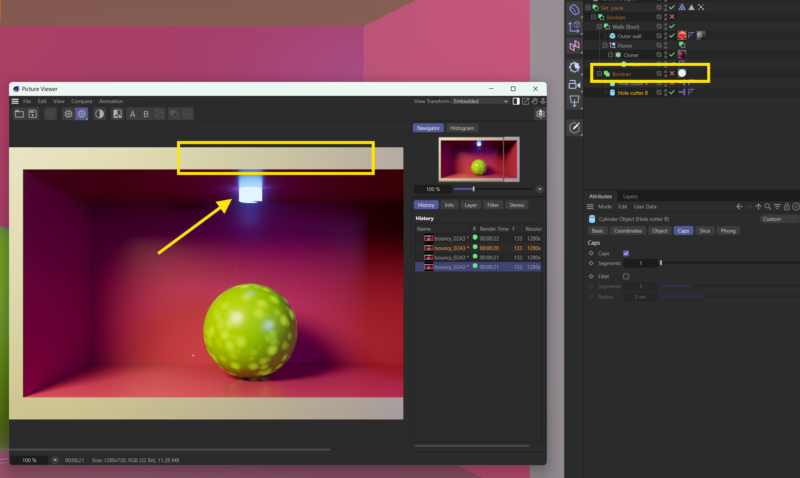
    Thanks for the suggestion. I gave it a whirl, but those weird artifacts remain (attached screen shot). I’m going to attempt to recreate the scene and see if I get the same results (hopefully I won’t!). I appreciate the help.

    Edit: Upon additional exploration, I think it has to be something with the Booleans: I disabled the Boolean that cuts the hole in the floor and re-rendered and the weird stripe is gone. Of course, that wrecks the animation, but at least I know where to focus my energies! (Second attachment.)

  • Yeah, I’ll try to do that! Gotta get some screen recording software first!

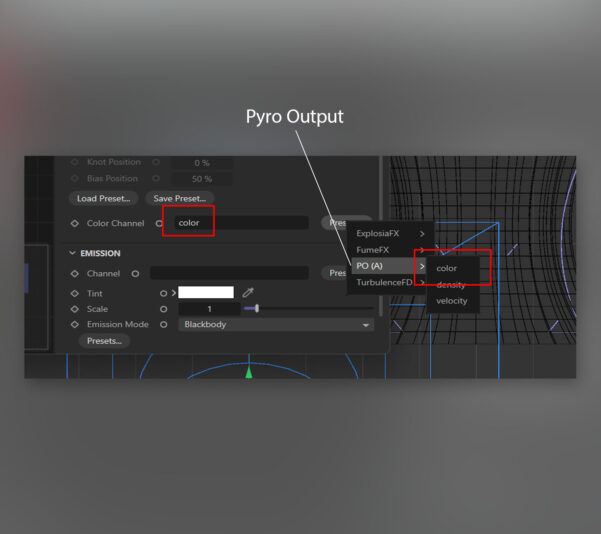
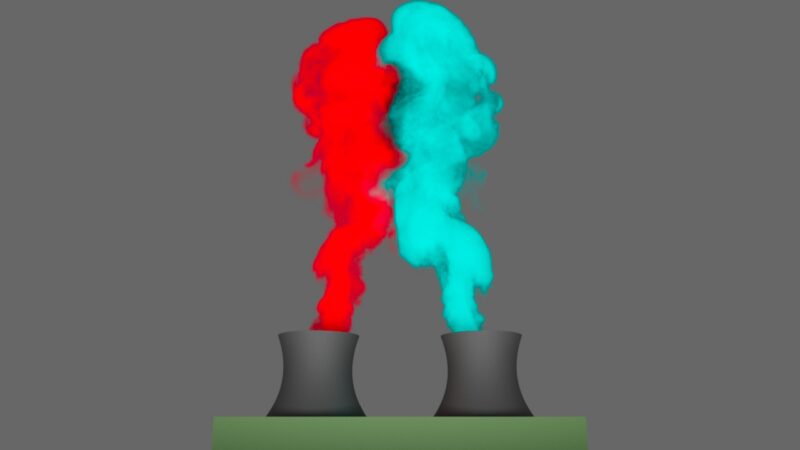
  • Okay, I figured out what I was missing — I knew it had to be something! 🙂 When creating a RS Pyro Volume to apply to my Pyro Output (I only need one of each, not multiple), I wasn’t filling in the Color field with the color property of the Pyro Output (after assigning color to each emitter and enabling Color as an option in the Pyro Object’s Object tab). In case anyone else runs into this “issue” (which was user error!), here’s a few more screen shots (the connection I was missing, then a rendered example [that still needs other settings tweaked!]):

  • Thanks for the suggestion, but that’s not the goal or the issue. And this example is just a trouble-shooting exercise anyway. The problem that I can’t solve is this: if I have more than one pyro output in a scene, both sharing the same (default) simulation scene, and if I apply separate pyro volumes to each output, the rendered result is that C4D attempts to blend properties of both volumes (or more, if, say, I have three pyro objects, etc.), and this happens on all pyro objects, whether their trees intersect or not. In fact, if I only apply a pyro volume to one pyro output, _both_ outputs render! Seems messed up to me.

    My “complaint” is that pyro output won’t render without a pyro volume, but let’s say I had two smoke grenades with separate smoke colors and needed to render them in the same scene: right now, both smoke clouds would share an unwanted blend of pyro volume properties (tints, density, absorption, emissive gradients, etc.). That’s not what I think should happen! (Also, within each volume, in the Scatter field, I’ve assigned the “presets” of density from the relevant pyro emitters to no avail.)

    Thanks again for looking.

  • Blake Goulette

    January 28, 2025 at 3:04 pm in reply to: Pyro emitter ignores squash and stretch?

    Hi Kouraib, thanks for responding. I came here to post what seemed to work for me (which most C4D users might have already known!)

    I created an experimental file and got things working. When comparing the two, I noticed I had objects stacked in a different order, and some things grouped that I hadn’t grouped in the original. After adjusting my original scene, the Pyro emission occurs where the squashed object appears, so it’s working now! (I’m in the process of trying to shut down to clear enough VRAM to continue testing, so I can’t provide any screenshots right now). Thanks again for responding!

  • Blake Goulette

    October 5, 2024 at 11:40 pm in reply to: argument 2 to createPath() must be 2 numbers

    Well hey, I figured it out. I was building my arrays for points, ins, and outs incorrectly. Shocker. When I changed my code to look like the following, it worked!

    _dd = thisComp.layer("N exp controls").effect("Diverge distance")("Slider");

    _dcs = thisComp.layer("N exp controls").effect("Diverge curve strength (%)")("Slider");

    _mult = 0.5;

    _prev = thisComp.layer("Sh primary route").content("Group 1").content("Path 1").path;

    _knots = _prev.points().slice(1);

    _knotsIn = _prev.inTangents().slice(1);

    _knotsOut = _prev.outTangents().slice(1);

    _knot01 = [0, 3300 - 480];

    _knot02 = _knot01 - [_dd, _dd * 1.547] * _mult;

    _knot03 = [_knot02[0], thisComp.height * -1.0];

    _knots.push(_knot01, _knot02, _knot03);

    _knotsIn.push([0, 0], [0, _dd * _dcs * _mult], [0, 0]);

    _knotsOut.push([0, _dd * -_dcs * _mult], [0, 0], [0, 0]);

    createPath(_knots, _knotsIn, _knotsOut, false);

  • Thanks (again!) Dan. That’s what I was afraid of. I’ll create multiples of the comp(s) in question then. Shouldn’t be too bad: there are only three…I think!

  • Blake Goulette

    July 29, 2024 at 2:37 pm in reply to: looping but with a pause feature?

    Dan, thank you so much! That seems to do the trick! I appreciate your help!

    While I’m here, what do you suggest I read/study to get a better understanding of just what exactly all that code is doing? Or how to know what elements/properties to manipulate to achieve what you shared above? I can hamfist my way though some stuff, but other times I have no real idea of where to start. Thanks again!

Page 1 of 3

We use anonymous cookies to give you the best experience we can.
Our Privacy policy | GDPR Policy