Creative Communities of the World Forums

The peer to peer support community for media production professionals.

Activity Forums Maxon Cinema 4D Unexplained render artifacts?

  • Kouraib Abdmalek

    February 12, 2025 at 9:14 am

    Hi Blake,

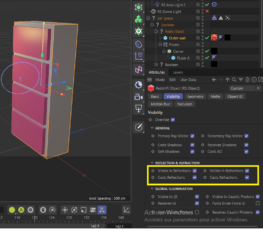
    On the object that receives the weird effects, apply an RS Object tag, then activate the visibility option, and under REFLECTION & REFERACTION, disable the visibility in the reflections and re-render to make sure that the weird effects is gone, otherwise disable the visibility in refractions as well. This may not be a radical solution, but it solves the problem, especially when you do not have time to check all the settings and find out where the problem is. I hope this is helpful.

  • Blake Goulette

    February 12, 2025 at 2:04 pm

    Hi Kouraib,

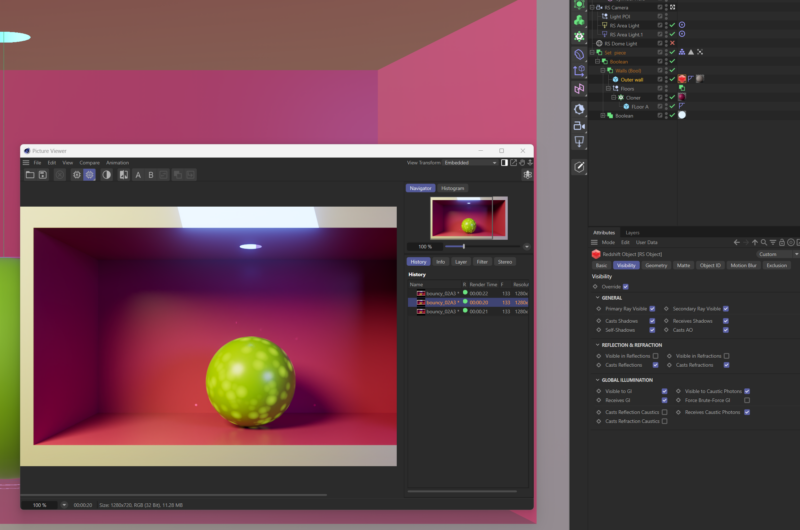
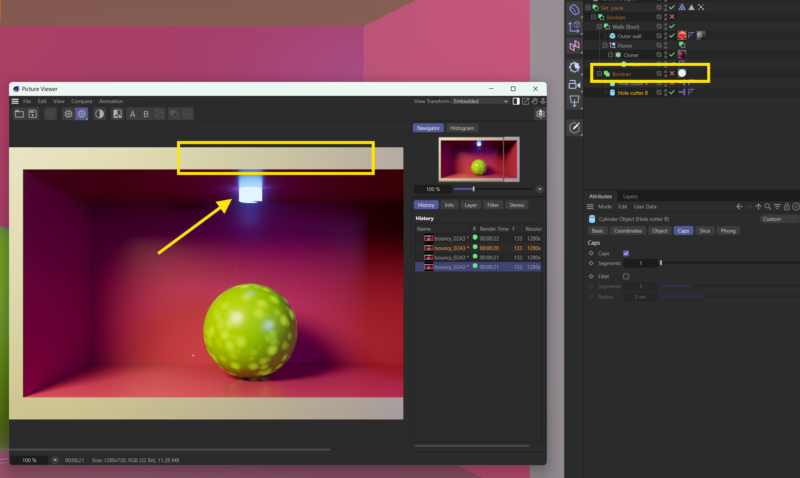
    Thanks for the suggestion. I gave it a whirl, but those weird artifacts remain (attached screen shot). I’m going to attempt to recreate the scene and see if I get the same results (hopefully I won’t!). I appreciate the help.

    Edit: Upon additional exploration, I think it has to be something with the Booleans: I disabled the Boolean that cuts the hole in the floor and re-rendered and the weird stripe is gone. Of course, that wrecks the animation, but at least I know where to focus my energies! (Second attachment.)

  • Blake Goulette

    February 12, 2025 at 3:56 pm

    All right, one more discovery: I had the particle emission tied to the intersection of a field (parented to the green ball thing) and the “floor” of my set. In order for emission to only happen at the locus of the intersection, I’d subdivided the floor: I think the Boolean object got confused with all those components, so I removed the subdivisions and used planes that are invisible to the renderer as my “hit boxes,” so to speak. That seems to be working in my testing so far.

We use anonymous cookies to give you the best experience we can.
Our Privacy policy | GDPR Policy