Creative Communities of the World Forums

The peer to peer support community for media production professionals.

Activity Forums Maxon Cinema 4D Multiple pyro objects and multiple pyro volumes don't play nice together?

  • Kouraib Abdmalek

    February 9, 2025 at 9:01 am

    Hi Blake,

    If I understood the requirement well, I think that using two emitters in each tower, so that you make the emitters in one tower two different colors to get blended upon emission manually, I think that would be better and would give you greater smoothness in control. hope this is useful for you.

  • Blake Goulette

    February 9, 2025 at 1:31 pm

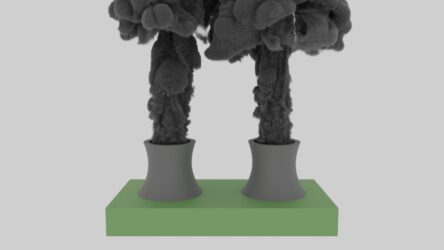
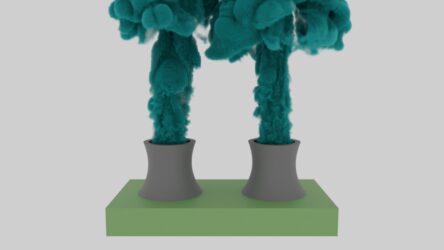
    Thanks for the suggestion, but that’s not the goal or the issue. And this example is just a trouble-shooting exercise anyway. The problem that I can’t solve is this: if I have more than one pyro output in a scene, both sharing the same (default) simulation scene, and if I apply separate pyro volumes to each output, the rendered result is that C4D attempts to blend properties of both volumes (or more, if, say, I have three pyro objects, etc.), and this happens on all pyro objects, whether their trees intersect or not. In fact, if I only apply a pyro volume to one pyro output, _both_ outputs render! Seems messed up to me.

    My “complaint” is that pyro output won’t render without a pyro volume, but let’s say I had two smoke grenades with separate smoke colors and needed to render them in the same scene: right now, both smoke clouds would share an unwanted blend of pyro volume properties (tints, density, absorption, emissive gradients, etc.). That’s not what I think should happen! (Also, within each volume, in the Scatter field, I’ve assigned the “presets” of density from the relevant pyro emitters to no avail.)

    Thanks again for looking.

  • Blake Goulette

    February 9, 2025 at 9:31 pm

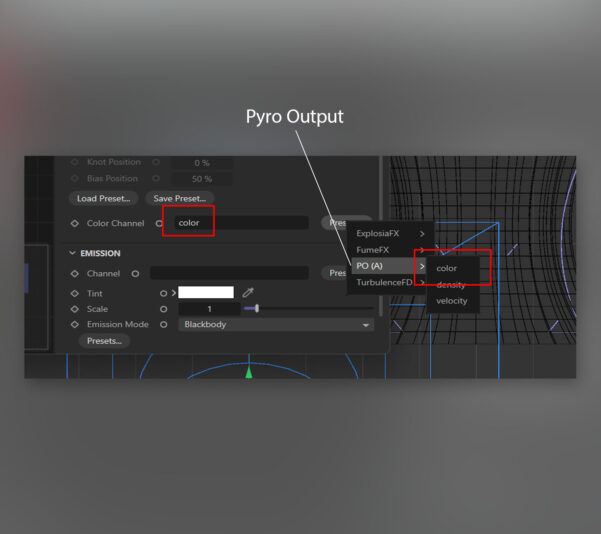
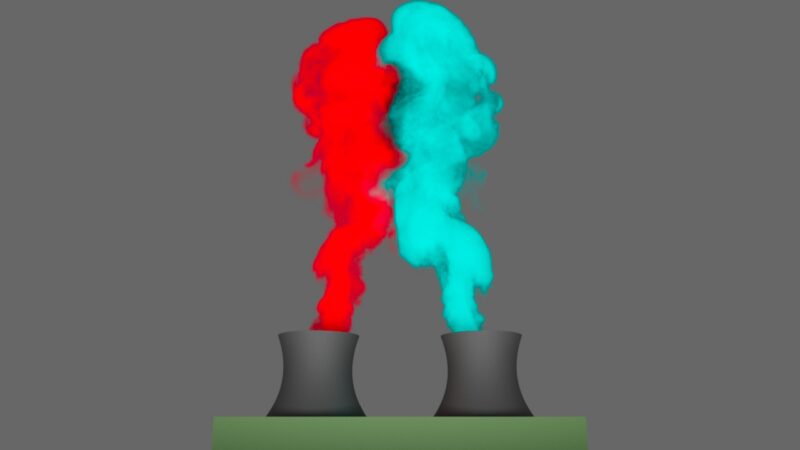
    Okay, I figured out what I was missing — I knew it had to be something! 🙂 When creating a RS Pyro Volume to apply to my Pyro Output (I only need one of each, not multiple), I wasn’t filling in the Color field with the color property of the Pyro Output (after assigning color to each emitter and enabling Color as an option in the Pyro Object’s Object tab). In case anyone else runs into this “issue” (which was user error!), here’s a few more screen shots (the connection I was missing, then a rendered example [that still needs other settings tweaked!]):

  • Kouraib Abdmalek

    February 10, 2025 at 12:20 pm

    Thanks for sharing your findings with us! I hope you have time to make a screen recording of what the situation was like and how you overcame the problem.

  • Blake Goulette

    February 12, 2025 at 12:56 am

    Yeah, I’ll try to do that! Gotta get some screen recording software first!

We use anonymous cookies to give you the best experience we can.
Our Privacy policy | GDPR Policy