Forum Replies Created

  • Ah sorry – I appreciate the help. I’ve been wrestling with it for too long too. I tired having nulls follow the path and giving each segment layer average position and rotation values of every two adjacent nulls, which kind of works, but not perfect..

    This new version you made looks promising. Will have a play with it. Cheers!

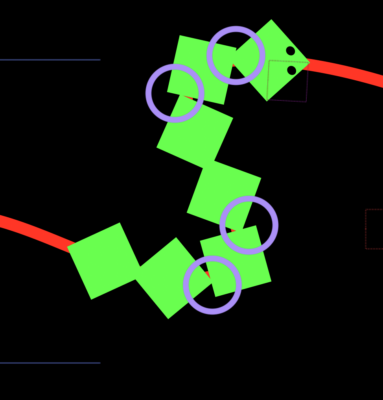
  • I appreciate your reply but your snake has broken one of the cardinal snake rules!:

    “The segments must be truly articulated and always fixed at their joint/hinge points. No overlapping or drifting…”

    The project you shared has all the joints overlapping and drifting around as highlighted here and not fixed at the corners. It does seem very tricky to do in after effects

  • Jackpot! Works perfectly, and so elegant.

    Thank you Dan!!!

  • Aaaamazing. Works flawlessly, Dan. Thank you so much for the fast and expert response, it really helped me out. You are an angel!

  • Hi Dan,

    Thank you for looking at this!

    It works perfectly between the first and second keyframes when I scrobble through. But when I go past the second keyframe, or ram preview, it disables, saying

    ‘Class ‘Array’ has no property or method named ‘1’
    Error occured at line 22…

    I’m using cs5.5 – not sure if it’s anything to do with it?

  • Bill Porter

    April 23, 2013 at 10:57 am in reply to: Animating a rope with ends tied to 2 moving objects

    Hi Mathew

    Your expressions look like the exact thing I’m looking for. For some reason I’m finding that the scale expression is distorting the connector layer a lot, and stretches it far beyond the “End 2” layer so it doesn’t appear connected.

    I’m probably missing something. Like if the layers need to be in certain positions or sizes before the expressions are applied?

    Do you have an example project I could compare with? Or if you have any pointers I’d be very grateful. I’m inept at figuring it out myself.

    Cheers!

  • Bill Porter

    September 28, 2012 at 11:29 am in reply to: Layer Z position driven by luminosity value

    Thank you Kevin! I see what you mean… But, sorry I didn’t explain properly. What I meant was can the gradient layer drive the opacity value of the pink layer?

    So it would act a bit like this

  • Bill Porter

    September 27, 2012 at 12:17 pm in reply to: Layer Z position driven by luminosity value

    Bingo! That’s exactly what I’m after. Thank you so much!

    Dan Ebbert’s article is interesting. Is there a way I could do this for the opacity of the moving layer? – so when the layer is at the lowest Z point it has 0 opacity and 100 at the highest?

  • Apologies for the late reply! Thank you, that is elegant and fantastic!

We use anonymous cookies to give you the best experience we can.
Our Privacy policy | GDPR Policy