Creative Communities of the World Forums

The peer to peer support community for media production professionals.

Activity Forums Adobe After Effects Articulated segments follow the leader (snake/train/centipede)

  • Articulated segments follow the leader (snake/train/centipede)

    Posted by Bill Porter on October 8, 2024 at 1:25 pm

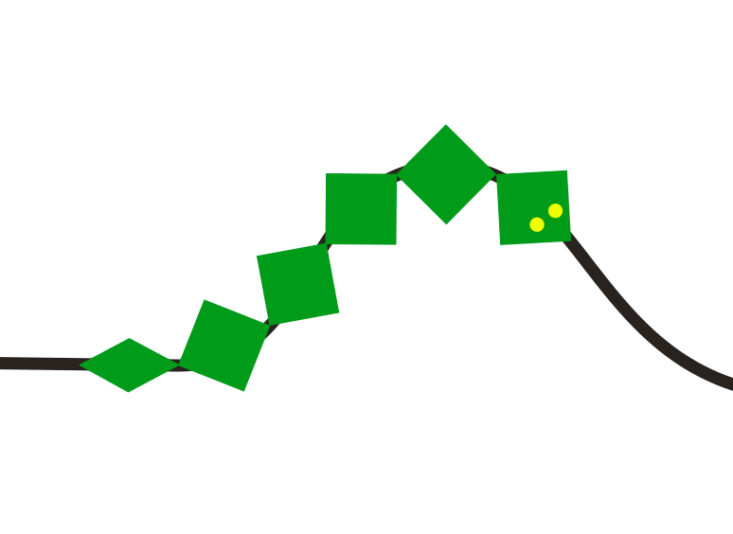
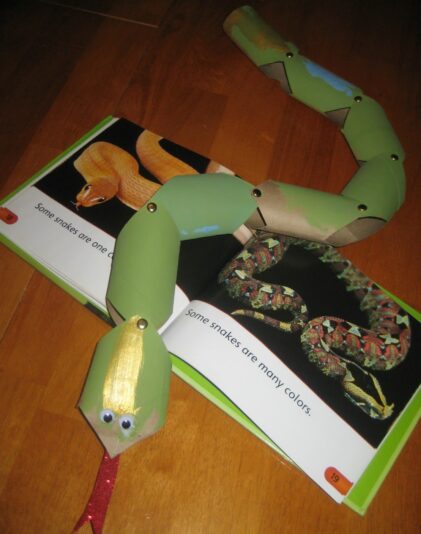
    I’m trying to animate a 2d snake along a path, where just like in the photo, the snake is made of rigid articulated segments. I haven’t found a guide on how to exactly achieve this where it follows these rules:

    •The segments cannot warp or be elastic.

    •The segments must be truly articulated and always fixed at their joint/hinge points. No overlapping or drifting as the snake speeds up or slows down.

    Is there a way to do this with expressions?
    I had a look at Dan Ebberts’ follow-the-leader expressions which sounds hopeful but I’m getting syntax errors when I try to use them in the current version of AE.

    I’m stuck. Any help would be appreciated

    Walter Soyka replied 1 year, 7 months ago 3 Members · 5 Replies
  • 5 Replies
  • John Cuevas

    October 8, 2024 at 4:39 pm

    I used the script that’s included with AE to trace the path and then reworked it from the null to the snakes head. Then I used the follow the leader expression for the body segments to look at the segment one layer above as it’s position minus a time time delay. The time delay is on the Delay controller null.

    Then I just pressed “cntl+alt+O” to open up the orient to path option and turned that on for the body segment. Then I just duplicated each segment until I had a snake.

    I noticed that if you make really quick turns, this effect falls apart, so adjust the path accordingly.

    Attached is AE project I made as example, you might be able to use that as a starting point.

  • Bill Porter

    October 8, 2024 at 4:58 pm

    I appreciate your reply but your snake has broken one of the cardinal snake rules!:

    “The segments must be truly articulated and always fixed at their joint/hinge points. No overlapping or drifting…”

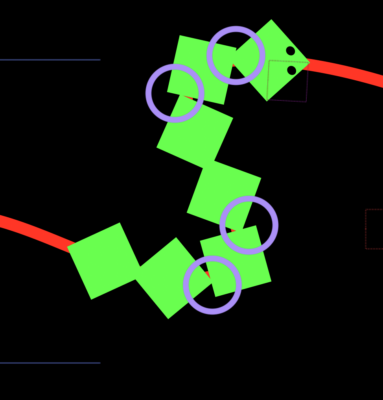
    The project you shared has all the joints overlapping and drifting around as highlighted here and not fixed at the corners. It does seem very tricky to do in after effects

  • John Cuevas

    October 8, 2024 at 8:17 pm

    Try posting this in the AE Expressions forum. I have to admit, I’ve wasted a day trying to get it to work and I’ve gotten close, but no cigar.

  • Bill Porter

    October 9, 2024 at 9:02 am

    Ah sorry – I appreciate the help. I’ve been wrestling with it for too long too. I tired having nulls follow the path and giving each segment layer average position and rotation values of every two adjacent nulls, which kind of works, but not perfect..

    This new version you made looks promising. Will have a play with it. Cheers!

  • Walter Soyka

    October 9, 2024 at 6:35 pm

    I think a physical simulation is the best approach for a problem like this.

    Try Newton maybe?
    https://aescripts.com/newton/

We use anonymous cookies to give you the best experience we can.
Our Privacy policy | GDPR Policy