Forum Replies Created

Page 23 of 27
  • if the view matte works fine, just use that as a matte layer no?

  • Andy Kiernan

    March 18, 2021 at 2:16 pm in reply to: Green Screen Actor in Element 3d – Matchmoving

    I don’t have E3D on this machine, but from memory, I think you will need to copy the 3d position from the Null to the position of the E3D emitter.

  • Andy Kiernan

    March 17, 2021 at 1:31 pm in reply to: Green Screen Actor in Element 3d – Matchmoving

    Use the 3d camera tracker in AE on the GS footage and extract the cam and a position null. Then use that for your E3D scene, you will most likely have to ‘fit’ it but that’s to be expected

  • Andy Kiernan

    March 17, 2021 at 1:27 pm in reply to: Mirror null group and make it independent.

    nice one, glad to help

  • Andy Kiernan

    March 15, 2021 at 4:23 pm in reply to: Mirror null group and make it independent.

    have the nulls anchor point in centre of model, duplicate and change x scale to -1?

  • Andy Kiernan

    February 26, 2021 at 10:29 am in reply to: Creating re-programmable stage lights in Cinema 4D

    **warning, there’s defo not a comprehensive answer below sorry!**


    The best idea is to use something like wysiwyg wysiwyg Lighting Design – CAST Software (cast-soft.com)

    but inside of c4d, make use of cloners, animate one moving head and clone it, offset it.

    To have the control I think you want, I think you would have to basically ‘make’ a lighting desk inside c4d, what I mean is have the pan/tilt/col/gobo/shutter/focus of each head wired to a separate slider using xpresso and user data,that would get you so far as to create the ‘channels’ of dmx, but to get the ‘shapes’ that come with most desks would require some more involved xpresso.

    Maybe you could use a midi controller (or actual lighting desk) to control the user data sliders. I don’t know if that would work mind. I think Chamsys magicQ can output midi, maybe, I don’t know, maybe the shapes and automation can come from the real desk? How you utilize that midi is beyond me, I used grip tools once and a midi controller and managed to just about get a cube to rot on a slider but that was it!

    Once you figure it all out though, you can use maybe cappuccino (character section) to record the actions you make.

    I was an LD for 15years before I switched to 3d & VFX, and I always wanted to do this!

    Depending on what renderer you’re using, but the c4d lights noise section does actually quite a decent job of faking the effects of ambient fog in the air.

    You can look at the docs of real heads on websites to find the curves of the shutters as most are not so linear, that would give you better fades, also you can probably find the curves for the steppers so you get very realistic moves! And if you’re going for photo real, don’t forget the small light spill out the back of the heat sinks!

    I would bet (once again, I don’t know!) that using UE or similar would be easier to create what amounts to lighting visualization software!

    I’m sorry I ended up just rambling! I hope you can get it sorted, report back on here whe you do, id love to know how you get it solved. Good luck mate!

  • I made a little test using xpresso, a plain effector that uses sound effector field to effect clones scale… Then I take that data out and pipe it into the luminance channel. Now, I’m no xpresso wiz so it could be wrong or there’s a better way, but this I think gets you what you want. Then just duplicate the set up per material you want and move the probes in the effector.

  • I think one approach is to have a cloner with two ‘states’ inside, on and off. Set cloner to sort, set sound effector to modify clone, then the sound will switch the clones between the states. I think this will give a stepped change so either 100% on or off, another approach would be needed if dimming was Required. possibly some re-mapping with xpresso.

  • Andy Kiernan

    February 18, 2021 at 3:28 pm in reply to: Undulating flame edges

    Displacement map using a fractal noise set to swirl as a source?

  • Andy Kiernan

    February 11, 2021 at 10:26 am in reply to: Advice on attaching cloners to surface

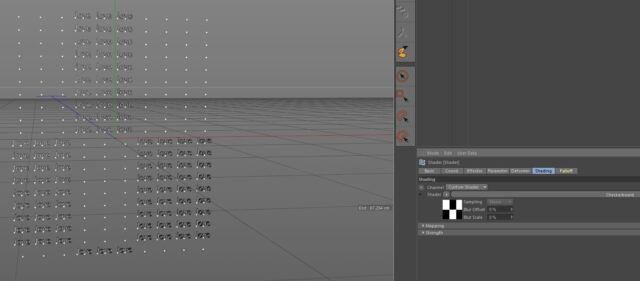
    Make a grid larger than you need with cloner, add a shader effector using scale -1, use a greyscale image to define which clones you want to keep. My image uses a checkerboard pattern but its the same principle. you can also do this with geometry, same set up but use a plain effector and fields, use some geo to define which clones to keep, stick it in the fields list.

Page 23 of 27

We use anonymous cookies to give you the best experience we can.
Our Privacy policy | GDPR Policy