Forum Replies Created

Page 1 of 3
  • Andrew Jehan

    May 30, 2023 at 5:24 pm in reply to: expression / pick-whip to HSL effect?

    To all those who come across this post in the future, I did some digging and found a solution. The “hue” property value of the hue/saturation effect is included in the “”channel range” property.

    So, if you want to animate or pickwhip the hue, you can just use the colour range property (with the “channel control” dropdown set to master). Any changes to the hue value will be reflected when animating or parenting this property.

  • Andrew Jehan

    January 15, 2023 at 1:36 am in reply to: Prob with Glow on Layers with Alpha

    Dan’s is the solution. The export settings solution only works if your dark edge happens to be a problem in an exported file. It doesn’t work if your glow is in a precomp being layerer over something else inside After Effects

  • Thanks for your reply. I was so hoping that would work but it didn’t. The problem can be re-created quite simply with the following steps:

    1) Create a new comp (1920×1080, name “Main”), add a camera, a point light (casts shadows: on) and a red solid.

    2) Adjust
    the z position of the light so that it’s behind the camera. Make the
    solid a 3D layer and turn on “accepts shadows” in the material options.

    3) Create a new comp (1920×1080, name “Precomp”), add a new shape layer with a centred, 400×400, blue-filled rectangle.

    4) Make the shape layer 3D, set its z position property to -400, and turn on “casts shadows” in the material options.

    5) Open
    the essential graphics panel and select “Precomp” from the primary
    dropdown. Drag the rectangle path size property to the
    essential graphics panel.

    6) In the “Main” comp, add the “Precomp” above the solid. Turn on collapse transformations and 3D layer checkboxes.

    Adjusting the rectangle size essential property
    changes the shape of the blue box, but the shadow does not correctly reflect
    any changes from the default values.

    Any help would be very much appreciated! Thanks again!

  • I spoke too soon! Changing the render engine solves the one problem but introduces another! Now the essential properties of the precomp don’t adjust individually. If I change them in on one instance of the precomp, it changes them in all instances.

    Still need help! Anyone?

  • For anyone who encounters this thread in the future, I’ve got a solution. It took a day for Adobe tech support to come up with it, and I’m not sure why it fixes the issue, but it does.

    Solution, switch the renderer (dropdown in bottom right corner of the composition panel) to Cinema 4D. (Doing so changes the way the lighting looks, so re-adjustment will be necessary.) That’s it!

    Anyone have any idea why this works and why the problem exists using the classic renderer?

  • Andrew Jehan

    March 18, 2022 at 3:41 am in reply to: Reverse Path / Mask Direction

    This script does it. Note, the path cannot have any keyframes and you have to select the shape as opposed to the path itself before clicking reverse (or it won’t work).

    https://aescripts.com/first-vertex-toolkit/

  • Andrew Jehan

    March 15, 2022 at 7:43 pm in reply to: Animate object along animated path

    That fixed it! Thanks!

  • Andrew Jehan

    March 15, 2022 at 7:13 pm in reply to: Animate object along animated path

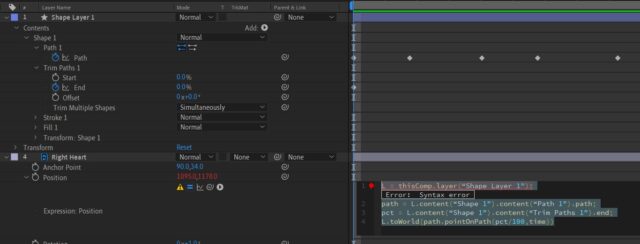
    I’m getting a “syntax error” on line 1 (see screenshot). Can you help?

    Thanks!

  • Nevermind. I just saw Ranveer’s suggestion above (who knew there was a page 2?) and it works fine! Thanks

  • I’m trying to simply get the shape group’s position information, but I’m still having trouble.

    When I pickwhip the properties in question, they’re as follows:

    content(“Group 1”).transform.position
    content(“Group 2”).transform.position

    and so on. I’ve tried copying in the code from the solution above like so:

    content(“Group” + (parseInt(thisProperty.propertyGroup(3).name.split(” “)[1],10))).transform.position

    but I get a “syntax error”. Can you tell me what I’m doing wrong? Thanks.

Page 1 of 3

We use anonymous cookies to give you the best experience we can.
Our Privacy policy | GDPR Policy