Creative Communities of the World Forums

The peer to peer support community for media production professionals.

Activity Forums Adobe After Effects Shadow Problem with Essential Graphics and Collapse Transformations 3D Precomp

  • Shadow Problem with Essential Graphics and Collapse Transformations 3D Precomp

    Posted by Andrew Jehan on January 3, 2023 at 7:49 pm

    This may be a bug, but I’m hoping someone has a solution.

    I have a precomp with 3D layers using essential graphics (so I can create multiple versions). In my main comp, I have the camera and light. The shadow cast by the object in my 3D layer doesn’t change accordingly when I alter some of the essential properties from their original default values (although, oddly, it does change accordingly when I change other essential properties).

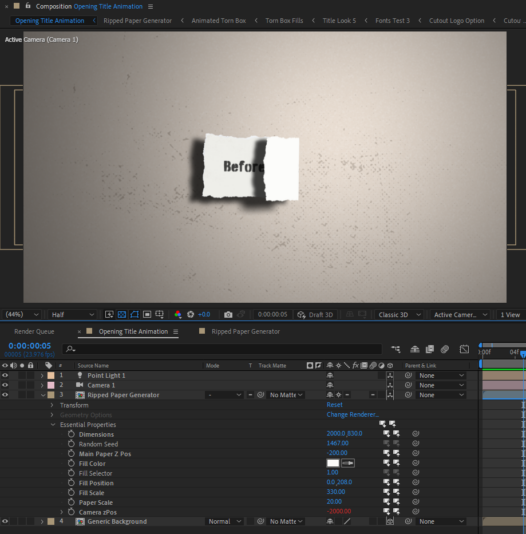
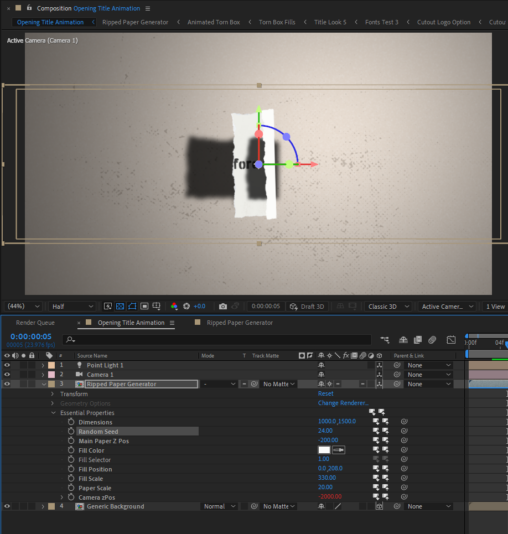
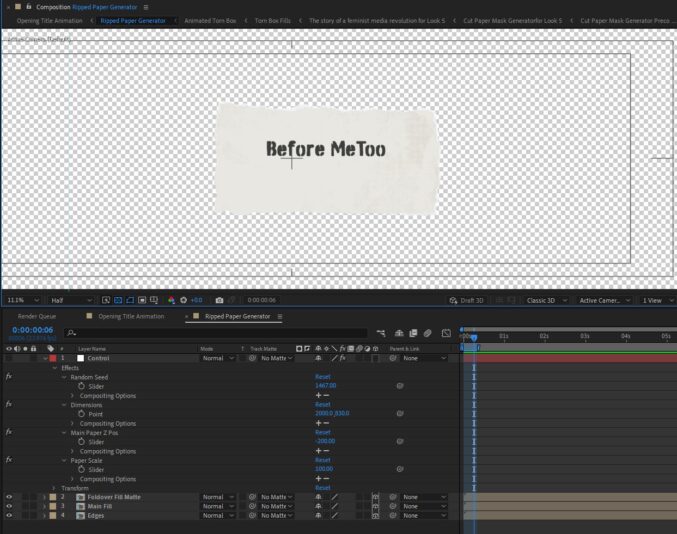
    Here are some screen shots to illustrate. My main comp is “Opening Title Animation” and my precomp is “Ripped Paper Generator”.

    The first is the main comp with the problem essential properties (“dimensions”and “random seed”) set to default values, but other essential properties have been adjusted (“paper scale” and “main paper z pos”). In it, the shadow has correctly changed to match the adjusted properties.

    The 2nd is the same comp with the problem properties adjusted from their defaults
    (“dimensions” and “random seed”). The shadow has not changed to match the objects casting the shadows.

    The final screenshot shows the contents of the precomp.

    Any help would be greatly appreciated. Thanks!

    Andrew Jehan replied 3 years, 6 months ago 2 Members · 4 Replies
  • 4 Replies
  • Andrew Jehan

    January 4, 2023 at 2:57 pm

    For anyone who encounters this thread in the future, I’ve got a solution. It took a day for Adobe tech support to come up with it, and I’m not sure why it fixes the issue, but it does.

    Solution, switch the renderer (dropdown in bottom right corner of the composition panel) to Cinema 4D. (Doing so changes the way the lighting looks, so re-adjustment will be necessary.) That’s it!

    Anyone have any idea why this works and why the problem exists using the classic renderer?

  • Andrew Jehan

    January 4, 2023 at 3:19 pm

    I spoke too soon! Changing the render engine solves the one problem but introduces another! Now the essential properties of the precomp don’t adjust individually. If I change them in on one instance of the precomp, it changes them in all instances.

    Still need help! Anyone?

  • Walter Soyka

    January 4, 2023 at 8:45 pm

    If you change the parameters that don’t correctly affect the shadow (with Classic Renderer), then Edit > Purge > All Memory and Disk Cache, do the shadows re-render correctly?

  • Andrew Jehan

    January 4, 2023 at 10:03 pm

    Thanks for your reply. I was so hoping that would work but it didn’t. The problem can be re-created quite simply with the following steps:

    1) Create a new comp (1920×1080, name “Main”), add a camera, a point light (casts shadows: on) and a red solid.

    2) Adjust
    the z position of the light so that it’s behind the camera. Make the
    solid a 3D layer and turn on “accepts shadows” in the material options.

    3) Create a new comp (1920×1080, name “Precomp”), add a new shape layer with a centred, 400×400, blue-filled rectangle.

    4) Make the shape layer 3D, set its z position property to -400, and turn on “casts shadows” in the material options.

    5) Open
    the essential graphics panel and select “Precomp” from the primary
    dropdown. Drag the rectangle path size property to the
    essential graphics panel.

    6) In the “Main” comp, add the “Precomp” above the solid. Turn on collapse transformations and 3D layer checkboxes.

    Adjusting the rectangle size essential property
    changes the shape of the blue box, but the shadow does not correctly reflect
    any changes from the default values.

    Any help would be very much appreciated! Thanks again!

We use anonymous cookies to give you the best experience we can.
Our Privacy policy | GDPR Policy