Forum Replies Created

Page 8 of 14
  • Tom Morton

    December 8, 2023 at 7:27 am in reply to: Exports have a colour cast

    No problem Andy, I know what it’s like to jump between different jobs, always glad to help. Enjoy your xmas too!

  • Tom Morton

    December 7, 2023 at 7:41 am in reply to: Final delivery on thumb drive ???

    Export in a couple of different formats to ensure at least one version will work on the device it’s currently plugged into. I’d recommend H.264 and MPEG-4 versions

  • Tom Morton

    December 7, 2023 at 7:39 am in reply to: Audio reactive shape layer query

    Haha should have known you’d reply Dan – you’re THE man! I like the idea of this project though, I now want to give this a go too 🙂

  • Tom Morton

    December 6, 2023 at 3:35 pm in reply to: Audio reactive shape layer query

    On your first question, you can analyse the variables with standard if statements:

    if (temp < 35) { temp=35 ; };

    Not sure I entirely get point 2, but just to sum up, when the amplitude ranges from 35 to 45, you map that to the equivalent number in 3-20, and then the polygon has the corresponding amount of points? Are you asking how to animate a random selection of those points?

    If you can explain a bit more what you’re trying to do that would be useful – it’s some kind of live audio visualisation right?

    Just another note, for the cleanness of your code you may want to round the “temp” variable as the output from the linear() expression may give you a float. If you add “temp = Math.floor(temp)” after the linear expression, that will remove any numbers after the decimal point and ensure you’re working with whole numbers. (although AE can handle this, it’s good practise to keep it clean)

  • Tom Morton

    December 6, 2023 at 2:32 pm in reply to: Using Expression to Check Text String Match

    no worries 🙂

  • Tom Morton

    December 6, 2023 at 12:43 pm in reply to: Exports have a colour cast

    Ok no worries.

    So just to check something: you import MXF-Prores 4444XQ footage into a new comp on your PC, export it as Prores4444 – am I right in thinking that the source and rendered export look identical on your PC, but they look different on the editors PC, with the export having a color cast?

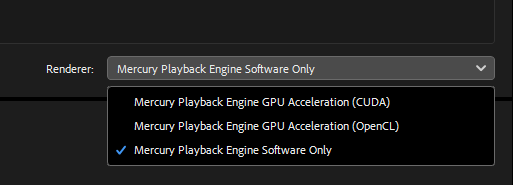
    Interested in this point so let me know… But I would also try exporting in some different formats as a test to see if it’s something to do with the codec. First thing I would try is to render it with Media Encoder with and without GPU acceleration. If the GPU is at fault, then rendering with Mercury engine only should show that up.

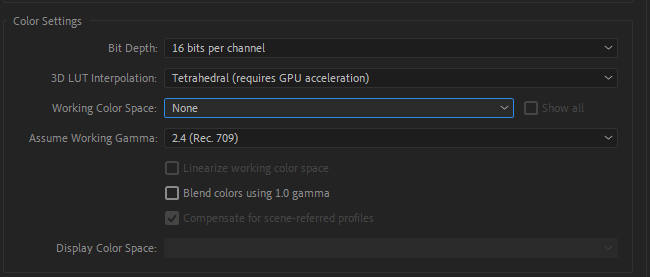
    Also try an export with slightly different color settings in your project settings: change 3D interpolation to Tetrahedral if your gpu supports it, color space to “none” and working gamma as “Rec.709”. By default AE compositions use Rec.709 color space so this may help in preventing color conversions.

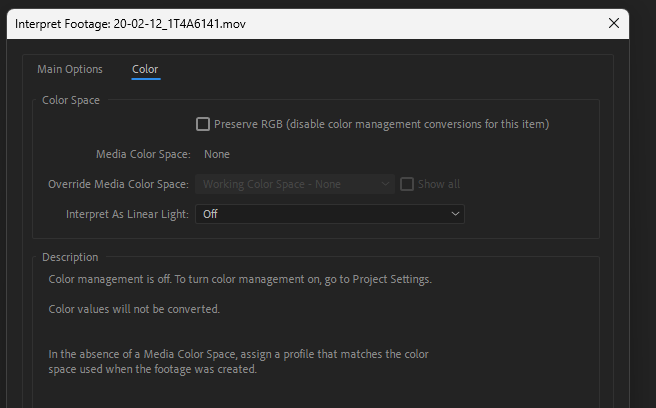
    Lastly, try right clicking on the footage in the project panel of AE, go to “Interpret Footage” and click on the preset that’s being used (I use the default one called “Main”) and then go to the color tab – just make sure there’s nothing weird setup in here. I’ve attached a screenshot of my settings for this to compare against.

    Let me know if any of this changes things?

  • Tom Morton

    December 6, 2023 at 12:30 pm in reply to: Using Expression to Check Text String Match

    You’re using the wrong new line operator. By default, AE uses “\r” rather than “\n” (although “\n” will work as a new line if you output it in a string)

    so the below for me gives me a “YES” instead.

    var a = thisComp.layer(“Layer Text”).text.sourceText;

    if(a == “Comprehensive Meals\rTODAY ONLY”) {“YES”; } else {“NO”; };

    Note that you don’t need to concatenate the strings with the \r operator, you can just use a single string.

  • Tom Morton

    December 6, 2023 at 12:17 pm in reply to: Exports have a colour cast

    It’s possible Adobe have changed something – I have a bugbear about this, but I keep all my auto-update settings firmly turned to “OFF” in Adobe products – I never update unless I have to because a lot of Adobe software tends to be buggy, especially new updates. Good to have something to blame anyway!

    What format is the source footage in? Are you able to attach before and after files to look at?

  • Tom Morton

    December 6, 2023 at 12:13 pm in reply to: Is there a tutorial for the 2008 BBC Regional News Titles

    Dylan, I guess you’ve had a look for such a tutorial yourself? It’s very unlikely you’ll find a tutorial on something this specific, and if you’ve had a look and can’t find anything I guess the short answer is no, there’s not a tutorial on this.

    Not sure what you’re trying to do exactly… if you’re trying to create a copy of the intro to re-purpose, I suggest you need to find the highest quality video of the intro possible, and then mask out any real footage and leaving the graphics. Then you can put your own B-Roll behind this layer with some nice effects and it will show through where you’ve masked.

    If you’re looking to recreate it yourself as a project to help you learn, I suggest you just make a start. You’ll need some creative thinking in terms of how the pieces are put together, and you’ll need at least a basic understanding of video editing. You’ll need to do some graphic design, and so I suggest you have a basic understanding of Adobe Illustrator too.

    Are you using After Effects for this? Where are you at with understanding AE, do you know it well? If you don’t know your way around After Effects, you might want to try some simple projects first to get an understanding. I don’t feel there’s any point in me writing a tutorial that guides you through every step, this won’t help you learn. If you’re brand new to AE, then you need to put in the hard work to learn how it works before attempting something complex. If you know it well, then maybe list out what specific challenges you’re facing and we can help a bit more maybe.

    Hope that helps, look forward to hearing from you!

  • Tom Morton

    December 6, 2023 at 12:00 pm in reply to: Exports have a colour cast

    Ah sorry, just seen that you’ve said your renders look the same as the edit. Tell us what machines and operating system you and the editors are using – and are you all using different screens or same screens?

    The most likely cause is that you’re all using different graphics cards and different monitors, and all the colours are being interpreted differently.

    One solution would be to make sure everyone’s screens are calibrated to the same standard using the same equipment.

    Are you actually doing any colour correction / grading in AE yourself? If so, you need to be using scopes and not relying on your screen to produce accurate colours, this way you can be sure you’re avoiding any color casts. If you’re not doing any color correction, have you tried comparing some source files to the render on your editors machine and see if they look different?

Page 8 of 14

We use anonymous cookies to give you the best experience we can.
Our Privacy policy | GDPR Policy