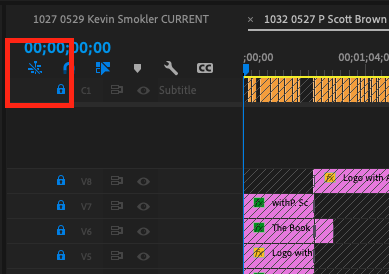
Alternatively, you can “Link” clips in the timeline so that Premiere will default to editing them together. This is the default with most clips. If you click on video, for instance, the audio is automatically selected. This behavior can be enabled and disabled in the timeline (see picture). If you have two independent clips you want to be treated as tracks in a single clip, you can link them in the timeline so they are treated as one. Select both clips, right-click and select “Link.”
Once linked, when you click on one track’s transition, the linked track
should automatically be selected (if the function is on, see picture). Apply a transition and both tracks
should get the same transition.
Yes, if you modify the clip to stereo it will become more difficult to control. What you want is not “stereo” but dual-audio meaning two synchronous tracks in one clip, that are not meant to be combined as stereo. If these came into the system together as a single clip they should already be linked and you may simply need to enable linking in the timeline.