


Tim Ward
Forum Replies Created
-

Are you talking about white lines at the VERY top of the video? If that’s the case, then don’t worry about it. It’s supposed to be there. It’s just the VITC (Vertical Interval Time Code). It’s inserted into the video signal, where LTC (Longitudinal Time Code) is recorded to a longitudinal audio track. DV camcorders like the XL2 don’t record VITC, where professional camcorders (like DVCAM, DVCPro) DO record VITC.
tim
-
Hi Daryl, how do you have your Keyspan USA28XG setup?
I’m trying to install one on a G5 Quad FCP 6.0.4 system, and cannot get it to communicate with a PVW-2800, DSR-1600, or DSR-45. I have followed all installation instructions, used newest v2.5 driver, confirmed ports in the Keyspan Serial Assistant application, and spent 40 minutes on the phone with Keyspan tech support personnel who had never heard of Final Cut Pro (I had to spell it). Their bottom line was basically “it’s not us, it’s them”, suggesting I contact the software manufacturer for support, “if they are still in business.”
Thanks for any suggestions,
tim -
[Jeffrey Buras] “The zoom factor is the same, but focal lengths are still different. A 4.7mm high-resolution lens is very hard to make, so it’s very expensive. But video cameras require such short focal lengths because their sensors are so small. To get a standard wide-angle shot, you need a very very short focal length. If you were to find a 4.7mm SLR lens it would be pretty darn expensive.
Another factor is that SLR lenses benefit from economies of scale. Canon produces a lot more SLR lenses, cutting down on manufacturing costs. Video lenses are more of a specialty item, making them more expensive.”
I can see where that could make sense. But just to play devil’s advocate here: you can also get a 10mm SLR for under $1000. A 10mm Professional (not Broadcast) video lens is 10-times that, with inferior glass. I don’t see where supply-and-demand would have that much of an effect, but I’m not in the lens business either. 🙂
tim
-
Sorry about that, I forgot to come back and add that I also posted this in the Cinematography forum!
tim
-
Thanks for that, Todd. Very informative. That’s pretty much what I thought, with regard to quality. We have an XL2 that I want to get the EF lens adapter for to be able use our Canon SLR lenses for certain situations, especially telephoto.
All this being said then, why does a Canon HJ11x4.7 cost ~10 times more than a Canon EF 28-300 (with same zoom factor), and why do my video lenses cost a lot more than my photographer’s lenses? I can see where the fact that video zooms can have much larger zoom factors might be a cause, but “wow”!
Thanks for indulging me! *grin*
tim
-
Have you tried the “Continuously Rasterize” toggle setting?
tim
-
Re-installed Kona 3.0 drivers. Things are better, but not fixed. I think I’m gonna wipe and re-install. It’s overdue anyways. I’ll post back with results for closure.
Thanks all
tim
-
Okay, for those of you keeping count, it appears to be the Kona card. I can play the same video in the Finder using the Built-in audio, and all is fine.
Going to re-install Kona now. Ugh.
tim
-
Thanks Jerry. I have 5.1 on the shelf but haven’t had the time to install it, but we’ll be getting a Mac Pro and FCS 2 for both soon.
[Jerry Hofmann] “I’ve long held that you should run your system on the OS and QT that the software was written on.. which for 5.0 would be QT 6 and Panther. You’d think Tiger and QT 6 might also work well with FCP 5.0.x.”
There is a certain logic to that. Kind of an “upgrade only as far as you need” mantra.
tim
Oh, and the Playback Meter doesn’t show video? Hmm.
-
Okay, done. This is what I get now at RAID 3@2k + RAID 0@256:
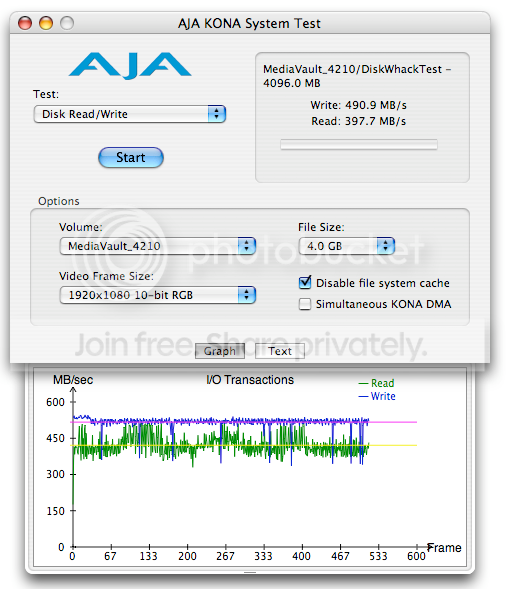
That’s pretty much what I was seeing when it was new (average-wise). But I wanted to compare with this Ciprico’s benchmark:
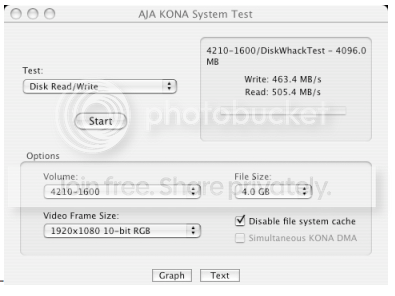
So I switched to RAID 0@512 + RAID 0@256 and got this:
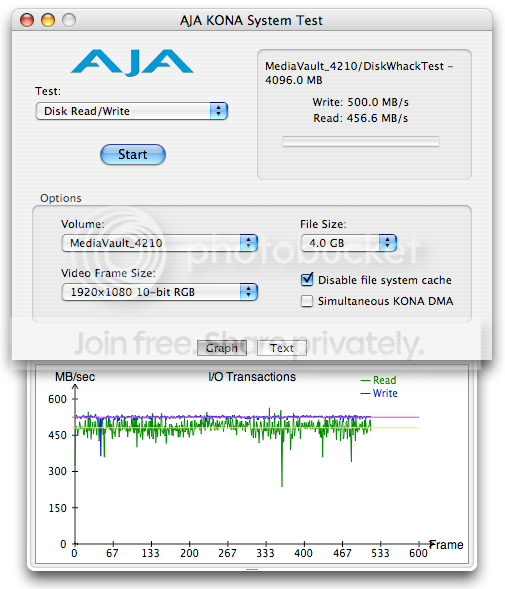
My Read/Write numbers are flip-flopped. Is that supposed to happen? I mean, 500MB/s write speed is great and all, but I’d rather have that as my read speed. I’ll contact Ciprico to make sure everything’s cool.
Meanwhile, it turns out I haven’t been dropping video frames, it’s the audio that is screwy. It drops out continuously, like there’s bits missing or something, and it’s playback that does it – even on DV25.
My Playback Meter doesn’t show a RAID bandwidth problem either:
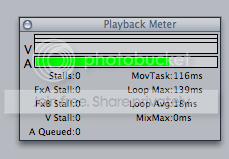
Well, I’ve determined that the culprit is Quicktime, but I haven’t updated it since 7.3.0, and haven’t had a problem with it until now. I guess I can try the 7.4 update, or wipe and re-install, or both.
I’ll report back.
tim


