

Activity › Forums › Apple Final Cut Pro Legacy › HD Capture/Playback Problems
-
HD Capture/Playback Problems
Posted by Tim Ward on January 22, 2008 at 4:13 pmOkay, so I’m beginning to get into HD production, and even though I’m “book-learned,” I have little practical experience. I’ve been editing uncompressed SD with no problems, and I know I have the hardware for uncompressed HD, but I’ve got dropped frames all over my floor.
Two things:
1. I have P2 MXFs from the HVX-200 demo disc, and they will not play smoothly from my RAID.
2. I have captured some test clips from a DTV tuner (720p59.94 10-bit, 720p59.94 8-bit, 720p59.94 DVCPro HD). I either drop frames on capture (although it doesn’t indicate it), or the machine doesn’t like HD analog video and audio. I drop frames on playback of each format. The video progressively lags behind audio.
My specs are at the bottom, and here is my Kona Test:
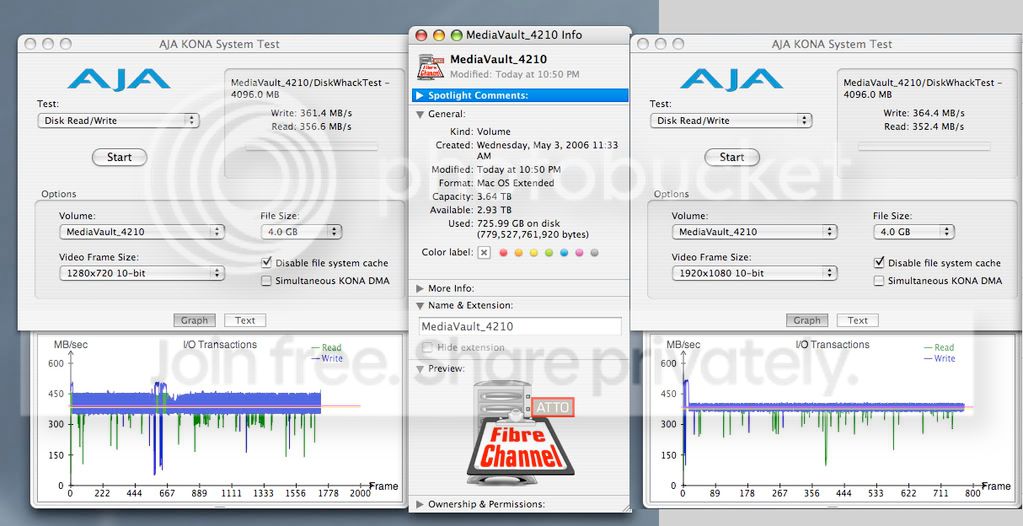
What gives? The RAID is striped with Mac OS. Should I use the ATTO utility instead? Or is this a more complex issue that should be resolved elsewhere?
Thanks,
timPower Mac G5 Quad Mac OS X (10.4.9) 8 GB; FCP 5.0.4; QT 7.3.0; AJA Kona LHe; Atto Celerity 42ES; Ciprico MV4210 (RAID 30)
Latch Everest replied 18 years, 7 months ago 4 Members · 13 Replies -
13 Replies

-

Jerry Hofmann
January 22, 2008 at 4:49 pmYou have to import the MXF’s as QT’s with FCP’s Log and Transfer window to get them to play OK…
I’m unfamiliar with a DTV tuner, so not sure what’s happening there…?
Jerry
Apple Certified Trainer
Author: “Jerry Hofmann on Final Cut Pro 4” Click here
Dual 2 gig G5, AJA Kona SD, AJA Kona 2, Huge Systems Array UL3D
-

Tim Ward
January 22, 2008 at 5:24 pm[Jerry Hofmann] “You have to import the MXF’s as QT’s with FCP’s Log and Transfer window to get them to play OK…”
I used the File > Import > Panasonic P2… way. Is that not correct?
[Jerry Hofmann] “I’m unfamiliar with a DTV tuner, so not sure what’s happening there…?”
Perhaps the tuner may be the problem there. I’m using analog HD, with a non-genlocked source? But I’ve read where guys are using Xboxes with no problems.
Another thing I just tried was pulling up some clips I had upconverted for a previous project at 1080i29.97 10-bit, and with 158 MB/s (higher than the 720p59.94) data rates, they play fine. Is frame rate the issue? Would the 142.5 MB/s rate of the 720p59.94 be 285 MB/s (double) in comparison to 29.97? And if so, I still should have the headroom to play that data rate.
tim
-
Jerry Hofmann
January 22, 2008 at 5:48 pmAh, you’re running FCP 5.1? What you’re doing sounds correct.
Log and transfer window is in 6…
The Data rates of DVCPROHD are no where near the ones you’re posting here… they are a 100mbps not mb’s…
Your raid should play several streams of it without any problems. It’s not your array.. it’s something else.
Post the exact versions of FCP, OS, and QuickTime you’re running. Might be something there for sure. Certain combos of software might give you problems especially if the install isn’t totally clean.
I never use anything like the DTV for capturing, so just not sure what’s wrong. I’d suspect that it’s video isn’t locked or all that proper as it were… but the MXF’s you’ve imported should work fine.
Jerry
Apple Certified Trainer
Author: “Jerry Hofmann on Final Cut Pro 4” Click here
Dual 2 gig G5, AJA Kona SD, AJA Kona 2, Huge Systems Array UL3D
-

Shane Ross
January 22, 2008 at 6:53 pmWell geeze…look at the graph! It really dips down to WELL BELOW 150…in a huge group. Somethings up with your Raid.
Shane

Littlefrog PostGETTING ORGANIZED WITH FINAL CUT PRO DVD now for sale!
http://www.lfhd.net -
Tim Ward
January 22, 2008 at 9:30 pm[Jerry Hofmann] “Post the exact versions of FCP, OS, and QuickTime you’re running. Might be something there for sure. Certain combos of software might give you problems especially if the install isn’t totally clean.”
It’s in the top post.
[Jerry Hofmann] “I’d suspect that it’s video isn’t locked or all that proper as it were… but the MXF’s you’ve imported should work fine.”
That’s one of my suspicions.
Thanks Jerry.
tim
-
Tim Ward
January 22, 2008 at 9:36 pm[Shane Ross] “Well geeze…look at the graph! It really dips down to WELL BELOW 150…in a huge group. Somethings up with your Raid.”
Yeah I thought about that too. That happened on a couple of the tests I did. I’ve thought about wiping it and re-building it from scratch, because I’ve lost about 100MB/s on it, and it’s only 20% full. I know I’m gonna lose some as it fills, but that seems a little much.
tim
-
Tim Ward
January 22, 2008 at 11:44 pmI kinda feel stupid or something. I’m not a newbie to television/video production, and even though I know the rules of the game, I am not yet an experienced player in HD, and I’m not ashamed to admit my ignorance. Maybe it’s something simple – maybe not. Thanks for any suggestions you guys offer.
I’m going to backup/wipe/rebuild the array and update the Atto firmware, and see where that takes me.
tim
-
Jerry Hofmann
January 23, 2008 at 3:01 pmI think you should upgrade to Studio 2 myself (Color alone is worth the price of admission)… never ran 5.0 on Tiger with QT 7 myself, so not sure if there’s some gotchas in there. I’d also suggest that if you’ve not rebuilt your startup disk in a while, it’s likely time… install Studio 2 while you’re at it?
I’ve long held that you should run your system on the OS and QT that the software was written on.. which for 5.0 would be QT 6 and Panther. You’d think Tiger and QT 6 might also work well with FCP 5.0.x.
Your Raid could certainly be part of the problem, but my guts say it’s deeper than that… course, I could be dead wrong.
Jerry
Apple Certified Trainer
Author: “Jerry Hofmann on Final Cut Pro 4” Click here
Dual 2 gig G5, AJA Kona SD, AJA Kona 2, Huge Systems Array UL3D
-
Tim Ward
January 23, 2008 at 3:38 pmOkay, done. This is what I get now at RAID 3@2k + RAID 0@256:
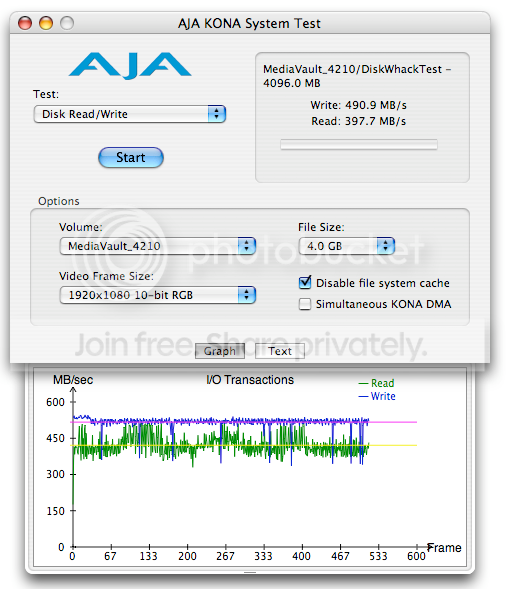
That’s pretty much what I was seeing when it was new (average-wise). But I wanted to compare with this Ciprico’s benchmark:
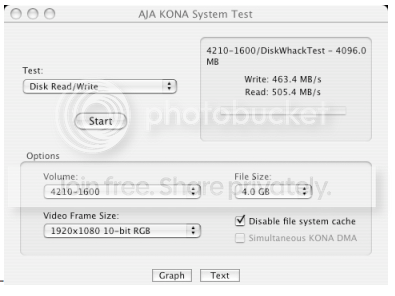
So I switched to RAID 0@512 + RAID 0@256 and got this:
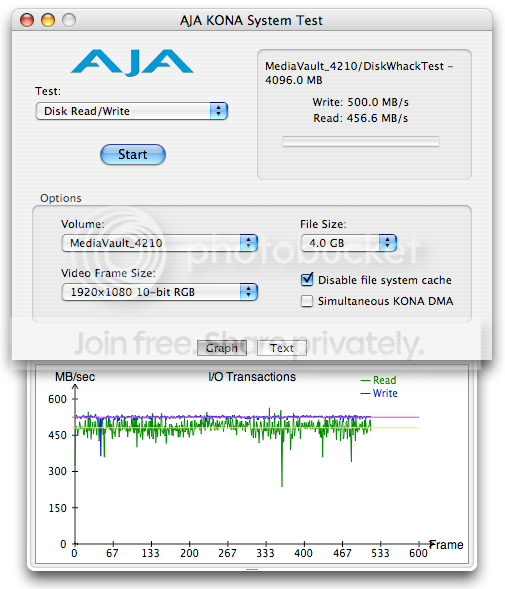
My Read/Write numbers are flip-flopped. Is that supposed to happen? I mean, 500MB/s write speed is great and all, but I’d rather have that as my read speed. I’ll contact Ciprico to make sure everything’s cool.
Meanwhile, it turns out I haven’t been dropping video frames, it’s the audio that is screwy. It drops out continuously, like there’s bits missing or something, and it’s playback that does it – even on DV25.
My Playback Meter doesn’t show a RAID bandwidth problem either:
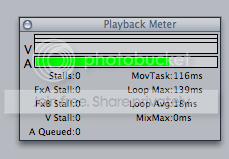
Well, I’ve determined that the culprit is Quicktime, but I haven’t updated it since 7.3.0, and haven’t had a problem with it until now. I guess I can try the 7.4 update, or wipe and re-install, or both.
I’ll report back.
tim
-
Tim Ward
January 23, 2008 at 3:45 pmThanks Jerry. I have 5.1 on the shelf but haven’t had the time to install it, but we’ll be getting a Mac Pro and FCS 2 for both soon.
[Jerry Hofmann] “I’ve long held that you should run your system on the OS and QT that the software was written on.. which for 5.0 would be QT 6 and Panther. You’d think Tiger and QT 6 might also work well with FCP 5.0.x.”
There is a certain logic to that. Kind of an “upgrade only as far as you need” mantra.
tim
Oh, and the Playback Meter doesn’t show video? Hmm.


Reply to this Discussion! Login or Sign Up