Forum Replies Created

  • Suan k. Seol

    February 2, 2025 at 12:22 pm in reply to: editing clips with different aspect ratio on FCPX

    Oops! I meant 1920×1080 😂😂

    Thanks for correcting!

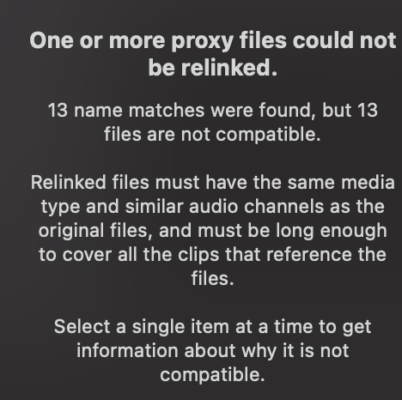
    Here I attach the image of error. When I checked with individual clip, I found they were on different ratio.

  • Thanks Doug,

    Tried resetting FCP by deleting preferences while opening.

    But same thing happens.. I don’t get the error message any more, which is pity.

  • Suan k. Seol

    February 28, 2022 at 10:52 am in reply to: relink source files in proxy editing project

    Thanks Jeremy,

    Then should I relink the original files all again in the same way for the later export?

  • Suan k. Seol

    November 19, 2017 at 1:34 pm in reply to: Unable to “Insert Edit” in this particular Project

    Did you check if your cursor was in ‘position’ mode instead of ‘select’?
    Yeah, you solved the problem by rebuilding the project, but just in case, next time if it happens, you could double-check it.
    I had the same problem and it was that simple problem, my arrow was in ‘position’ mode. It could be confusing as they look similar and do everything else same except for inserting clips.

  • Suan k. Seol

    November 17, 2017 at 2:48 pm in reply to: Can’t “INSERT EDIT” in Final Cut Pro X

    Hi,

    While I was searching for my problem with FCPX, I found you’ve experienced the same issue.
    I cannot ‘insert edit’ the clip just by dragging it. The reply posted below was one way to do it, but doesn’t solve the problem fundamentally.
    I wonder, did you solve your problem so that you can now drag the clip and ‘insert’ instead of overwriting? I don’t really want to bond clips as storyline when I’m just starting to make a rough cut.

    Hope to hear from you. Thanks!

We use anonymous cookies to give you the best experience we can.
Our Privacy policy | GDPR Policy