Steve Shelton
Forum Replies Created
-

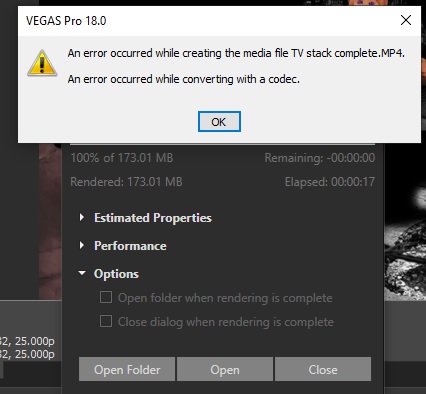
And its happened again, this time here’s the evidence with a screen shot. As said never got this ever until yesterday’s update.

-
Problem – I’ve just updated with this latest update today and it has straight away caused a really annoying problem. Neary everytime I go to render it states there is a codec error and stops rendering at 1%. I’ve found if I close vegas and go back in again it then renders ok. I’ve updated all the latest drivers and have a very hi-spec workstation and I wasn’t ever having this issue with the original Pro 18 version. Any suggestions to stop this happening or is it a bug. Cheers
-
Wow! Thank you John, that is a massive complement coming from someone so experienced in video editing as yourself. Yes you are correct the end credit was thrown together last minute to meet a deadline and not very well but better than nothing, I was getting exhausted with it all by then. Some of my green screen could have been better set up and lit but I had very limited room space …and I won’t be so stupid as to green screen someone with a green whiskey bottle again (that took absolutely ages, almost frame by frame, putting in a green shape exactly behind the moving image to keep it green and not transparent!!)
I’m so grateful to all the help and tips I got from this forum, esp from you. If I had to pick the one most useful help tip that I was given, as there was no way my PC could have coped with every thing in one project edit, it was that about two years ago you told me about ‘lossless’ codecs and the one you advised for me was ‘XDCAM EX’ from which I make (what I call) mp4 ‘submixes’ for each section in separate projects which I then load into the master overall project. I used that method constantly and lots of times. I could never have achieved anywhere near the result I did without that advice!
I have now got 2 months to plan, film and edit the follow up video!! ..expect some more pleas for help very soon 🙂 -
D’oh! Soz John for typo – ‘Rofrano’
-
John, just one question – what codec allows me to render to 4096 wide. At present when I’m doing what I call a sub mix (a render to go into the master project for a final rendering) I use the XDCAM EX (mp4) codec as this was the one a couple of years ago you advised me was the best lossless render to use if transferring into a master project (and it has works extremely well thank you). Can I just customise the setting is this or is there a special codec I need to be using?
Kind regards
Steve -
Thank you John, I didn’t know what was the max size I could render to, looks like I can split into two halves then, say approx 3000 wide. I can work away in confidence now!
-
Hello John, thank you for reply, yes sorry prob not described needs very well. That’s sounds good but I want to keep the definition of the output video as best as possible, HD, so am I able to render a pre master output of people in place in room that is really wide, say order of 6000 x 1080 pixels? So after I’ve rendered it and drop it in the master project I can zoom in and pan across I have a track motion size that give 1920 x 1080 HD output quality? Alternatively if I can’t do that (6000×1080 output) it has just occurred to me, triggered by your reply, I could split the room into, say, 3 segments, render each with people in place and join them effectively in line with each other and pan across, hopefully without any join line (?) (processing demand will be a bit tamer that way too).
Steve -
Hi Russ, sorry I wasn’t meaning to pester you or move off topic I was just responding, like chatting I suppose, and was just curious at some aspects at all the great support & info you have provided; a lot of which is new to me and I’m sure others that will read it following on. Thank you also for the further contact, but I’ll leave it there though and research it a bit myself first and maybe come back on your generous offer of email contact if it is some I actually try and do and get stuck on!
Kind regards for all your support, it has been extremely helpful
Steve -
Hi Russ, thanks for details & Fusion sounds a great program and looking forward to test driving it in my limited way once I have the time and hardware. One thing you said that intrigued me was ‘those that don’t know how to make their own light wrap’ – I’m certainly one of those, is making a light wrap something that can be done manually with basic tools?
-
Thank you Russ for time spent responding, that is really useful info. I know little about Fusion at the moment but will definitely give it a serious go once I upgrade. I liked the light wrap that the Boris chroma key had (saw a great tutorial on it by John Rofrano), has Fusion a similar solution to blending a green screen subject into the background of choice?
kind thanks
Steve