Creative Communities of the World Forums

The peer to peer support community for media production professionals.

Activity Forums VEGAS Pro VEGAS Pro 18 Update 1 (Build 334)

  • VEGAS Pro 18 Update 1 (Build 334)

    Posted by James Ollick on September 21, 2020 at 9:23 pm

    VEGAS Pro 18 Update 1 (Build 334)

    Created on 9/21/2020 by Bri-Hageman

    Dear Community,

    We are happy to announce the first update for VEGAS Pro 18 (build 334) has just been released. In it, you will find some significant fixes and improvements to the application. Below, you will find a detailed list of the newest features, bug fixes, and direct download links. As always, you can update through these links, or with the auto-update feature.

    We would love to hear your feedback. Please let us know what you think of update one in our general discussion thread.

    New Features

    • Support for HEVC HDR presets available for NVENC
    • AMD support for Driver Update dialog
    • NVidia Quadro support for Driver Update dialog
    • Smart proxy generation based on GPU capabilities
    • Greater ability to move the Region of Interest for Video Stabilization
    • Interface to VEGAS Image
    • Direct control of Motion Tracking from within the Bezier Masking FX
    • Progress bar on the Motion Tracking panel is now clickable

    Bug Fixes

    • Better handling GPU auto selection
    • Fixed crash on startup related to some Intel GPU drivers
    • Flicker Control FX thumbnail now displays properly in Plugin window
    • Colorization FX thumbnail now displays properly in the Plugin Window
    • Auto update for VEGAS Image and VEGAS Effects now functions
    • VEGAS Pro 17 projects that have the Slow Motion FX will no longer cause a crash
    • Grids in Expert mode on the Video Stabilization FX now work properly
    • Style Transfer and Colorization plugins now work on all supported hardware
    • Motion Tracking icon in the timeline toolbar correctly opens the Motion Tracking panel
    • Render progress dialog now remains in focus when open
    • VEGAS no longer freezes when clicking into another application while the Render Progress dialog is open
    • Proxy generation and use of Proxy files now work as expected
    • Motion data now properly applied to 2D parameters
    • Fixed problem where some Notebook GPUs are not detected by the Driver Update dialog
    • Exposure control in the Color Grading panel no longer clips in full-range projects
    • Fixed crash when reading in a file that was rendered from a 360 project with a non-hardware accelerated template
    • Improved performance of Plugin window thumbnail generation
    • Some iPhone files will no longer appear inverted in the Explorer window
    • Clicking on a Panasonic P2 template in the Render As dialog and then clicking a different format now allows editing of the file name
    • Fixed crash on shutdown
    • Adding Motion Tracking to a Lens Flare FX will no longer cause a crash
    • Picture in Picture FX now works properly in Free Form mode
    • Pan and Crop will no longer crash if “Collapse loop region” option is enabled in preferences
    • Hide the Third Party tab in the plugin window if no third party plugins are installed
    • Default format for Save Snapshot feature is now PNG
    • HDR templates now displayed when they should be available in the Render As dialog
    • Change the default render format in the Render As dialog
    • Video Stabilization no longer causes VEGAS to hang on playback with some AMD GPUs
    • Interlaced templates now available in the MAGIX AVC/AAC render plugin
    • Fixed problem with selection of animation keyframes that are not aligned with frame boundaries
    • Crash when clicking on the Creative Tab in the Video FX plugin window is fixed
    • Saving and loading of Favorites in the Plugin Windows now works as expected
    • Collapsing track groups with a fade applied to events no longer results in crash
    • Opening the Motion Tracking panel from an event’s burger menu now properly selects the event
    • Fixed a crash when reading some MP4 files with an unusual AAC format

    Direct Download Links

    Best Regards,

    Bri

    Steve Rhoden replied 5 years, 7 months ago 5 Members · 17 Replies
  • 17 Replies
  • Steve Shelton

    September 22, 2020 at 6:22 pm

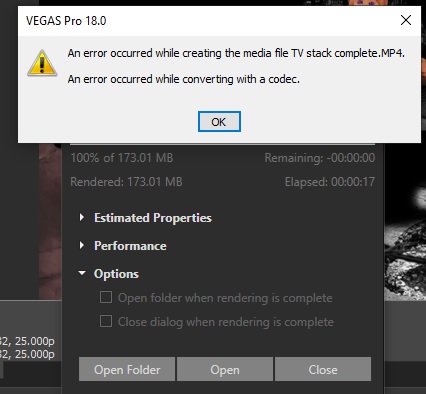
    Problem – I’ve just updated with this latest update today and it has straight away caused a really annoying problem. Neary everytime I go to render it states there is a codec error and stops rendering at 1%. I’ve found if I close vegas and go back in again it then renders ok. I’ve updated all the latest drivers and have a very hi-spec workstation and I wasn’t ever having this issue with the original Pro 18 version. Any suggestions to stop this happening or is it a bug. Cheers

  • Steve Shelton

    September 23, 2020 at 2:50 am

    And its happened again, this time here’s the evidence with a screen shot. As said never got this ever until yesterday’s update.

  • James Ollick

    September 23, 2020 at 3:45 pm

    Steve, I recommend sharing your issue on the Vegas site if you have not done so already. I am not sure any of their staff monitor the Creative Cow Vegas threads. https://www.vegascreativesoftware.info/us/vegas-pro-forum/video/

  • Ron Lindeboom

    September 23, 2020 at 4:36 pm

    If they don’t feel this nearly 20-year Vegas community is important enough to bother supporting their own customers in, James, that is quite a statement about the way they see themselves, their customers, and the people who have supported Vegas for nearly 20 years as Creative COW and additional years when we ran the old WWUG site, where Sonic Foundry used us for their official support.

    Ron Lindeboom
    CEO, Creative COW LLC

  • Steve Shelton

    September 23, 2020 at 7:43 pm

    I have done and, surprise surprise, still waiting for a reply, however you posted this as ‘WE are happy to announce’ therefore you present yourself as a stakeholder in the update and even ask for feedback, hence my post on here …or don’t you really want any feedback afterall? Besides I find Creative Cow far more proactive and helpful than the Sony site tbh. and all I’m doing is highlighting a user issue (isn’t that what forums are used for among other things?) and my first thought was that experienced users on here might be able recognise the problem and give an answer, and probably far quicker and in a more helpful than Sony’s site.

  • James Ollick

    September 23, 2020 at 8:06 pm

    I am sorry if I misled anyone as that was not my intention. I was just sharing the notice I received from Vegas. I did not want to get credit for the announcement so I did include the byline. <font face=”inherit”>Created on 9/21/2020 by </font><strong style=”font-family: inherit; font-size: inherit;”>Bri-Hageman.

    If I could delete the post I would, but have not been able to see a way to do it. Perhaps Ron can delete it. Slight Smile

  • Graham Bernard

    September 24, 2020 at 4:05 am

    Fixed a crash when reading some MP4 files with an unusual AAC format

    Hi Steve! Within the mass of bug fixes, there’s much attention given to MP4s. Does your MP4 have a QT element/CODEC requirement? Use MediaInfo to determine if you do. In which case you need to activate QT under the Deprecated Tab in Preferences. If that doesn’t work then you’d need to update your QuickTime s/w to last Windows compatible update available. If that doesn’t work then those MP4 files need to be transcoded to an MP4 that is friendly to VegasPro. Us Editors have had to recognise that QT will no longer be supported by WINDOWS.
    I’ve been in a similar situation and have been able to access my MP4, with the QT component, and have Unchecked the QT Box in Preferences. Here’s the thing: VegasPro can do this because by default it is running So4 (don’t ask! ?) to allow MP4s with that QT component. I’ve got QT component in my MP4s and it works.
    VegasProSoftware has taken a responsible drive to move us away from QT as this will not be updated for WINDOWS.
    Cheers – Grazie

  • Steve Shelton

    September 24, 2020 at 2:16 pm

    Hi James – my appologies, I’m not a regular on the forum and I thought you were from Sony giving it a plug when actually you are just trying to be helpful posting useful information; a misunderstanding

  • James Ollick

    September 24, 2020 at 2:25 pm

    No worries :-). We are all here to help one another 🙂

    Sony no longer has ownership of Vegas. Magix has owned Vegas software for a couple of years now. Gary Rebholz, the person who created Vegas here in the USA long ago, and his team are still the developers. Perhaps that is why they do not monitor this site, they have their own, https://www.vegascreativesoftware.info/us/vegas-pro-forum/video/ that they monitor on a regular basis. Slight Smile

  • Steve Shelton

    September 24, 2020 at 2:32 pm

    Hi Graham, thank you for your detailed response. I’ve tried to follow that but not sure I have fully understood, my problem! The codecs I’m using to render are all as supplied with the Sony software (XDCAM EX and MAGIX AVC/AAC MP4 codecs). The fault is also intermittent. I often try and render and I get this error. I close Vegas and open up the very same .veg file again and the render then works fine, so nothing has changed at all in the set up of the file, which I find confusing (and this has only happened with this update, didn’t happen on the same .veg files & render codecs before this). I’m lost of the Mediainfo bit, where is that found? Some of my .veg files have a .mov input (ironically supplied by Sony in their action VFX bundle), is that what you mean or is the QT elements to do with rendering something to play in QT?

Page 1 of 2

We use anonymous cookies to give you the best experience we can.
Our Privacy policy | GDPR Policy