Steve Shelton
Forum Replies Created
-

I have indeed and a they got a bit cross with me 🙂 To quote:
‘If you just want to tell your story and rationalize, do so in the Off Topic forum. I don’t find it particularly interesting’ and another guy was a bit more helpful by suggesting I could reset the program. I haven’t had any advance on that yet.
I’m just seeing if a) anyone had the same problem (if not maybe it’s just me or my set up or if yes then something amiss with V18) and b) a bit of specific rendering formatting/settings advice from experienced users. I hope that’s not overly abusing the rules of a forum?
-
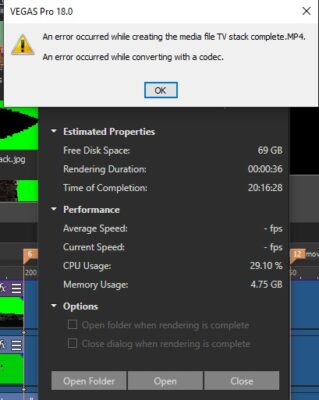
My error message when it stops rendering (nearly always at 2% on a range of various veg files) – never got this with V17 on the same files –

-
Steve Shelton
October 2, 2020 at 3:01 am in reply to: What camera and how does Sony Cyber shot DSC RX10M3 rate for videoAgain thank you. I was pretty aware of the green screen comments, done a fair bit of it last few years (learned from all my mistakes!) and you were exactly right about the banding in the sunset sky (the tones in the blue sky especially), which is what made me think the video function on the camera was very good/too compressed but I just want to say you have opened up a whole new videoing world for me with that reply …Slog2. I’d never heard of it before. Has taken me ages tonight to work out if a) my camera had it and b) how to action it but got there in the end (fn button and change PP setting). I wondered what all the grading stuff was about on sony vegas tutorials, now it all makes sense. I’m really excited now that I’m aware I have a decent (enough for me at least atm) camera to video with and will get a big increase in quality by using the settings properly, all down to you. You have been so helpful, can’t thank you enough!
-
Steve Shelton
October 1, 2020 at 5:17 pm in reply to: What camera and how does Sony Cyber shot DSC RX10M3 rate for videoPS just checked out your profile. Wow, those video / adverts are fantastic, very professional!
-
Steve Shelton
October 1, 2020 at 5:13 pm in reply to: What camera and how does Sony Cyber shot DSC RX10M3 rate for videoHey Blaise, thank you so much for taking the time to reply and for that info, it’s really good to get that sort of specific reply. I didn’t want to waste hours filming my latest video with it if there were going to be issues I’d regret later, wishing I’d got another camera earlier, but thanks to your advice I’m confident to give it a go with the RX10. I have lots of good lighting already but I know what you’re saying re low light as the first test run I did for using video with the RX10 …was a fading sunset!! D’oh! lol I wanted one in a video and tbh the footage didn’t come out too well, which made me want to ask on here, esp as I’ve seen a few YT videos on XAVC-s and it looks good. Thank you!
..and if I can be cheeky and ask another question, as you seem well versed on the camera, what would you recommend as an external monitor screen. My previous panasonics had little flip around monitor screens, which was so useful but the RX10 is fixed at the back, which isn’t useful doing my green screening.
-
Thank you Steve for your time and having a think about this. In fact that makes sense as I often had to do that on my old laptop (8Gb ram) with an older Vegas version as it would often crash midway through a big veg file render but be ok with a reboot. My new workstation has 32Gb ram and a 6 Gb video card for GPU so I thought I’d be OK! That said it’s good and interesting for intermediates like me to know what the experts do with tips and techniques like that – reboot before big renders. I’m ok at living with that, as at least if it ever has this issue it stops the render straight away rather than wasting time getting halfway through it and Vegas reboots quick enough which, as you say, is probably a habit I should think of doing regardless! Thank you very much.
-
Hi Steve, thank you for asking. There will probably be other MP4s in the timeline yes but as the fault has been intermittant on a number of .veg renders I haven’t been keeping a close eye on it, as said they all render fine, if I get this error, if I then close the sony vegas and open up the same .veg file again (it’s like the old IT support answer of have to turned it off and back on again!). I have only been using 2 rendering formats with this update XDCAM EX for what I call lossless submixes and MAGIX AVC/ACC MP4 for general finished viewing. I’m in the UK so I use 25 fps and keep to 1080p but everything else is as per default. In my timeline, as well as the XDCAM mp4s, I have been using some 3840x2160x32 intermediate .mov (created in and rendered from a sony vegas .veg) as it seemed the easiest way to do zoom ins for items that contain one feature lots of other moving videos embedded in. Thing is this never caused any problems before the update; I was using the same files.
-
Hi Graham, thank you for your detailed response. I’ve tried to follow that but not sure I have fully understood, my problem! The codecs I’m using to render are all as supplied with the Sony software (XDCAM EX and MAGIX AVC/AAC MP4 codecs). The fault is also intermittent. I often try and render and I get this error. I close Vegas and open up the very same .veg file again and the render then works fine, so nothing has changed at all in the set up of the file, which I find confusing (and this has only happened with this update, didn’t happen on the same .veg files & render codecs before this). I’m lost of the Mediainfo bit, where is that found? Some of my .veg files have a .mov input (ironically supplied by Sony in their action VFX bundle), is that what you mean or is the QT elements to do with rendering something to play in QT?
-
Hi James – my appologies, I’m not a regular on the forum and I thought you were from Sony giving it a plug when actually you are just trying to be helpful posting useful information; a misunderstanding
-
I have done and, surprise surprise, still waiting for a reply, however you posted this as ‘WE are happy to announce’ therefore you present yourself as a stakeholder in the update and even ask for feedback, hence my post on here …or don’t you really want any feedback afterall? Besides I find Creative Cow far more proactive and helpful than the Sony site tbh. and all I’m doing is highlighting a user issue (isn’t that what forums are used for among other things?) and my first thought was that experienced users on here might be able recognise the problem and give an answer, and probably far quicker and in a more helpful than Sony’s site.