Forum Replies Created

Page 2 of 410
  • Roland R. kahlenberg

    November 27, 2025 at 2:50 pm in reply to: Mograph with Interpolated Media Replacement

    You can’t access composition settings to work automatically with a MoGRT.

    If you need a MoGRT to be used in different frame sizes, frame rates and with interlacing, you have to set up the MoGRT accordingly in AE.

    In AE, each ‘final’ composition is placed into a composition which will be exported as a MoGRT. In this composition, you create a Drop Menu for the user to select which nested composition they want to work with. You will link each nested composition’s opacity to the Drop Menu so that only 1 nested composition has Opacity = 100% from any selection. And this composition should also be the sized to the largest output requirement amongst the different outputs because Premiere will just display each MoGRT centrally.

    It’s a bit cumbersome because you will have to link the text inputs centrally so that 1 change ripples through to all compositions. And this too for the Replacement Media.

    HTH

  • Roland R. kahlenberg

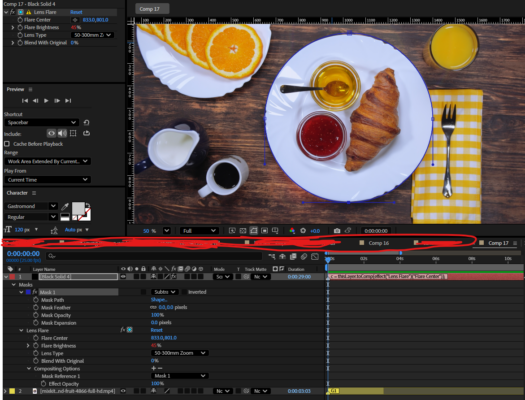
    November 26, 2025 at 9:57 pm in reply to: Make lens flare reactive.

    Here’s the expression to apply to the brightness parameter for Lens Flare –

    // Flare Brightness driven by pixels directly under the Flare Center point

    // PLACE THIS EXPRESSION INTO THE Flare Brightness parameter

    // Grab the Flare Center (2D point inside the effect)

    flareCenter = effect(“Lens Flare”)(1); // change name if you use Optical Flares

    // Convert that point from **effect point space** → **composition space**

    samplePointComp = thisLayer.toComp(flareCenter);

    // Target layer you want to sample (your video)

    target = thisComp.layer(“mixkit-breakfast-at-a-table-with-bread-coffee-and-fruit-4866-full-hd.mp4”);

    // Rect Size for sampleImage

    rectSize = [120, 120];

    sampled = target.sampleImage(samplePointComp, rectSize, false, time);

    // converts captured RGB to brightness value which will then be used to drive the effect’s brightness value

    luma = sampled[0]*0.299 + sampled[1]*0.587 + sampled[2]*0.114;

    // Your desired brightness range – tweak these two numbers only

    linear(luma, 0, 1, -35, 100)

    You’ll need a Mask – I placed a mask over the plate. You will need to set the Flare effect’s Compositing Options to point to this mask.

    HTH

  • Roland R. kahlenberg

    November 26, 2025 at 4:36 pm in reply to: Mocha AE & offscreen corners

    This is where Mocha’s Unlink Tracking feature is useful.

    Take a look at this tutorial – https://youtu.be/7UQcPRNKoiQ

    TIP – Unfortunately, the green board doesn’t have a texture – so, draw a tracking spline to cover the left edge of the board and include parts outside of the board’s left edge. Hopefully, there isn’t any parallax to throw off the tracker and ensure the tracking spline area isn’t obscured.

    HTH

    Some contents or functionalities here are not available due to your cookie preferences!

    This happens because the functionality/content marked as “Google Youtube” uses cookies that you choosed to keep disabled. In order to view this content or use this functionality, please enable cookies: click here to open your cookie preferences.

  • Roland R. kahlenberg

    September 26, 2025 at 7:17 am in reply to: Kinetic boxes and masks

    sourceRectAtTime() expression method is the building block and the Null Points feature saves you one step. Also, look at purchasing scripts directly from developers – most have a store on Gumroad and purchasing directly from developers earns them a lot more than making a purchase from aescripts who make a 30%. So, help developers by purchasing directly from them. 🙂

  • Responsive Design Time in MoGRTs produces iffy/maybe/meh results, at times. This is my experience. Then, it’s designed for stretching only the head and tail of a MoGRT but what you’re trying to achieve is beyond the feature’s design.

    An option is to deliver the MoGRT as part of a PPro Project file with a sequence set up with two copies of the MoGRT at the head and tail which the user can time stretch. For the middle section, you will have to look at using a Dynamic Linked AEP. It can get tricky but this is a bullet-proof option.

    HTH

  • Roland R. kahlenberg

    August 14, 2025 at 6:10 am in reply to: Mogrt Timing Control in Premiere Pro?

    In PPro, its Frame Hold feature works well with AeMoGRTs. Pair that with edits on the AeMoGRTs at strategic points is far more productive and PPro Editors are accustomed to these tools – edit and Frame Hold tools.

  • Roland R. kahlenberg

    August 13, 2025 at 3:32 pm in reply to: Mogrt Timing Control in Premiere Pro?

    I’ve never found time-stretched AeMoGRTs to work reliably in PPro. Instead of time-stretching in PPro, use cuts/edits in PPro on the AeMoGRT. Then ALT+Drag to create a duplicate and adjust accordingly. This will of course not work if you have elements within the AeMoGRT that animate continually.

    HTH

  • Render Time is not accurate – agreed – too many dynamic variables at play but it is a quick way to for identifying bottlenecks.

  • The issue with inconsistent results is with AE using its cached results. So, the best tests are those that start off fresh, with no cached data – purging cache data prior to starting a preview is a good starting point for conducting tests.

    BTW, do your Expressions use the valueAtTime() method? And is there a reason not to bake the Expressions into keyframes or even perhaps to just use keyframes instead of Expressions? I’m asking because I’m working on a script that works well with lots of layers and keyframes.

  • You’re welcome.

    On the Opacity setting, I use the Render Time column in the timeline to do my checks – it’s supposed to be accurate AFAIK to check if processing is being done to a layer. How are you doing your checks?

Page 2 of 410

We use anonymous cookies to give you the best experience we can.
Our Privacy policy | GDPR Policy