

Activity › Forums › Adobe After Effects Expressions › Make lens flare reactive.
-
Make lens flare reactive.
Posted by David Nerlich on November 26, 2025 at 7:25 pmCan I get the brightness of the native AE lens flare to:
A: Vary with the brightness of the underlying pixels at the flare centre position.
B: Disappear behind a matte layer or when travelling out of shot.
Video Copilot’s optical flares do both so there should be a way?
David Nerlich replied 9 months, 2 weeks ago 3 Members · 8 Replies -
8 Replies
-

Dan Ebberts
November 26, 2025 at 9:51 pmProbably. It depends on how you have things set up. Say you have all your underlying elements in a precomp. In an outer comp, you apply the Lens Flare effect to the precomp layer. You could then have an expression like this on the Flare Brightness property:
p = effect("Lens Flare")("Flare Center");
s = sampleImage(p,[.5,.5],false,time);
rgbToHsl(s)[2]*100
I’m not sure about the matte layer, but depending on what you’re doing you can probably incorporate that into this expression as well.
-

Roland R. kahlenberg
November 26, 2025 at 9:57 pmHere’s the expression to apply to the brightness parameter for Lens Flare –
// Flare Brightness driven by pixels directly under the Flare Center point
// PLACE THIS EXPRESSION INTO THE Flare Brightness parameter
// Grab the Flare Center (2D point inside the effect)
flareCenter = effect(“Lens Flare”)(1); // change name if you use Optical Flares
// Convert that point from **effect point space** → **composition space**
samplePointComp = thisLayer.toComp(flareCenter);
// Target layer you want to sample (your video)
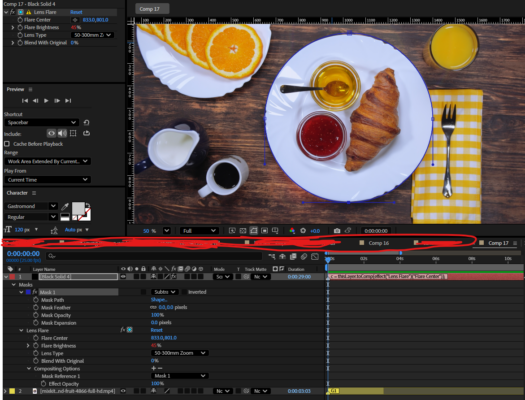
target = thisComp.layer(“mixkit-breakfast-at-a-table-with-bread-coffee-and-fruit-4866-full-hd.mp4”);
// Rect Size for sampleImage
rectSize = [120, 120];
sampled = target.sampleImage(samplePointComp, rectSize, false, time);
// converts captured RGB to brightness value which will then be used to drive the effect’s brightness value
luma = sampled[0]*0.299 + sampled[1]*0.587 + sampled[2]*0.114;
// Your desired brightness range – tweak these two numbers only
linear(luma, 0, 1, -35, 100)
You’ll need a Mask – I placed a mask over the plate. You will need to set the Flare effect’s Compositing Options to point to this mask.
HTH

-
David Nerlich
November 29, 2025 at 3:51 amThanks Dan. This worked! However a shortcoming with the result is there is no control, as it’s been all ceded to the underlying image layer. It would be good if there was a secondary brightness control or threshold to control the degree to which the brightness is affected.
Another option would be if the brightness could be driven by a copy of the source that was not visible, while the flare remained visible, so you could adjust the brightness, contrast etc of that layer. Then you could control the behaviour of the flare, which could be placed over a clean image layer.
-
David Nerlich
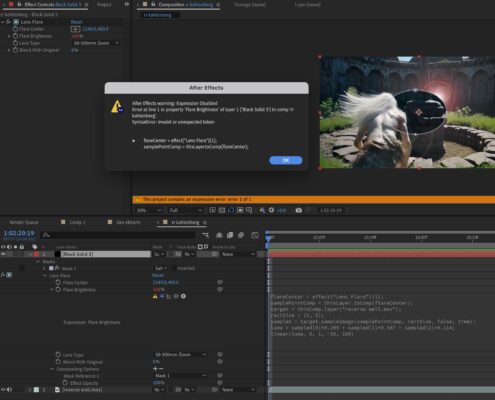
November 29, 2025 at 4:08 amThanks Roland. Expression error. What have I done wrong here?
-
Roland R. kahlenberg
November 29, 2025 at 8:44 amHi David, looks like copying from the forum creates CURLY QUOTES in the expression instead of normal quotes. So, look at the expression in your Expression Textbox to see if there are any of these and change them to normal quotation marks.
Let me know how it does. I was going to drop an AEP and host it on my blog – may do it sooner than later but lots of things brewing over here. 😉
-
David Nerlich
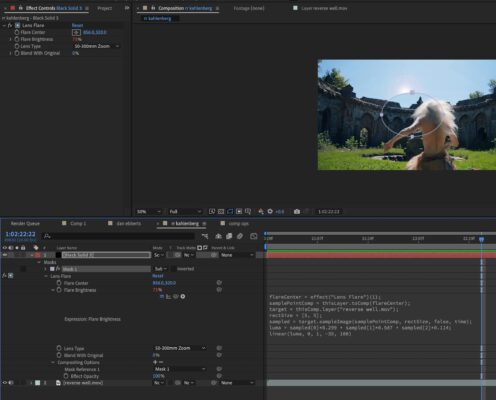
November 29, 2025 at 11:27 amRoland, that’s working really well! Thank you!
However the mask doesn’t seem to do anything but cut a hole in the layer.
-
Roland R. kahlenberg
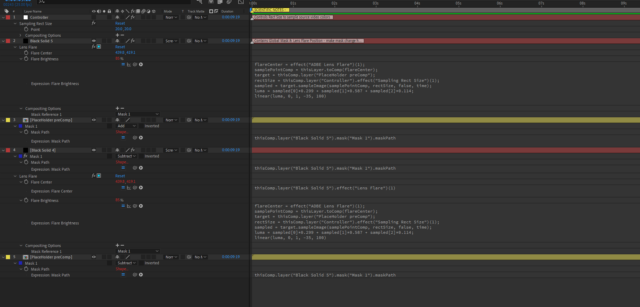
November 29, 2025 at 12:23 pmYou need to set the timeline stack for a compositing task – see image below …
It’s going to take too long of a time for what I can offer now to post the AEP on my blog or at the COW. Hopefully the screen grab below provides enough clue for you to get productive OR DIG IN!!!
😀
-
David Nerlich
November 30, 2025 at 5:27 amThanks Roland, a clue maybe. It’s going to take a minute to figure out what you’ve done here visually. Please let us know if you upload an aep.
However I’m very happy. Mask control isn’t vital for my purposes and your expression has made it possible to have the flare controlled by a hidden layer so I can put all sorts of moving mattes derived from the video source in a precomp then layer the flare over a clean video underneath the hidden precomp – which is more useful than having to roto masks.
Reply to this Discussion! Login or Sign Up