Creative Communities of the World Forums

The peer to peer support community for media production professionals.

Activity Forums Adobe After Effects Mocha AE & offscreen corners

  • Mocha AE & offscreen corners

    Posted by Gary Turner on November 25, 2025 at 9:31 pm

    Hi gang.

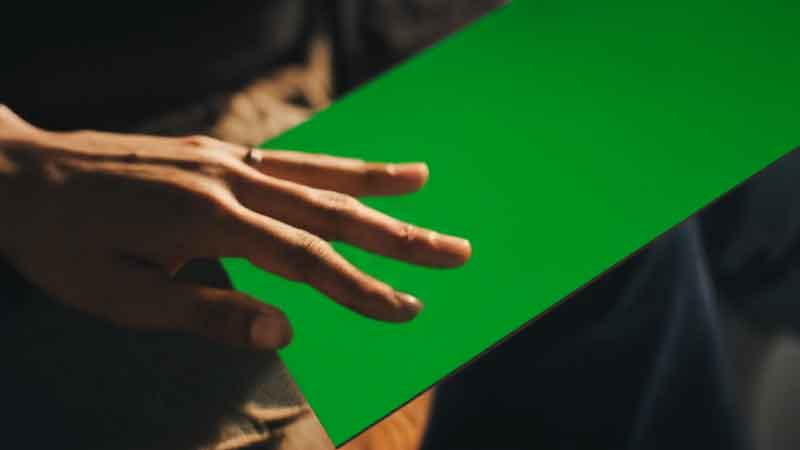
    It’s been a hot minute since I used Mocha AE for a project. I was given this green screen footage and asked to map in a photograph to the scene. At first I thought, “no problem.” I’ll use Mocha AE. But now that I’ve tried, my corners are swimming all over the place. The tracker cannot seem to lock on, nor can I set keyframes at ideal points and have them average between.

    Is it that I just don’t have enough visible corners to work from?
    (see below)
    Gary Turner replied 5 months, 2 weeks ago 4 Members · 6 Replies
  • 6 Replies
  • Dan Fredley

    November 26, 2025 at 12:27 am

    There doesn’t seem to be much texture on the green screen to track, unfortunately. If there was something to track, the offscreen corners wouldn’t be much of an issue.

  • Gary Turner

    November 26, 2025 at 12:30 am

    Yeah. I’m figuring that out now, after the fact. I should have had place markers on it.

  • John Martin

    November 26, 2025 at 6:01 am

    hey Gary, send me the Raw footage so i try my own methods to track it (Mocha is overestimated, there are better solutions at this point in history), thank you!

  • Roland R. kahlenberg

    November 26, 2025 at 4:36 pm

    This is where Mocha’s Unlink Tracking feature is useful.

    Take a look at this tutorial – https://youtu.be/7UQcPRNKoiQ

    TIP – Unfortunately, the green board doesn’t have a texture – so, draw a tracking spline to cover the left edge of the board and include parts outside of the board’s left edge. Hopefully, there isn’t any parallax to throw off the tracker and ensure the tracking spline area isn’t obscured.

    HTH

    Some contents or functionalities here are not available due to your cookie preferences!

    This happens because the functionality/content marked as “Google Youtube” uses cookies that you choosed to keep disabled. In order to view this content or use this functionality, please enable cookies: click here to open your cookie preferences.

  • Gary Turner

    November 27, 2025 at 1:21 am

    Unfortunately, I do not have Mocha Pro. Just Mocha AE. 🙁

  • Gary Turner

    November 27, 2025 at 1:25 am

    Disregard. I figured out a solution. Thanks for sharing the tips!

We use anonymous cookies to give you the best experience we can.
Our Privacy policy | GDPR Policy