Roei Tzoref
Forum Replies Created
-

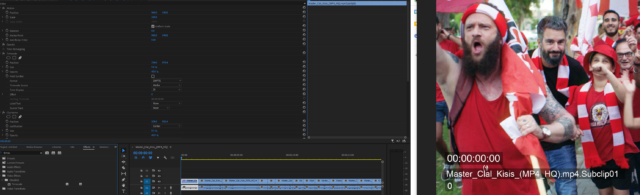
I recently had to do that and found a workaround ever since premiere introduced scene detection.
1. import the master rendered file to premiere
2. activate scene detection under clip, check create subclips and hit analize
3. drag all the subclips into the timeline
4. add clip name and timecode effects with these settings
5. now you have a timecode + subclip number(shot number) and frame number for each shot.6. if you invest in a renamer script in premiere you could rename “subclip” to “shot”

-
also this can work:
loopIn(“continue”)+loopOut(“continue”)-value -
more like this:
loopIn(“continue”)+loopOut(“continue”)-value -
after discussing with Jacob for a while I figured out some things for the workflow and plan to create a tutorial about my particular struggle with this. thanks for the help Brendon, I appreciate it.
-
sorry I edited my reply. please read it again. the scopes seems to work fine now maybe it was a refresh issue. I will have to run some tests.
-
Thanks Brendon. I actually watched that tutorial before and even when it came out but couldn’t really make it work, but now it works. I still have some questions:
1. compositing sRGB/Rec709 footage/graphics: I see I should place OCIO plugin on each asset coming from sRGB/Rec709 sources. should I place generic->sRGB texture? I see it works fine on footage. I also see I have utility->curve->sRGB/Rec709. what do you use when you composite each sRGB/Rec709 source that doesn’t have a camera profile? what do I place on solid graphics (shapes/solids)?
2. I was looking for a way to use Ae’s color management combined with Aces and save all the “preserve RGB” ticks. like explained here in 23:00 https://www.youtube.com/watch?v=7uY4-bPvRKs&t=1610s do you think this is possible?
Some contents or functionalities here are not available due to your cookie preferences!This happens because the functionality/content marked as “Google Youtube” uses cookies that you choosed to keep disabled. In order to view this content or use this functionality, please enable cookies: click here to open your cookie preferences.
-
that would be great. I would prefer to bring my LOG to linear. but how do I revert it back to LOG?. how would you do it non-destructively? can you give an example of a basic setup?
-
@chriswright6 please let me know what you think of this post as a continuation of this topic. thanks 🙂
https://creativecow.net/forums/thread/log-rec709-roundtrip-in-after-effects/
-
Roei Tzoref
April 21, 2021 at 12:48 pm in reply to: Sharper projection mapping/camera mapping? (/possible to increase shadow map beyond 4000?!) -
Roei Tzoref
April 21, 2021 at 11:35 am in reply to: Sharper projection mapping/camera mapping? (/possible to increase shadow map beyond 4000?!)thanks Michael that’s a solid workaround! if anyone finds another please share