Forum Replies Created

Page 1 of 7
  • Rob Lindsay

    March 8, 2024 at 9:07 pm in reply to: Suddenly a different rendered outcome

    Thank you Edward!

  • Rob Lindsay

    April 22, 2022 at 1:02 am in reply to: Fx not working no matter what I do

    Of my Vegas interface.

  • Rob Lindsay

    April 21, 2022 at 6:28 pm in reply to: Fx not working no matter what I do

    Thank you Graham. One last request — is there a simple way to upload a screenshot here?

  • Rob Lindsay

    April 20, 2022 at 11:37 pm in reply to: Fx not working no matter what I do

    Thank you for tutorial tip, Francois — i have watched 6 or so! And I did use levels to adjust the brightness.

    graham, clicking on the FX Bypass button seems to change nothing in that drop down menu. Can you show me what it should look like when FX is enabled, please? Also, i dont see how to add a screen shot anymore. Is there a button I don’t see?

    Thank yoou,

    rob

  • Rob Lindsay

    April 18, 2022 at 11:53 pm in reply to: Fx not working no matter what I do

    Thank you Francois — fiddling around with the FX Bypass dropdown seemed to do the trick, but I don’t know how or why. Even when my buttons were the same as yours in your SS, it wouldn’t affect the picture. But suddenly, it startd to work. I don’t see a direct way to add a SS to show you, or I would.

    Can you explain it?

    Many thanks,

    Rob

  • Rob Lindsay

    April 18, 2022 at 2:56 pm in reply to: Fx not working no matter what I do

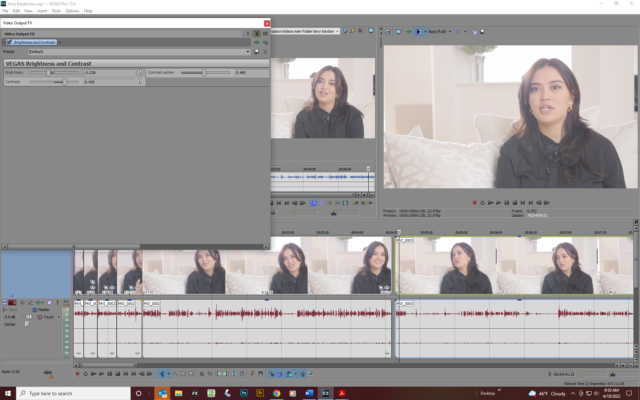
    Here’s a SS, Graham. The FX button is set to Enable. The sliders have no effect on the picture — this is how it came out of the camera. i just want to add a bit of contrast.

    Thank you for yur help,

    Rob

  • Rob Lindsay

    December 26, 2020 at 6:32 pm in reply to: New to Resolve 16

    I am using 7 video tracks — could that be too much for my system? I can see the track numbers in the edit window but the frames are black.

  • Rob Lindsay

    December 21, 2020 at 7:34 pm in reply to: Editing using 6+ video tracks

    Thank you — these recco’s are terrific. I will learn this !

  • Rob Lindsay

    December 21, 2020 at 4:04 pm in reply to: Turning off one track turns off all of them

    it was my fault — I had the “Link” button on, sooooo…..

    The explanation is one all too common in my life: Operator Error!

    Thank you, Graham, for being here.

  • Rob Lindsay

    December 20, 2020 at 11:14 pm in reply to: Turning off one track turns off all of them

    Also, I am finding that even muted tracks that are darkened are “sticking to active tracks I am trying to move on their own track line. I have Ungrouped several times. I have turned off and restarted the program.

    Very frustrating!

Page 1 of 7

We use anonymous cookies to give you the best experience we can.
Our Privacy policy | GDPR Policy