Forum Replies Created

Page 3 of 8
  • Robert Olding

    October 8, 2021 at 3:47 pm in reply to: Custom Text missing

    It may be that your MacBook Pro is missing the actual font used to create the text on the iMac.

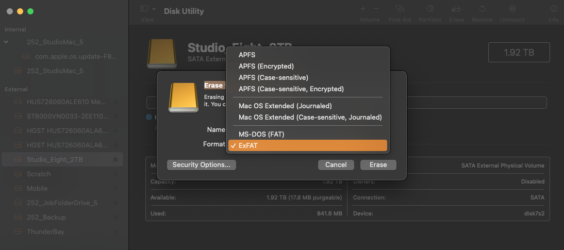
  • ExFat can handle the larger files sizes such as those from video files and it’s for disks that are larger than 32GB. There is a newer format for windows called NTFS but it’s not supported by macOS.

  • Use your Mac’s Disk Utility application to erase and format the drive to ExFat.

  • Robert Olding

    March 22, 2021 at 3:24 pm in reply to: Audio Files from external recorders

    Did you select the “Copy to library” in the import window? Also, when you consolidate media, you can also choose to consolidate the original media to a specific location/folder.

  • Robert Olding

    February 11, 2021 at 3:11 pm in reply to: Text Graphics packages

    I’ll recommend MotionVFX: https://www.motionvfx.com

  • Robert Olding

    February 10, 2021 at 4:22 pm in reply to: How in the heck do you buy DaVinci Resolve Studio?

    Version 17 is still in Beta. I’m assuming you could purchase it directly from Blackmagic once it’s officially released. You could contact them directly for version 16.

  • If you follow these simple rules it’s easy to deal with.

    Most importantly. Will the colors be exact? No, but they’ll be close. Will the colors look good to your eye and be similar to what you saw in person on set? Yes.

    First off, don’t use the “auto” white balance on a “mood” or multi-colored scene. The multi-colors will just confuse the auto white balance function of the camera causing the white balance to change while you’re shooting and deliver you a big mess.

    – If you’re using tungsten lighting, set your camera’s white balance to the tungsten setting.

    – If you’re using daylight lighting such as HMI’s or the sun, set your camera’s white balance to the daylight setting.

    Even if you’re using colored gels on the lights the rules work.

  • Robert Olding

    December 3, 2020 at 9:11 pm in reply to: Importing Proxies instead of originals

    Hi Chad,

    Mark and Steve at Ripple Training recently posted a YouTube video about this.

    https://www.youtube.com/watch?v=0j7zNEoc8tg

    or

    https://www.youtube.com/watch?v=IHL9gFwm85M

    Some contents or functionalities here are not available due to your cookie preferences!

    This happens because the functionality/content marked as “Google Youtube” uses cookies that you choosed to keep disabled. In order to view this content or use this functionality, please enable cookies: click here to open your cookie preferences.

  • Robert Olding

    November 20, 2020 at 11:06 pm in reply to: Upgrading FCPX

    We have one 2019 iMac 5K here in our studio that we went ahead and did the update to Big Sur and Final Cut 10.5. We opened a copy of a recently finished 4K Library on it. The assets reside outside of Library on attached drives and represent a mix of various media types, 4.6K ProRes 4444, UHD ProRes 422, 1080p.mp4, .png, .mp3, .aif. files. The plugins used on the Projects were, ColorFinale, various MotionVFX transitions and titles, iZotope audio plugins, Twixtor, along with some of the built-in titles, color board, and audio compression.

    We updated all the third party plugins before attempting this. Twixtor was the only plugin that crashed Final Cut Pro 10.5.

    We tried uninstalling Twixtor and reinstalling it but it still crashed.

    We then did a hard drive wipe and did a clean install of Big Sur and Final Cut Pro 10.5, along with all the third party plugins and other applications we use. That took close to two days to perform but it worked. Everything opened just fine including the clips that had Twixtor applied to them.

  • Robert Olding

    October 23, 2020 at 2:41 pm in reply to: Upgrade a 2013 trash can Mac Pro

    Hi Xavier,

    I use a 2013 Mac Pro (Tube/Trash) can to edit 4K everyday. I’ve seen those upgrades at OWC but haven’t taken advantage of them. My Mac Pro has 32GB of RAM, it’s internal drive is only 256GB and the GPU is the FirePro D500

    My set up relies on external Thunderbolt 2 drives that I’ve purchased from OWC. I have two ThunderBay 4 RAID with 24TB in each. One stores all my documents and files, the other is a Time Machine backup of everything. I also have a OWC Mercury Elite Pro Dual as a scratch/cache drive. It has two OWC 480GB SDD drives in it that I RAID together.

    I edit with FCPX and color grade with DaVinci Resolve.

Page 3 of 8

We use anonymous cookies to give you the best experience we can.
Our Privacy policy | GDPR Policy