

Activity › Forums › Apple Final Cut Pro › Need to transfer my footage onto hard drive for PC
-
Need to transfer my footage onto hard drive for PC
Posted by Jan Von bayern on June 23, 2021 at 4:15 pmHi I have a Mac and my video files are organized on MacOS formatted drives. 2 Terabytes of footage. Now I want to transfer the footage onto a drive for an PC editor. So it has to be readable by a Windows machine. I did some research but found no solution.
Oliver Peters replied 5 years, 3 months ago 6 Members · 12 Replies -
12 Replies
-

Robert Olding
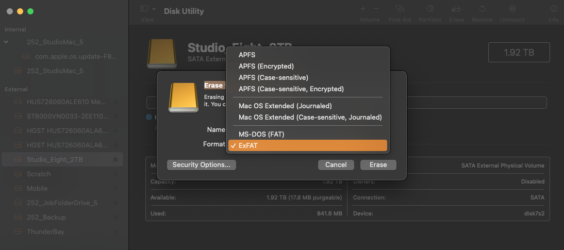
June 23, 2021 at 4:22 pmUse your Mac’s Disk Utility application to erase and format the drive to ExFat.
-

Jan Von bayern
June 23, 2021 at 4:23 pmThank you Robert – but I always thought the ExFAT has a limited files size? These are 4K video files.
-

David Battistella
June 23, 2021 at 4:26 pmI would take these steps.
1. Get a fresh disk.
2. Option one (forma the disk FAT 32 on your mac)
3. Option 2 (get software like <strong ng-bind-html=”record.$found.name || record.product.name” style=”font-family: inherit; font-size: inherit;”>extFS for Mac by Paragon Software)
4. Format the disk NTFS.
5. #2 is free #3 will cost you.
6. Use a professional checksum program to copy the fils from one disk to the other.
I would not eliminate the 6th step. It is important to make sure it isll all copied over correctly.
David
-
Robert Olding
June 23, 2021 at 4:32 pmExFat can handle the larger files sizes such as those from video files and it’s for disks that are larger than 32GB. There is a newer format for windows called NTFS but it’s not supported by macOS.
-

Eric Santiago
June 23, 2021 at 6:07 pmFor simpler tasks, MacDrive works fine.
I dont dare use the HFS drive as a working drive on Windows but you can at least read the files and copy to the other side as well. -

Patrick Donegan
June 23, 2021 at 8:04 pmyou dont have to Erase your old drives!
just the new one to transfer the source files to!
-
Patrick Donegan
June 23, 2021 at 8:05 pmWhen one buys a newer WD drive – it comes with an included version of the NTFS driver for the OS X …. both for writing and reading!
“Free as in beer” I mean “Free as in included”
-
Patrick Donegan
June 23, 2021 at 8:07 pmIt is supported by drivers available from Paragon …
free when purchasing a retail WD drive
-

Oliver Peters
June 24, 2021 at 6:06 pmI have had some compatibility issues with ExFat and hard drives. It’s really a format originally intended for thumb drives. Native Windows NT can be read on Macs, but not written without extra software – either Tuxera or Paragon. I personally use Tuxera to write Windows NT formatted drives and it has always worked well. It installs as an OS extension and once installed, the option shows up in the Disk Utility pulldown menu.
One thing I’ve run into with the “free” versions is that they are locked to that brand of drive. If you later try to use it to format a different brand of drive (even if it’s the same parent company), it may not work.
Reply to this Discussion! Login or Sign Up