The second method you could use would be to hand-drawn the title a few times and scan them, create pngs and put them one after the other with a length of 2 frames (usually animation is on twos). Even 3 different scans would be enough.
Third method would be to find a hand-drawn style font and animating it in fusion through fast noise. You can see how to do it here: https://www.youtube.com/watch?v=7_VfraKHpzY This is kinda slow wobbling, but you can change that by making the noise seed animation faster/the noise smaller.
Some contents or functionalities here are not available due to your cookie preferences!
This happens because the functionality/content marked as “Google Youtube” uses cookies that you choosed to keep disabled. In order to view this content or use this functionality, please enable cookies: click here to open your cookie preferences.
Hey David, I was indeed referring to Catalyst Browse. Unfortunately, I experienced something similar to what you are. I am on Windows but similarly, Browse would constantly crash/not boot. I figured it was because I was trying to load files that were stored in the cloud. Apparently, that makes the program crash. Before I discovered what the issue was I tried to contact Sony’s support but no response from them. Terrible service
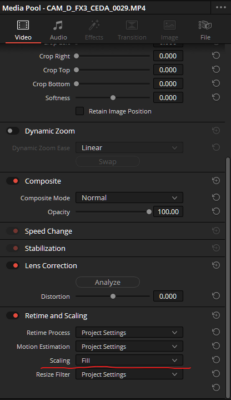
The only thing that I can think of that could make that happen is if the scaling for the clips is set to Fill instead of Fit (see screenshot). You can double-click on the clip in the mediapool to open it in the preview and then go to the Inspector. Scroll down to the Retime and Scaling menu and check that. If it is not set specifically to Fit, switch it to that.
Jean that is just a technical matter. If you were to scale down the PGN to 1080p 72dpi in Photoshop, you’d get the same result. It is the same as watching a video in 1080p or 4k. The difference is visible but it is not due to the quality of the files themselves, but to the fact that you are comparing them to a file that simply has more resolution.
Hey Antony, SDR film scans are in Rec709 colour space. Thus, in the IDT you should set the Input colour space to Rec709 and the input gamma to Cineon. Best, Riccardo