Nate Vander plas
 2
COW Coins
2
COW Coins
Forum Replies Created
-

This didn’t work for me either. I have two linear rotation keyframes on my 2D layer. I tried the loopOut(“continue”,0) expression, making sure they were straight quotes and not curly- gives me a syntax error.
SOLUTION: Also need to remove the ,0 after “continue” so the expression should look like this:loopOut("continue")
-
Thanks so much, Filip! It works great! This is much simpler than I was imagining, and a great starting point. I was able to make it also start playing on the inPoint of the grid layer (rather than being stuck in time as I try to shift the grid layer left/right in the timeline). I also added a slider value to the random seed so I can change the seed if I don’t like that iteration. Here’s what I have:
r = thisComp.layer("Controls").effect("Random Seed")("Slider");
seedRandom((index+r),true);
((time-inPoint) + source.layer(random(source.numLayers)).inPoint)%source.duration;
It works, although it sometimes gives me an error if I choose a value for my Random Seed slider that makes index+r = 0. I think it shouldn’t be a problem as long as I set it to a high value.
-
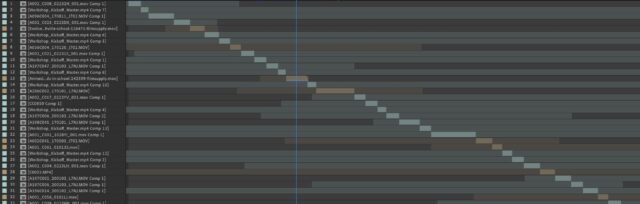
I have a similar problem except minus the CSV stuff. I’m making a sort of grid of videos floating in 3D space and I want them each to play part of a long sequence of footage in a precomp- but start on a random clip and loop back to the beginning if they reach the end. I’m unsure how to write an expression in Time Remapping that would start each 3D layer at the beginning of a random clip in the precomp. I don’t want it just to start on a random frame because inevitably it would start 2 frames before a cut and look awkward. See attached for what that footage precomp looks like.
What would be SUPER amazing would be if the expression could create it’s own random sequence from the precomp, starting on one footage layer, playing until its outpoint, then starting at the inpoint of another random footage layer that’s not itself, etc… But that would just be icing on the cake 😀
Thanks!
-
Nate Vander plas
December 8, 2020 at 3:31 pm in reply to: Absolute Camera Position, Orientation, and RotationThank you, Dan! This works great! I initially thought I still needed to have the X, Y, and Z Rotation properties of the cameras linked, but that is not the case! The Orientation expression takes care of it all ?
If anyone else is trying to do this, here is my simple expression for the Position:
comp("Main Comp").layer("Camera 1").toWorld([0,0,0]) -
Yes! Thanks so much, Dan!
-
Thanks Dan! This almost works! It does find the point where the End of the Trim Paths would be, but it doesn’t take into account the Offset, which is how I’m animating the circle along the path. I figured out how to get the Offset parameter into the expression, but I don’t know what math to do to get it to adjust the End position. Thanks again for your help!
-
Nate Vander plas
February 5, 2019 at 4:22 pm in reply to: Controlling layers with identical animation but scattered over timelineIn case you need the layers’ outPoints to have keyframes, here’s an updated project file that shows this functionality:
13087_keyframesatinpointexpressionv2.aep.zip -
Nate Vander plas
February 5, 2019 at 4:00 pm in reply to: Controlling layers with identical animation but scattered over timelineTry this expression on all your layers. It basically places keyframes at the inPoint and outPoint of your layer, so you can adjust the keyframes of all your layers at once (or individually) at the very beginning of the comp, and this expression will move them to the inPoint of the layer. See this project file: 13086_keyframesatinpointexpressionv1.aep.zip
if (time < (inPoint+outPoint)/2)

  valueAtTime(key(1).time+time-inPoint)

else

  valueAtTime(key(numKeys).time-(outPoint-time));
-
Thanks for taking a look! Good point with not using bells and whistles until the basics are working. I did make sure to add that stuff after I had some of it working. The thing is, the motion blur was necessary for the final, and I found that, depending on what motion blur technique was used, I would get artifacts when it looped. The frame between 9 (the last digit in my precomp) and 0 would be a complete blur- I think because it was almost like it was rewinding from the end to the beginning over one frame. So I was trying to find a solution that would work with my expressions setup since, without motion blur, those fast-moving numbers would look terrible.
Anyway, let me know if you figure anything out! -
I thought I should explain a bit further. First of all, the days can go up to 30 every month (that doesn’t have to be accurate). Then the months should got up to 11 before rolling over to “0” when the year digit advances.
When I time remap the precomped animation of the numbers bouncing into place, the bounce and the vertical movement becomes either too slow or too fast. I tried controlling the bounce expression in the precomp with sliders in the main comp, but the timing of the keyframes in the main comp just coincides with the same timecode in the precomp, which effects it every time it loops- sort of baking it in- not very helpful. I’d love for it to be consistent every time it clicks how fast it moves into place and how much/how fast it vibrates.
I had an idea to scrap the time remapping and use the Offset effect on a still Precomp that had all the necessary digits vertically. But I couldn’t figure out how to adapt the time remapping expression to get it working. I thought there could be a way for the expression to trigger almost a one frame change when the slider gets to an integer, then smooth that out with the smooth(x,x) function and then add my bounce on top of that. I’d even be willing to add the bounce using a marker-based expression rather than velocity-based. Something like this:amp=20; //amplitude (pixels)
freq=2; //frequency (cycles per second)
decay=3.5; //decay time (seconds)// find previous marker
n = 0; // assume haven't reached a marker yet
if (marker.numKeys > 0){
n = marker.nearestKey(time).index;
if (marker.key(n).time > time){
n--;
}
}if (n > 0) t = time - marker.key(n).time else t =0;
a = amp*Math.sin(freq*t*Math.PI*2)/Math.exp(decay*t);
a + value