Creative Communities of the World Forums

The peer to peer support community for media production professionals.

Activity Forums Adobe After Effects Expressions Change layer source via expression?

  • Change layer source via expression?

    Posted by Ray Collett on March 21, 2022 at 2:15 pm

    Is there a way to change the source of a layer with an expression?


    I currently have about 100 identical comps, and each comp has several effects that are driven by the contents from one of 100 different CSV files, which is selected based on the comp’s name. These CSV’s are automatically generated by another application, which makes everything almost automatic. This is working well, but I’d also like to use the CSV to change what footage a certain layer is using. Is this even possible?


    Here’s an example expression I have that changes the Source Text of a layer, based on a csv of the same name as the comp:

    footage(thisComp.name+”.csv”).dataValue([2,5]);

    I also have expressions that change colors and alter position and rotation. It’s all working lovely.

    If my CSV had the name of a piece of footage, could I (for example) alter the footage that layer 3 uses?


    Thanks!

    Filip Vandueren replied 4 years, 1 month ago 4 Members · 8 Replies
  • 8 Replies
  • Dan Ebberts

    March 21, 2022 at 2:57 pm

    I think the closest you could come would be to include multiple footage layers and use opacity expressions to turn on only the one specified in the CSV.

  • Ray Collett

    March 22, 2022 at 5:00 am

    Hmm, that’s not what I was hoping to hear… Some of my layers might be a choice of dozens of footage items. Maybe I can chain them together and then select them by the time range.

    It’d be nice to be able to set something like thisLayer.source(footage(“blahblah.png”))

  • Dan Ebberts

    March 22, 2022 at 6:23 am

    >It’d be nice to be able to set something like thisLayer.source(footage(“blahblah.png”))

    Agreed, it would be nice, but there’s nothing like that, unfortunately.

  • Filip Vandueren

    March 22, 2022 at 7:54 am

    Of course, doing it with a script would be a lot easier.

    Does your use-case exclude the possibility of running a script to get this outcome ?

  • Nate Vander plas

    March 22, 2022 at 3:32 pm

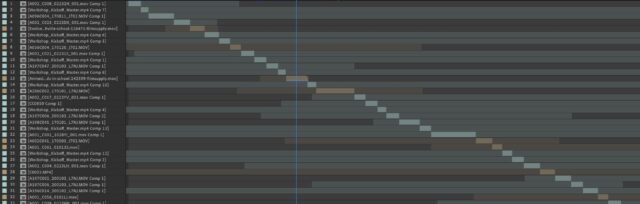
    I have a similar problem except minus the CSV stuff. I’m making a sort of grid of videos floating in 3D space and I want them each to play part of a long sequence of footage in a precomp- but start on a random clip and loop back to the beginning if they reach the end. I’m unsure how to write an expression in Time Remapping that would start each 3D layer at the beginning of a random clip in the precomp. I don’t want it just to start on a random frame because inevitably it would start 2 frames before a cut and look awkward. See attached for what that footage precomp looks like.

    What would be SUPER amazing would be if the expression could create it’s own random sequence from the precomp, starting on one footage layer, playing until its outpoint, then starting at the inpoint of another random footage layer that’s not itself, etc… But that would just be icing on the cake 😀

    Thanks!

  • Filip Vandueren

    March 22, 2022 at 3:47 pm

    For the basic thing (start at a random inPoint of precomp and loop):

    seedRandom(index,true);
    (time + source.layer(random(source.numLayers)).inPoint)%source.duration;

    as expression for timeremapping of a precomp.

  • Nate Vander plas

    March 22, 2022 at 5:15 pm

    Thanks so much, Filip! It works great! This is much simpler than I was imagining, and a great starting point. I was able to make it also start playing on the inPoint of the grid layer (rather than being stuck in time as I try to shift the grid layer left/right in the timeline). I also added a slider value to the random seed so I can change the seed if I don’t like that iteration. Here’s what I have:

    r = thisComp.layer("Controls").effect("Random Seed")("Slider");
    seedRandom((index+r),true);
    ((time-inPoint) + source.layer(random(source.numLayers)).inPoint)%source.duration;

    It works, although it sometimes gives me an error if I choose a value for my Random Seed slider that makes index+r = 0. I think it shouldn’t be a problem as long as I set it to a high value.

  • Filip Vandueren

    March 22, 2022 at 5:32 pm

    Right, it should be 1+random(…

We use anonymous cookies to give you the best experience we can.
Our Privacy policy | GDPR Policy