Forum Replies Created
-

Yeah same here. I don’t know what they did but it seems to have fixed a majority of the crashing issue for me. Mine still crashes on occasion but not nearly as much thank god.
-
That is an excellent question that’s not quite as easy to answer. NLE Software is VERY complex. I’ve approached Magix with similar questions, on which hardware they recommend and they don’t even know.
I have a build that cuts video quite well, but timeline playback still isn’t perfect. I custom made the machine myself. I easily have $5,000 into the computer now. I’ve been wanting to get a second graphics card to link up to my existing and complete my ultimate build and discovered they are sky high in price yet. However…
Here’s the one tannate of software. It ALWAYS lags hardware design. My system was built off old less expensive hardware. At the time was hardware that came out two and three years prior. Last generation stuff. Magix and Vegas are JUST NOW catching up with those hardware designs from 5 to 10 years ago. No joke.
I have bought nearly every vegas update in last 10 years. With each update my NLE runs faster and faster. For instance they just started supporting H.265 playback. Before it was software decoding and sucked. Now I can actually edit h.265 and play it back in the timeline without issue. I bought no hardware to do that, just updated vegas.
Long story short, I’d wait till the cards get back down in price. I’d use what I have, can you share the chipset? I’ll compare I think mine is a Radeon RX480 w/ 8GB video memory if I recall correctly. If you want to see what I built for my system you can see it here:
https://creativecow.net/forums/thread/ultimate-vegas-machineae/
It’s likely Magix doesn’t even fully support what you have in your system as of yet. Especially if it’s a newer machine.
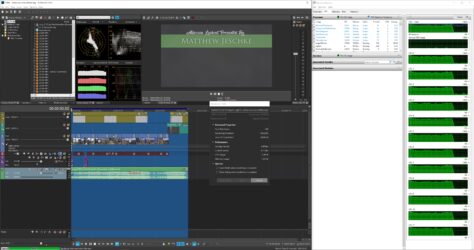
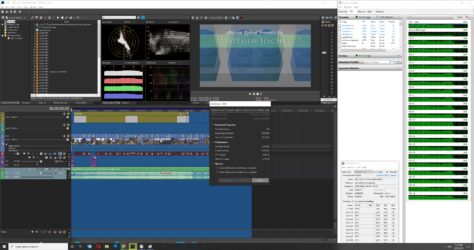
Another thing you can do and will want to do is open your task manager. Do a timeline playback as well as render and see how it effects your system performance. I think there’s a GPU monitor in there too. It will immediately show you if Vegas is even utilizing your GPU.
You can determine what your bottleneck is there. Typically it’s the CPU as the easy / quick way to write software is to write it with the CPU, not the GPU.
-
Thanks Douglas, I didn’t see your post till just now. Last couple updates from Magix seem to have increased stability a bit further. I’ll keep in mind to kill all background apps.
FYI ~ I don’t have all those versions of Vegas installed but I have several. I should really remove the extras to free up space but I have plugins that are only licensed to older versions 🙁
-
Thought I would post an update here. The build has gotten faster and faster as Magix implements more of the hardware support in their software. I’m now running Vegas Pro 18.
I also noticed some of the hardware is getting less expensive. I was able to update from an I7-5930k (6 core) to a i7-6850k (10 core). Was a bit worried as the new processor is slower frequency. However, it dramatically sped up render times.
I took a timeline and rendered it with both processors. The 10 core processor was 42% faster! Timeline playback appears to be comparable.
The only remaining upgrade to max out my system is a second graphics card. Unfortunately, with digital currency on the rise I’ve been unable to secure one at a reasonable price. However, that said, the CPU still seems to be a the main limiting factor. All 20 processors (10 cores) were mostly maxed out during the render.
With luck, Magix will implement more of the GPU functionality in their future releases decreasing CPU load.
-
Mike thanks for forum referral. I made a login on VegasCreativeSoftware.info and post. Honestly, nobody really has much advise to offer. However, I did make a breakthrough on this.
I noticed Magix is responsive on their Facebook Page. I posted my question about 18’s stability there and they gave me an email for customer support: infoservice@magix.net
Oddly enough, the software started behaving as if all on it’s own though. It still has occasional crash, but nothing like it was before. I’m just baffled. Must have been something in Windows 10 that got updated in background.
Here’s a link to the post I created on other forum as well: https://www.vegascreativesoftware.info/us/forum/vagas-pro-18-keep-crashing–123536/#ca769268
-
My problems have become even worse now. The software won’t even load. It takes about 10 attempts to load it before it launches.
Anybody know of a support number? Anything for Magix? Another forum with perhaps some of the software developers on it?
Thanks,
————————————–
I do Architectural Photograph & Cinematography as a part of being a Residential Real Estate Consultant.
Some of my work can be seen at,
http://www.youtube.com/keystoaz/
http://www.vimeo.com/matthewjeschke/
http://www.keystoaz.com/PS. It\’s an excellent excuse to ride off what I love, Camera equipment 🙂
-
I spoke too soon. It ran rock solid for about a day. Now it runs for about 5 minutes and randomly crashes. Only things I notice crashing it consistently:
1. Task switching
2. Clicking too fast in application on timelineAny ideas are welcome. My workflow is completely destroyed with this crashing so much. I wish vegas had a support line?
————————————–
I do Architectural Photograph & Cinematography as a part of being a Residential Real Estate Consultant.
Some of my work can be seen at,
http://www.youtube.com/keystoaz/
http://www.vimeo.com/matthewjeschke/
http://www.keystoaz.com/PS. It\’s an excellent excuse to ride off what I love, Camera equipment 🙂
-
Interestingly, I made some progress immediately after I posted this thread. I found a thread on Vegas Forum website. I cannot seem to find it again. Had customary stuff, turn this off, try that, etc. etc. etc. I tried some of the itmes:
1. Turned dynamic ram preview to 0 MB – NO HELP
2. Closed Project Media & Explorer Panes – NO HELP
3. Lowered Render threads to 12 – NO HELP (but keeping that way as I only have 6 cores, 12 with hyper threading).Lastly I updated the Radeon Drivers for my RX480. I had latest release of drivers from 2019, however, they came out with a newer literally a couple weeks ago. Version 20.8.1.
Hasn’t crashed since I updated the graphics driver.
Will post as I learn more. Hopefully that was the solution, as I’m really liking this silky smooth REALLY fast timeline playback in 18.
————————————–
I do Architectural Photograph & Cinematography as a part of being a Residential Real Estate Consultant.
Some of my work can be seen at,
http://www.youtube.com/keystoaz/
http://www.vimeo.com/matthewjeschke/
http://www.keystoaz.com/PS. It\’s an excellent excuse to ride off what I love, Camera equipment 🙂
-
Great question. I’ve been with the software since 10 I believe. You might try some of the settings under preferences -> general (tab). I cannot seem to find the setting… maybe they removed it in the last version? I used to have it set there so it doesn’t pull the program from memory on a task switch. I have a masters in computer engineering (granted that was 13 years ago bit rusty)… However, I am guessing it crashes partly due to task switching in the OS. I think, some of the different panes in the software maybe run in different tasks on the OS / timeslices on the processor… Especially when you switch out of the program to something else, it tends to crash. It could be due to it pulling Vegas out of the memory and onto the hard drive or elsewhere to free up memory space. This software is quite complex and fickle. It’s annoying. Probably I didn’t help out at all…
Also try to adjust the render threads and dyanmic ram under Video pane of preferences.
————————————–
I do Architectural Photograph & Cinematography as a part of being a Residential Real Estate Consultant.
Some of my work can be seen at,
https://www.youtube.com/keystoaz/
https://www.vimeo.com/matthewjeschke/
https://www.keystoaz.com/PS. It\’s an excellent excuse to ride off what I love, Camera equipment 🙂
-
Yeah the CPU I bought was an older architecture. It has 40 PCI lanes ☺ I’m woundering if upgrading to the 8 core (I think there’s even a 10 core) version would help. However, I also notice the newer CPU(s) have built in / better video decoding. I don’t believe my old i7 has any of the video decoding hardware.
That’s a sweet thread. I’ll have to check it out ☺ I thought might be worth it to buy that second graphics card. At time I built my system though Vegas was primarily optimized for Open GL. Now they are using CUDA from Nvidia as well ☹ I think? In which case, I’d have to swap out my graphics card for Nvida?
Is about only thing short of spending $1200 for the bigger processor that I can do with my current build. I’m curious though, I bet the color grading studios and big guys don’t bother rendering every single time they showcase something to a client. I’d think they have beastly computer builds that run the timeline buttery smooth with 4k effects and about anything you can throw at it. I wish Magix would show us what a built like that looks like. Even if it’s a $20,000 build.
————————————–
I do Architectural Photograph & Cinematography as a part of being a Residential Real Estate Consultant.
Some of my work can be seen at,
https://www.youtube.com/keystoaz/
https://www.vimeo.com/matthewjeschke/
https://www.keystoaz.com/PS. It\’s an excellent excuse to ride off what I love, Camera equipment 🙂