Martin Gardiner
Forum Replies Created
-

So, you have access to the full-res and the proxy video files?
We’re wondering about if the full-res files were on a remote server if it’s at all possible to be able to tell an edit system in that location to switch out the proxy files and assemble the exported file (without an editor being at that location). The more I think about it, the crazier it sounds. -
Apparently you can do select it as a setting with some audio program called ‘GoldWave’, but it’s not available on Mac, so, not sure what I can do next year… thankfully, this is only needed around Christmas each year… so got some time to figure it out 🙂 Merry Christmas!
-
It seems to be any export I do from premiere… as soon as I select ‘waveform audio’ it goes to Audio: Uncompressed and greys out/can’t change it
I figured out how to do it in Audition, but it doesn’t seem to allow for 64bits with all of the other settings they need. Most it allows is 32bits. Hoping they’re ok with it and will find out soon.
Thanks for your help -
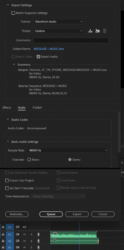
Here is the screenshot, I have the format set to Waveform Audio, but in the Audio tab, the Codec is greyed out, I can’t change it. Is that what you’re asking me to change?
Yes, I have Audition and the whole suite. Thanks -
In the Audio tab, I can’t change the ‘Audio Codec’ setting. It is stuck on ‘uncompressed’
-
got it…
https://www.youtube.com/watch?v=C0v_ae2ckesSome contents or functionalities here are not available due to your cookie preferences!This happens because the functionality/content marked as “Google Youtube” uses cookies that you choosed to keep disabled. In order to view this content or use this functionality, please enable cookies: click here to open your cookie preferences.
-
it’s the effect called ‘audio waveform’, I’ll have to try to export at different formats, what would that mean if an image seq or .mov worked, but the .mp4 doesn’t work, what fix is there for that? Thanks for your reply.
-
That worked great, thanks!
-
found it….
[value[0],effect(“Slider Control”)(“Slider”)]
-
Martin Gardiner
May 2, 2019 at 2:23 pm in reply to: Audio Waveform – that doesn’t move from right to leftSorry, I meant the effect ‘audio waveform’ – not a timeline feature. I want to apply the effect to a solid and just have the waveforms get bigger and smaller, but not scroll from right to left.
Is there a way to do this?