Forum Replies Created

Page 78 of 126
  • Mads Nybo jørgensen

    May 24, 2023 at 9:30 am in reply to: Be Careful Updating FCPX!

    Hey Ben,

    Thank you for the heads up, and for you going through the pain-barrier for the rest of us.

    It sounds like back in the old days of Apple (25+ years ago), where they updated core elements of operating system / software, without bringing software developers from 3rd party companies with them. Often it incurred delays, sometimes complete re-coding of software projects in development…

    Atb
    Mads

  • Mads Nybo jørgensen

    May 23, 2023 at 1:31 pm in reply to: Capture BetaSP with Timecode

    Hey Dwight,

    You are very welcome.

    As far as I remember, the SDI out on that DigiBeta VTR should always be “live”.

    But if you can, it is always worth having a SDI monitor out feed, so you can see the picture direct from tape, whilst also on your capture screen on the Mac.
    This will also allow you to identify any issues with sync, if any.

    Atb
    Mads

  • Mads Nybo jørgensen

    May 23, 2023 at 8:43 am in reply to: Capture BetaSP with Timecode

    Hey Dwight,

    The Composite Video signal (analogue) will not carry the timecode.

    The two alternatives, are:
    1. Use SDI signal, which will give you better picture quality – depending on your tape format, and what codec that you are capturing to. And, some may argue that there will be less noise.

    2. Run a TimeCode signal out of the “Time Code” XLR “OUT” on the back of your VTR. What you connect it to on the capture card, I do not know. Just be careful with sync, as if the video and timecode signals are not in sync, you might as well not use it.

    Best option, IMHO, is SDI where picture, audio and TC are embedded.

    Hope that this helps.

    Atb
    Mads

    PS: There is a good picture of the back-side of a DVW-A500P here:
    https://www.nibroadcast.com/sony-dvw-a500p-dvwa500p-pal-digi-beta-recorder-with-betacam-sp-playback-ref-4.html

  • Mads Nybo jørgensen

    May 22, 2023 at 11:45 am in reply to: FCPX transcription capabilities?

    Hey Kyrina,

    On-Line seems to be the best way of transcribing video.
    There are one or two services that works as a plug-in to FCPX.

    There was recently an interesting conversation on transcribing on the A.I. COW, including FCPX recommendations:
    https://creativecow.net/forums/thread/why-do-all-auto-captioning-softwares-seem-to-be-online-%f0%9f%98%b1/

    Atb
    Mads

    Why do all auto-captioning softwares seem to be online ? 😱

  • Hey Daniel,

    As Greg suggested, use a green screen when recording yourself + make sure to have plenty of light both on your and the green screen, to get a better key. And, don’t wear green!

    Not sure why you want to use AE for this job?

    There are plenty of faster ways of doing this, that will give you the same quality, if not higher.
    When I say higher, as an example, if you use PPro instead, you’ll have much better audio controls.
    One big feature that will save you time is to use Auto-Ducking, so every time you speak, the game audio will fade down to let your voice come through.

    Same goes with syncing audio and video up.

    And, yes, you can do chromakey, create masks + Zoom/Rotate video in most editing software packages too.

    My advice is as you are starting out on this new exciting venture, is not to over-complicate the production process before you have even got started, but instead concentrate on making engaging content.

    Atb
    Mads

  • Hey Eric,

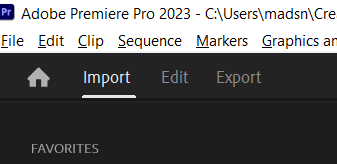
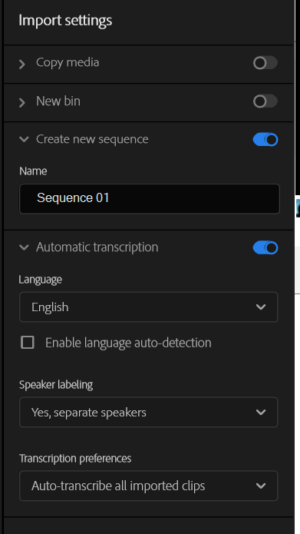
    Check out your “Import” settings menu – there is only one place that I have found where it shows up.

    Admittedly, never realised that it existed in the first place, so curiosity got me looking for it 🙂
    You need to select “Import” menu in your top left corner, that will open up the “hidden” settings.

    Have Fun!!!

    Atb
    Mads

  • Mads Nybo jørgensen

    May 18, 2023 at 3:31 pm in reply to: Menu for streaming

    Hey Simon,

    You can always create a DVD, then rip it to an ISO file, that would then be playable in packages like VLC – maybe even within a web-browser, although likely to be in a high fixed bit-rate.

    The alternative is to start programming in HTML5 and set-up an on-line version the DVD – not much different to programming a website. Here you could use YouTube, Vimeo or bespoke video hosting solutions for hosting the video files.

    A few years back, for a good client who is an on-line publisher, I recommended https://www.webtvsolutions.com/ws_webtv_pro.php?s=try&lang=en
    This more for those who wants their own on-line TV-Station.
    Again, you will need a hosting solution to make that work.

    A quick search shows that there are companies out there offering “interactive” video solutions, but most of them are enterprise clients and do not display pricing on their websites.

    Atb
    Mads

  • Adding to Craig’s excellent advice.

    Quicktime for Windows is dead. I am suspecting that less development is going into it for Mac too.

    There can be a number of issues, mainly security related or the original could have been produced using a specialist codec from companies like BlueFish444 or other similar board/camera manufacturers. These can be purchased.

    I find with VLC on “professional file codecs” that it often on playback does not show an accurate colour space (gamma).

    Out of interest, have you tried to export it out of VLC?
    It will only give you MP4, but the quality might be high enough for your needs.
    The alternative could be to try out Adobe Media Encoder or HandBrake (although the latter takes a fair bit of work to get going.

    In my tool-box I have WinXConverter which should be able to do the job too – they also sell a Mac version of it – starts from free:
    https://www.winxdvd.com/hd-video-converter-deluxe/

    Hope that it works out for you.

    Atb
    Mads

  • Hey Johnny,

    There is no right or wrong answer to that question.

    If the story catches the audience, it can get 10 mill + views on YouTube, and festivals are no different. “The Blair Witch Project“, a low-budget movie, was released on Sundance back in 1999, and the rest is history.

    But a good place to start to avoid rejection letters are to ask the film festivals for their delivery specifications. Most likely they’ll ask for a DCP. If you can deliver that without failing QC, then you are half way there.

    Also, avoid festivals where they are specific on a subject that your film is not about – no point in going for the dedicated festival for films about cucumbers, if your movie is about apples, right?
    (And no, before you search, I don’t think that there is a film festival dedicated to cucumbers).

    Good Luck – I hope that you get into as many festivals as possible.

    Atb
    Mads

  • Mads Nybo jørgensen

    May 17, 2023 at 8:28 pm in reply to: Illustrator Sphere fill with circle

    Hey Michiel,

    Always good to post an image to show what you are trying to do.

    Are you working in 3D with the sphere?
    Adobe has got info here:
    https://helpx.adobe.com/uk/illustrator/using/creating-3d-objects.html
    Also, on searching, I found this neat YouTube tutorial that might help you:
    https://youtu.be/0SrpOi5WejE

    Otherwise the people over on the COW Photoshop forum might be able to help you better:
    https://creativecow.net/forums/forum/adobe-photoshop/

    The slight difference with this forum is the “A.I.” for Artificial Intelligence in the title.
    Where as Adobe is using “Ai” for Adobe Illustrator.

    Hope the above is helpful.

    Atb
    Mads

    Some contents or functionalities here are not available due to your cookie preferences!

    This happens because the functionality/content marked as “Google Youtube” uses cookies that you choosed to keep disabled. In order to view this content or use this functionality, please enable cookies: click here to open your cookie preferences.

Page 78 of 126

We use anonymous cookies to give you the best experience we can.
Our Privacy policy | GDPR Policy