Forum Replies Created

Page 3 of 126
  • Patrick,

    You need to pull your finger out of your backside, and do some work yourself, maybe pull your head of that hole too as you appear angry that no one want to volunteer their spare time for something that you are either not equipped to do yourself, or just too lazy to do.

    There is a great thread already on the internet, why don’t try this out for measure as there is a very kind person who I am sure will help you:
    https://forum.blackmagicdesign.com/viewtopic.php?f=21&t=235527

    Or you could go to the Adobe forums and ask the same question there?

    It is disingenuous of you to keep on saying that no-one wants to help you here, when that is what I did in my very first post on this thread (and others have tried to do too) – I asked you about what your aspirations are.
    That word “aspirations” in my top post was about lifting you up, not expecting to get a bucket load of moaning in return.

    Your actions here is not about learning, but only about sowing discord whilst displaying a narcissistic ignorance. There are better places in the digital world for you to do that.

    As you are suffering from memory loss, I repeat my first reply below, because if you don’t know what you want to use the NLE software for, then only No-One can make a serious suggestion as to what is best for you in a “contrast and compare” explanation.

    If you don’t like it: Go use CapCut, Adobe Express, Canva, even Blender have a video editing module. Although iMovie is another one, that might suit you better. Or you could just stay on Davinci and live happpily ever after.

    Here you go, as this advice was intended to inspire you to explain what work you want to do:
    And, you know what, it still is.

    You might even get a polite response if you reply in the same spirit, as what was asked.

    April 25, 2026 at 10:01 am

    Reply

    Hey Patrick,

    Rather than focusing on “features”, it would be more relevant for you to define what kind of work you want to do?

    Currently, if you are happy with something overly expensive, that breaks all the time, and the company’s point releases are avoid at all costs, then Premiere Pro is perfect.

    If you want something that feels a bit clunky, but has delivered on 27 of the movies that were nominated for this year’s Academy Awards (Oscars), then Davinci is fantastic.
    Admittedly, I’ve never had to use Davinci Technical Support – which tells you how bad the software releases that are coming out of Adobe is.
    https://creativecow.net/2026-oscar-nominated-films-powered-by-blackmagic-design/

    If subscription is your thing, and you want to get into high-end editing, then AVID is making its way back from years of not really keeping up with the market. And the “Standard” version cost less than Premiere Pro…

    Most importantly, what are your aspirations with the work that you want to do?
    Is this for making a living, or for your own projects?

    I have all the above NLE packages, and currently reducing my reliance on Premiere Pro. Adobe Creative Suite is no longer what it used to be, and the company’s C-Suite is not fixing the problems.

    Just yesterday, a colleague who has used Adobe since 1997 told me that he cancelled his subscription and has replaced all the Adobe apps that he used most with free or minimal-cost alternatives.

    The other “small” issues to consider are what computer you will run your software on?
    And if you need a better monitor and more storage?

    Hope that this helps?

    Atb
    Mads

  • Yes, in my opinion the “4060 is a better version of the 2080”.

    You can benchmark them, as I’ve done here:
    https://gpu.userbenchmark.com/Compare/Nvidia-RTX-4060-Ti-vs-Nvidia-RTX-2080/4149vs4026

    There is a more recent version, the RTX 5060-TI:
    https://gpu.userbenchmark.com/Compare/Nvidia-RTX-5060-Ti-vs-Nvidia-RTX-2080/4183vs4026

    Keep in mind that they are not top of the range cards, but sitting somewhere between gaming and video editing.

    Not taking your other PC specs into account, here is what Google A.I. on search suggested about the 5060:

    The NVIDIA GeForce RTX 5060 Ti 16GB is an exceptional budget-to-midrange choice for video editors and colorists. Its massive 16GB VRAM allows you to handle heavy AI-based denoising, optical flow, and complex fusion workflows in DaVinci Resolve without crashing or severe memory bottlenecks.

    DaVinci Resolve Denoise Performance

  • The AI Factor: DaVinci Resolve’s Neural Engine and heavy Temporal/Spatial Noise Reduction operations are heavily dependent on GPU Tensor Cores. The Blackwell architecture in the 50-series provides massive AI processing power that speeds up these tasks significantly compared to older generations.
  • VRAM Advantage: Denoising at 4K resolutions requires enormous VRAM. The 16GB of GDDR7 memory allows you to enable GPU timeline preview generation and stack multiple nodes without maxing out the card and causing it to drop frames or crash.
  • Setting all of the above aside, why are you having to “better handle noise reduction”!?

    It suggest that your footage is not at the optimal picture quality?
    Which is normal, but not neccesarily “helpful” when want to optimize for 4K/UHD/HDR.

    I use Topas Video for all of my denoising footage.
    With Topaz, I run a seperate pass on the footage for denoise, and as it is not realtime, I build it into my workflow.

    Hope this helps?

    Atb
    Mads

  • Hey Matthew,

    Once you start tearing your PC apart for small gains, you run the risk that it won’t work when you put it back together again.

    Saying that, if you are in the lower end of the 4K spectrum, the NVIDIA GeForce RTX 4060 Ti (16GB VRAM) looks interesting. It is a 2023 release v your current 2018 release version.
    But if you felt that the monitor migh be too expensive, once you start on upgrading your PC (or Mac), then you’ll quickly drain your bank accounts, or load up your credit cards.

    Instead, maybe spend some money on marketing and networking, and use that to get more customers, at a higher fee.

    Looking forward to following this thread.

    Atb
    Mads

  • Mads Nybo jørgensen

    June 20, 2026 at 8:01 pm in reply to: Portable HDR Reference Monitor

    Hey Matthew,

    Great news that you have found a monitor that works for you in your current setup.

    Hopefully you can now dedicate time to get the best end-result out of the kit that you have.

    And upgrade your kit as you go along.

    Atb
    Mads

  • Hey Mert,

    Thank you for your insights.

    Sorry for the late response, but I’ve been on a job.

    “i’d be cautious about updating a production machine straight to 26.2.2, especially mid-project.”

    For clarity, I was told not to update to point releases which I normally don’t do anyway, except v25.X gave nothing but problems.

    Even so when support emailed me, I followed their intial advice:
    “To ensure you have the most stable editing environment while we finalize the upcoming version 26.1, we recommend using Adobe Premiere 25 for the time being.”

    v26.1 turned out to be as bad as v26 had been reported to be.
    Hence I eventually ended up on 26.2.2 (Build 3).

    The big issue with Adobe is that returning the project to a previous full-point release, say go from v26.X to v25.x is not really optimal.

    However, over the last couple of days I’ve had constructive conversations with both Adobe technical support and accounts.

    For clarity: When updating, I always have the project version file to fall back on.

    Atb
    Mads

  • Mads Nybo jørgensen

    May 28, 2026 at 7:30 am in reply to: Portable HDR Reference Monitor

    Hey Matthew,

    It would not be a surprise if some monitors have near identical output, as there are only soo many patents and factories for making the core component for the screen (OLED/LED/???).

    And at the money that you are initially spending, you can easily be spending too much time researching whether to spend $200 or $500, where it really only make a difference if you are spending more than $2,000 – just an opinion.

    “However, I’m unsure if resolve will let me dock the scopes and preview like that”
    Search on Google, or similar, and you shall find.

    Keep in mind that BlackMagic are continuously adding new features to Davinci.
    This is what I got from my search:

    Enabling Dual Screen Interface

    1. Navigate to the top menu bar and select Workspace.
    2. Select Dual Screen and click On.
    3. You can then choose how to arrange your panels, such as placing the viewer on one monitor and the media pool or nodes on the other.

    Atb
    Mads

  • Mads Nybo jørgensen

    May 28, 2026 at 12:11 am in reply to: Portable HDR Reference Monitor

    Hey Matthew,

    You’ve built a great setup.
    And it is fab to hear that you are getting excited about grading HDR.

    For what it is worth, and it is not necessarily the advice that you are seeking, but this is my opinion:
    even a “small” 13.3″ HDR display is not going to give you the scale that you are looking for. And the small ninja is even worse, as you’ll soon find it too small for doing detailed work on.
    Not joking, although I am: You might be better off getting a 4K VR headset…

    I get your point about cost v earnings, that those two have to match before you can invest in a bigger screen.
    I’ve got my eye on the new ASUS 4K selfcalibrating monitors – they are not top of the range, but will work for 98% of the work I do. Anything at a higher quality for DCP distribution, I’ll hire in a bigger and better calibrated monitor.

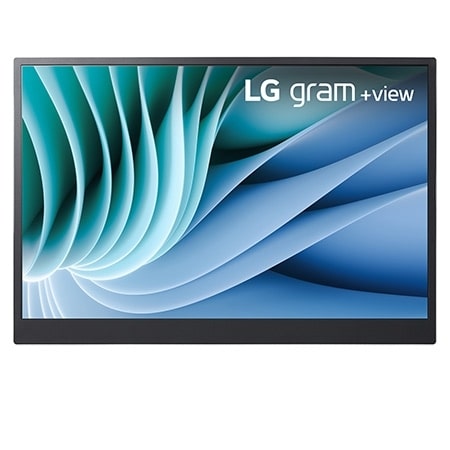
    Currently, for when I go on location, or to the offices of my client(s), I have a 16″ portable LG screen.
    It is not HDR, but
    – 16:10 WQXGA (2560×1600) Display
    – DCI-P3 99% (Typ.)

    https://www.lg.com/uk/laptops/16mr70/

    Although I have 2 screens in my office setup, similar to your setup, I can when required add the LG screen to run my scopes and other measurement tools on.

    When I purchased the “big box” items from DELL, I got enough points + added a bit money to buy a DELL 27″ 4K monitor for my boys to use for the X-BOX. There is a newer version out that could potentially be suitable for you:
    https://www.dell.com/en-uk/shop/dell-27-plus-4k-monitor-s2725qs/apd/210-bqwm/monitors-monitor-accessories
    Which offers:

    Video

    Maximum Resolution

    3840 x 2160

    Standard Refresh Rate

    120 Hz

    Color Supported

    1.07 Billion Colors

    Native Contrast Ratio

    1,500:1

    Brightness

    350 cd/m<sup>2</sup>

    Tearing Prevention Technology

    FreeSync Premium

    Color Gamut

    99% sRGB (CIE 1931)

    Maximum Preset Resolution

    3840 x 2160 at 120 Hz

    Pixel Per Inch (PPI)

    163

    This option is not perfect, but it is at the same time likely to give you the quality of image that your viewers will be watching on at home. And, it get you moving forward in the pursuit of HDR, without breaking the bank.

    Hope this helps?

    Atb
    Mads

  • Mads Nybo jørgensen

    May 15, 2026 at 6:10 pm in reply to: Deflickering

    Hey Jean,

    Much better, well done!

    Atb
    Mads

  • Mads Nybo jørgensen

    May 15, 2026 at 1:08 pm in reply to: Deflickering

    Hey Jean,

    Sharing knowledge is what makes the COW a great place to hang out.

    Yes, see each pass as an export out to a video file.

    Then import that video file, add the deflicker filter again. If it shows no difference to the flicker with the filter added to the exported file, tweak the settings until you see a change, then export again.

    Obviously make sure that use high-quality uncompressed video format for this, or the video will degrade on each export.

    Hope this answer your question?

    Atb
    Mads
    PS: Will be going out shortly, back later.

  • Mads Nybo jørgensen

    May 15, 2026 at 12:55 pm in reply to: Deflickering

    Hey Jean,

    That is OK, we all need to work within budget.

    I suggest that you give Davinci a go, and follow the advice of making multiple passes on the render (new render for each pass, and then import that to your timeline).

    And see where that takes you.

    There are other DeFlicker tools out there, some which may be on monthly subscription.

    But I still remember when the colourist phoned me and congratulated me sorting the flicker out on the film, with him saying “I never thought that flicker could be fixed” – back in the days of HD-Cam 1920×1080.

    Atb
    Mads
    PS: Have not dived in to Fusion, yet, but that might have better tools than the Resolve editor has.
    Same with the Davinci grading part, where you might be able “Smart Mask” the flicker..?

  • Page 3 of 126

    We use anonymous cookies to give you the best experience we can.
    Our Privacy policy | GDPR Policy